
Introduction
This manual provides instructions for the safe and efficient operation of your Mudder TU-22A 24-Hour Mechanical Grounded Outlet Timer. This device is designed for time-controlled switching of various in-house appliances.
Applications include controlling lighting, heating systems, sprinkler systems for terrariums, humidifiers, aquarium pumps, ventilators, and CO2 systems. It also features a manual switchover for Automatic or Permanent ON operation.
Product Overview
Familiarize yourself with the components of your timer.
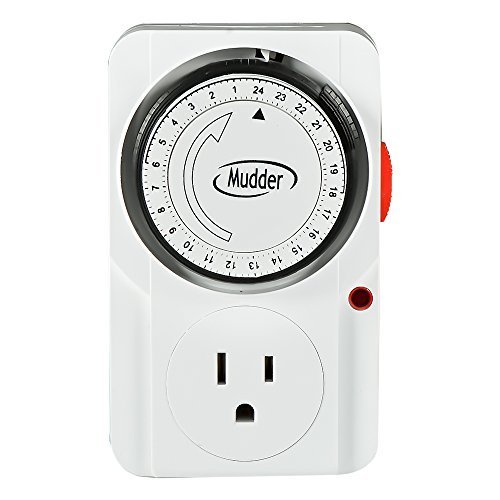
Figure 1: Front view of the Mudder TU-22A timer, showing the 24-hour dial and grounded outlet.

Figure 2: Side view of the timer, highlighting the arrow indicating the current time on the 24-hour dial.
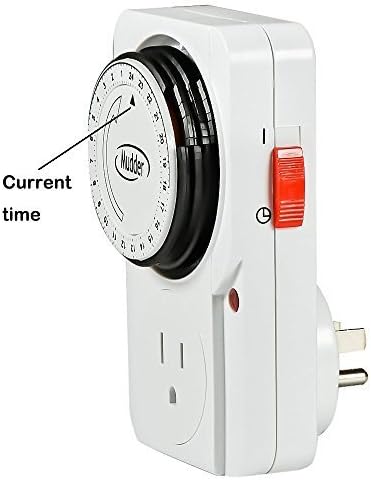
Figure 3: Side view of the timer, showing the manual switch with 'Normal' (I) and 'Timing' (clock symbol) positions.
Key Features
- 24-hour mechanical plug-in timer with grounded 3-prong plug.
- 24-hour cycle, with each pin representing 15 minutes of ON time.
- Instant indicator with a hand switch, allowing for switching between operating and setting at any time.
- Rated for 125V/60Hz, Max. 1875W.
- Conforms to UL standards, certified by CSA and Intertek ETL listed.
Setup and Programming
1. Setting the Current Time
Turn the dial clockwise until the arrow points to the current time. For example, if it is 8:00 AM, turn the dial until the arrow points to '8'.
2. Setting the Program
The timer dial is divided into 24 hours, with each segment representing 15 minutes. To set a program, push down the pins corresponding to the desired ON times. Each pushed-down pin activates the connected device for 15 minutes.
For example, to have a device operate from 8:00 AM to 11:00 AM and from 1:00 PM to 5:00 PM, push down all pins within these two time periods. The "pins" are the color slices around the dial.
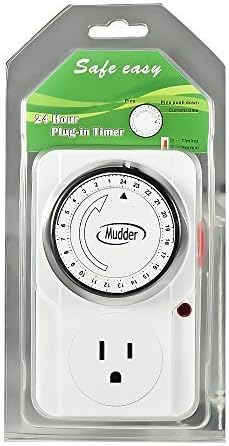
Figure 4: Diagram illustrating how to set the current time and program ON/OFF cycles by pushing down pins on the dial.
Operation
1. Connecting the Timer
- Plug the electrical device you wish to control directly into the timer's outlet. Ensure the electrical device is powered on.
- Plug the timer into a grounded electrical wall outlet.
2. Using the Manual Switch
The timer features a manual switch with two positions:
- Normal Open (I): In this mode, the electrical device is always powered on, and the timer function is bypassed.
- Timing (Clock Symbol): In this mode, the timer operates according to the programmed ON/OFF schedule.
Make sure the switch is in the "Timing" position for the programmed schedule to function.
Figure 5: Close-up of the manual switch, indicating the 'Normal' (I) and 'Timing' (clock symbol) settings.
Maintenance
To ensure optimal performance and longevity of your timer:
- Keep the timer clean and dry. Avoid exposure to moisture or extreme temperatures.
- Do not attempt to disassemble or repair the timer yourself. Refer to qualified service personnel.
- Regularly check the timer and connected devices for any signs of damage or wear.
Troubleshooting
Device Not Turning On/Off as Programmed
- Check if the timer is securely plugged into a live electrical outlet.
- Ensure the connected device is plugged into the timer and is switched to its ON position.
- Verify that the manual switch on the timer is set to the "Timing" (clock symbol) position.
- Confirm that the current time is correctly set on the dial.
- Check that the pins for the desired ON times are pushed down correctly.
Timer Not Functioning
- Ensure the power outlet is working by plugging in another device.
- If the issue persists, discontinue use and contact customer support.
Specifications
| Specification | Value |
|---|---|
| Product Model | TU-22A |
| Ratings | 125V~60Hz |
| Resistive Load | 125V~15A |
| General Purpose Load | 125V~15A |
| Motor Load | 125V~1/2 Hp |
| Tungsten Load | 125V~1250W |
| Max. Wattage | 1875W |
| Item Weight | 161 g |
| Manufacturer | Mudder |
| Certifications | UL, CSA, Intertek ETL listed |
Safety Information
- For indoor use only.
- Do not exceed the maximum load ratings specified.
- Always ensure the timer is properly grounded by plugging it into a grounded outlet.
- Keep out of reach of children.
- Do not use in wet or damp conditions, or near water.
- Unplug the timer from the wall outlet before cleaning.
- Do not use with extension cords unless absolutely necessary and ensure the extension cord is rated for the timer's load.
Warranty and Support
For warranty information and customer support, please contact the manufacturer, Mudder, or your retailer directly. Keep your purchase receipt for proof of purchase.