
1. Introduction
This manual provides essential information for the safe and effective operation, setup, and maintenance of the Shimadzu TX3202L Top Loading Balance. Please read this manual thoroughly before using the balance to ensure proper functionality and to prevent damage or injury.
The Shimadzu TX/TXC series incorporates UniBloc technology, an aluminum alloy mass sensor, which contributes to its high performance, resistance to impact, and long operational life. This design ensures stable temperature characteristics, excellent response time, and stable corner-load performance.
2. Safety Precautions
Observe the following safety precautions to ensure safe operation and to prevent damage to the balance or injury to personnel:
- Power Supply: Use only the specified AC adapter. Ensure the power outlet is properly grounded.
- Environment: Operate the balance in a stable, vibration-free environment. Avoid direct sunlight, drafts, and extreme temperature fluctuations.
- Handling: Handle the balance with care. Do not drop or subject it to strong impacts.
- Cleaning: Disconnect the power before cleaning. Use a soft, damp cloth. Do not use abrasive cleaners or solvents.
- Overload: Do not exceed the maximum weighing capacity of 3.2 kg. Overloading can damage the weighing mechanism.
3. Setup
Follow these steps to set up your Shimadzu TX3202L Top Loading Balance:
- Unpacking: Carefully remove the balance and all accessories from the packaging. Retain the packaging for future transport or storage.
- Placement: Place the balance on a firm, level, and stable surface, away from vibrations, drafts, and direct heat sources.
- Leveling: Adjust the leveling feet until the air bubble in the spirit level (located on the front or side of the balance) is centered. This ensures accurate measurements.
- Pan Installation: Carefully place the weighing pan onto the pan support. Ensure it is seated correctly and does not wobble.
- Power Connection: Connect the AC adapter to the balance's power input and then plug it into a suitable power outlet.
- Initial Power On: Press the power button. Allow the balance to warm up for at least 30 minutes before performing any measurements for optimal stability.
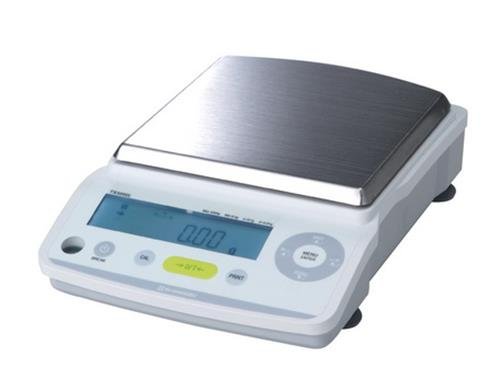
Figure 3.1: Shimadzu TX3202L Top Loading Balance. This image shows the compact design of the balance, featuring a stainless steel weighing pan, a clear digital display, and control buttons for operation and calibration.
4. Operating Instructions
4.1 Basic Weighing
- Power On: Press the ON/OFF button to turn on the balance.
- Zero/Tare: Ensure the weighing pan is empty. Press the ZERO/TARE button to set the display to 0.00g. If using a container, place the empty container on the pan and press ZERO/TARE to tare its weight.
- Weighing: Carefully place the item to be weighed onto the center of the weighing pan. Wait for the display to stabilize.
- Reading: Read the stable weight value displayed on the screen.
- Remove Item: Remove the item from the pan. The display will return to zero or the tared value.
4.2 Calibration
The TX3202L balance supports external calibration. Regular calibration is crucial for maintaining accuracy.
- Preparation: Ensure the balance has warmed up and is leveled. Have a certified calibration weight (e.g., 2kg or 3kg, depending on the calibration procedure) ready.
- Enter Calibration Mode: Refer to the balance's display or the specific calibration button (often labeled CAL or accessed via the MENU button). Follow the on-screen prompts.
- Zero Point Calibration: The balance will likely prompt for a zero point. Ensure the pan is empty and stable, then confirm.
- Span Calibration: The balance will then prompt for the calibration weight. Carefully place the specified calibration weight onto the center of the pan. Wait for the balance to register the weight and complete the calibration.
- Completion: Once calibration is complete, the balance will return to weighing mode. Remove the calibration weight.
4.3 Unit Conversion
The balance can display weight in various units. Press the UNIT button (if available) or navigate through the menu to select the desired weighing unit (e.g., grams, kilograms, milligrams, ounces, pounds, etc.).
5. Maintenance
Proper maintenance ensures the longevity and accuracy of your balance.
- Cleaning: Regularly clean the weighing pan and the balance housing. Use a soft, lint-free cloth dampened with mild detergent or isopropyl alcohol. Do not allow liquids to enter the balance.
- Pan Removal: The weighing pan can be carefully removed for thorough cleaning. Ensure it is reinstalled correctly.
- Calibration: Perform external calibration regularly, especially after moving the balance, significant temperature changes, or if accuracy is in doubt.
- Storage: When not in use for extended periods, disconnect the power adapter and store the balance in a clean, dry, and stable environment.
- Inspection: Periodically inspect the power cord for any damage.
6. Troubleshooting
| Problem | Possible Cause | Solution |
|---|---|---|
| Display shows "Err" or "Overload" | Weighing capacity exceeded; pan not installed correctly; internal error. | Remove excess weight. Check pan installation. Power cycle the balance. If error persists, contact service. |
| Unstable readings | Vibrations; drafts; temperature fluctuations; balance not leveled; dirty pan. | Move balance to a stable location. Close doors/windows. Allow balance to acclimatize. Re-level the balance. Clean the pan. |
| Balance does not turn on | No power; faulty AC adapter; power button issue. | Check power connection and outlet. Try a different outlet. Ensure AC adapter is correctly connected. |
| Inaccurate readings | Needs calibration; environmental factors; damaged weighing cell. | Perform external calibration. Check environmental conditions. If problem persists, contact authorized service. |
7. Specifications
- Model: Shimadzu TX3202L
- Capacity: 3.2 kg
- Readability (Display): 10 mg / 0.01 g
- Pan Size: 167 x 181 mm
- Calibration: External
- Weighing Technology: UniBloc (One-piece aluminum alloy mass sensor)
- Material: Aluminum (UniBloc sensor), Stainless Steel (Pan)
- Form Factor: Compact
- Item Weight: Approximately 454 g (unit weight)
8. Warranty and Support
For warranty information, technical support, or service inquiries, please contact your authorized Shimadzu distributor or visit the official Shimadzu website. Keep your purchase receipt and product serial number handy when contacting support.
Shimadzu Official Website: www.shimadzu.com