Shimadzu UW6200H UniBloc Top Loading Balance User Manual
Model: UW6200H
Introduction
This manual provides essential information for the proper setup, operation, and maintenance of your Shimadzu UW6200H UniBloc Top Loading Balance. Designed with the advanced UniBloc mechanism, this balance offers exceptional response, stability, and durability, making it suitable for a wide range of weighing applications. Please read this manual thoroughly before using the balance to ensure safe and accurate operation.
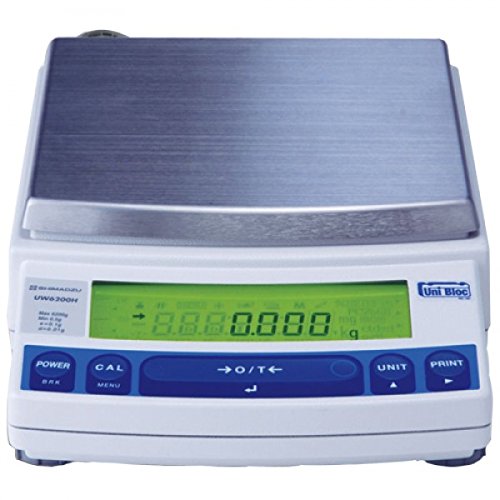
Image: Front view of the Shimadzu UW6200H UniBloc Top Loading Balance. It features a large stainless steel weighing pan, a green backlit LCD display showing "0.000 g", and a control panel with buttons for POWER, CAL, O/T (Zero/Tare), UNIT, and PRINT. The "UniBloc" logo is visible on the right side of the display.
Setup
- Unpacking and Inspection: Carefully remove the balance from its packaging. Inspect all components for any signs of damage during transit. Retain the original packaging for future transport or storage.
- Choosing a Location: Place the balance on a stable, level, and vibration-free surface. Avoid locations exposed to direct sunlight, rapid temperature changes, drafts, or strong electromagnetic fields, as these can affect weighing accuracy.
- Leveling the Balance: Use the adjustable feet at the bottom of the balance and the spirit level (usually located near the display) to ensure the balance is perfectly level. Adjust the feet until the bubble in the spirit level is centered.
- Power Connection: Connect the supplied AC adapter to the balance's power input and then plug it into a suitable power outlet.
- Initial Warm-up: After connecting power, allow the balance to warm up for at least 30 minutes before performing any measurements or calibration. This ensures optimal stability and accuracy.
Operating Instructions
Basic Weighing Procedure
- Power On: Press the POWER button to turn on the balance. The display will show "0.000 g" (or the last used unit) after a self-test.
- Zero/Tare: If using a container, place the empty container on the weighing pan. Press the →O/T← button to zero the display. The display will show "0.000 g" again.
- Weighing: Carefully place the item to be weighed onto the container or directly onto the weighing pan. Wait for the stability indicator (if present) to appear, and then read the displayed weight.
- Unit Selection: Press the UNIT button to cycle through available weighing units (e.g., grams, kilograms).
- Power Off: Press and hold the POWER button until the display turns off.
Calibration
The Shimadzu UW6200H features internal and fully-automatic calibration functions, ensuring high accuracy. Regular calibration is crucial for precise measurements.
- Automatic Calibration: The balance may perform automatic calibration at set intervals or upon significant temperature changes. Refer to the on-screen prompts or specific model features for details.
- Manual Internal Calibration: To initiate a manual internal calibration, press the CAL button. Follow the instructions displayed on the screen. Do not disturb the balance during the calibration process.
Data Output (PRINT)
If connected to a compatible printer or data management system, pressing the PRINT button will send the current stable weight reading to the connected device. Refer to the separate interface manual for connection and configuration details.
Maintenance
- Cleaning:
- Always disconnect the power adapter before cleaning.
- Wipe the balance exterior with a soft, damp cloth. Use a mild detergent if necessary.
- Do not use abrasive cleaners, solvents, or harsh chemicals, as these can damage the finish or internal components.
- The weighing pan can be removed for cleaning. Ensure it is dry before re-placing it.
- Environmental Care:
- Keep the balance free from dust and debris. Consider using a dust cover when not in use.
- Avoid spilling liquids or powders onto the balance. If a spill occurs, clean it immediately and thoroughly.
- Regular Checks: Periodically check the balance's level and perform calibration to ensure continued accuracy.
Troubleshooting
| Problem | Possible Cause | Solution |
|---|---|---|
| Balance does not power on. | No power supply; faulty AC adapter; power button issue. | Check power cable connection. Ensure outlet is functional. Try a different AC adapter if available. |
| Inaccurate or unstable readings. | Balance not level; drafts/vibrations; temperature fluctuations; needs calibration; dirty pan. | Re-level the balance. Move to a stable location. Allow warm-up time. Perform calibration. Clean the weighing pan. |
| "OVERLOAD" or "ERROR" message. | Weight exceeds capacity; pan not properly seated; internal malfunction. | Remove excess weight. Ensure pan is correctly placed. If problem persists, contact service. |
| Display shows "UNSTABLE". | Vibrations; air currents; item not stable on pan. | Ensure stable environment. Close doors/windows to prevent drafts. Wait for item to settle. |
If you encounter issues not listed here or if the suggested solutions do not resolve the problem, please contact Shimadzu customer support or an authorized service representative.
Specifications
| Feature | Detail |
|---|---|
| Brand | Shimadzu |
| Model Number | UW6200H |
| Capacity | 6.2 kg |
| Display Readability | 10 mg / 0.01 g |
| Pan Size | 170 x 180 mm |
| Calibration | Internal |
| Type | Top Pan Balance |
| Colour | Black |
| Material | Metal |
| Form Factor | Tilt |
Warranty and Support
The Shimadzu UW6200H UniBloc Top Loading Balance is covered by a manufacturer's warranty. Please refer to the warranty card included with your product or visit the official Shimadzu website for detailed warranty terms and conditions.
For technical support, service, or inquiries regarding spare parts, please contact your local authorized Shimadzu distributor or Shimadzu customer service. Keep your model number (UW6200H) and purchase date ready when contacting support.
You can find more information and contact details on the official Shimadzu website: www.shimadzu.com


