
1. Introduction
The Delta Trak Model 17100 is a single-use temperature chart recorder designed for monitoring temperature conditions in HVAC/R (Heating, Ventilation, Air Conditioning, and Refrigeration) applications. This device provides a permanent, visual record of temperature fluctuations over a specified period, ensuring compliance and quality control. Its compact design and ease of use make it suitable for various environmental monitoring needs where a continuous temperature log is required.
This manual provides essential information for the proper setup, operation, and handling of your Model 17100 recorder.
2. Product Overview
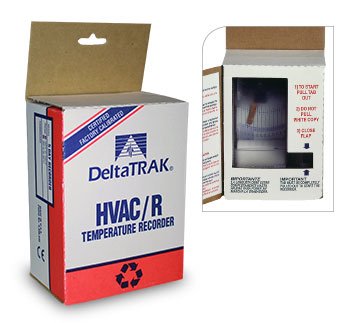
Figure 1: Front view of the Delta Trak Model 17100 Single-Use Temperature Chart Recorder. This image displays the device's compact form factor, typically featuring a clear cover, a visible chart paper, and a recording stylus.
The Model 17100 features a self-contained recording mechanism that tracks temperature changes on a circular chart paper. Key components include:
- Temperature Sensor: Integrated sensor for accurate temperature detection.
- Recording Stylus: Marks temperature readings onto the chart paper.
- Chart Paper: Pre-installed, single-use circular paper with temperature and time scales.
- Activation Mechanism: A pull-tab or button to initiate recording.
- Protective Casing: Durable casing to protect internal components.
3. Setup
Follow these steps to prepare your Delta Trak Model 17100 for operation:
- Inspect the Device: Before activation, visually inspect the recorder for any signs of damage. Ensure the chart paper is correctly seated and the stylus is intact.
- Choose Placement: Select a location that accurately represents the temperature conditions you wish to monitor. Avoid direct sunlight, heat sources, or areas with extreme air currents that could skew readings. Ensure the device is placed on a stable, flat surface or securely mounted if applicable.
- Activate Recording: Locate the activation mechanism (typically a pull-tab or a clearly marked button). Pull the tab firmly or press the button to initiate the recording process. You may hear a faint whirring sound as the chart motor begins to operate.
- Record Start Time: Immediately after activation, note the exact date and time on the device's casing or on a separate log. This is crucial for accurate data interpretation later.
Note: Once activated, the Model 17100 will begin recording and cannot be stopped or reset. It is designed for single-use operation.
4. Operating Instructions
Once activated, the Model 17100 operates autonomously. No further user intervention is required during the recording period.
4.1 Monitoring the Recording Process
The clear cover allows for visual confirmation that the stylus is moving and marking the chart. Periodically check the device to ensure it is functioning as expected. The chart paper rotates, and the stylus traces the temperature over time.
Figure 2: An example of a completed temperature chart from a Delta Trak recorder. This image, representing the internal chart, shows concentric circles for time and radial lines for temperature, with a visible trace from the stylus.
4.2 Interpreting the Chart
After the recording period is complete (typically indicated by the stylus reaching the end of the chart or the device's specified duration), the chart can be removed for analysis.
- Time Scale: The outer edge of the chart typically represents the start time, and the inner circles represent elapsed time.
- Temperature Scale: Radial lines on the chart indicate temperature values.
- Trace Line: The line drawn by the stylus shows the temperature profile over the recording duration.
- Reference Points: Use the start time noted during setup to align the chart with the actual time of events.
5. Maintenance
As a single-use device, the Delta Trak Model 17100 requires minimal maintenance before activation and no maintenance during or after its operational period.
- Storage: Store the device in its original packaging in a cool, dry place away from direct sunlight and extreme temperatures until ready for use. This preserves battery life and chart integrity.
- Cleaning: Before activation, you may gently wipe the exterior with a dry, soft cloth if necessary. Do not use liquid cleaners or immerse the device in water.
- Disposal: After use, dispose of the recorder according to local regulations for electronic waste. The device contains a battery and should not be discarded with general household waste.
6. Troubleshooting
The Model 17100 is designed for reliable, single-use operation. Should you encounter an issue, consider the following:
- No Stylus Movement After Activation:
- Ensure the activation tab was fully pulled or the button was pressed firmly.
- Check for any visible obstructions preventing stylus movement.
- If the device was stored improperly (e.g., extreme temperatures), its internal components or battery might be affected.
- Faint or Missing Trace Line:
- Verify the stylus is making contact with the chart paper.
- Ensure the chart paper is correctly positioned and not slipping.
- Extreme vibrations during operation might affect stylus contact.
- Inaccurate Temperature Readings:
- Confirm the device was placed in a location representative of the temperature being monitored, away from direct heat/cold sources or drafts.
- Ensure the device was not exposed to conditions outside its specified operating range.
For persistent issues or if the device appears to be faulty upon initial inspection, contact Delta Trak customer support.
7. Specifications
| Feature | Specification |
|---|---|
| Model | 17100 |
| Item Weight | 10.4 ounces |
| Package Dimensions | 7.9 x 4.3 x 2.6 inches |
| Item Package Quantity | 1 |
| Batteries Included? | No |
| Batteries Required? | No |
| ASIN | B013HA1PC6 |
| Date First Available | October 26, 2016 |
| Recording Type | Single-Use Temperature Chart Recorder |
| Application | HVAC/R |
Note: Specifications are subject to change without notice.
8. Warranty and Support
Delta Trak products are manufactured to high-quality standards. For specific warranty information regarding your Model 17100, please refer to the packaging or visit the official Delta Trak website. General warranty terms typically cover manufacturing defects for a limited period from the date of purchase.
Customer Support
If you have questions about the operation, specifications, or troubleshooting of your Delta Trak Model 17100, please contact Delta Trak customer support:
- Website: www.deltatrak.com (for product information, FAQs, and contact details)
- Phone: Refer to the Delta Trak website for regional contact numbers.
- Email: Refer to the Delta Trak website for support email addresses.
When contacting support, please have your product model number (17100) and any relevant purchase information ready.


