
Introduction
The NEW SPA Diamond Dermabrasion Machine is a portable skin care device designed to provide professional-grade microdermabrasion treatments at home. This device utilizes diamond-tipped wands and vacuum suction to gently exfoliate the outermost layer of the skin, removing dead skin cells and promoting skin regeneration. Regular use can help improve skin texture, reduce the appearance of fine lines, and enhance the absorption of skin care products.
This manual provides essential information for the safe and effective operation, maintenance, and troubleshooting of your device. Please read it thoroughly before first use and retain it for future reference.
Safety Information
- Read all instructions before using the device.
- Do not use on irritated, broken, or infected skin. Avoid areas with moles, warts, or recent surgical scars.
- Consult a dermatologist before use if you have sensitive skin, rosacea, eczema, psoriasis, or any other skin condition.
- Keep the device away from water and do not immerse it in any liquid.
- Ensure the power adapter is compatible with your local voltage supply.
- Keep out of reach of children.
- Do not use if the device or power cord appears damaged.
- Avoid excessive pressure during treatment, as this can cause skin irritation or injury.
Package Contents
Please check the package to ensure all components are present:
- Main Microdermabrasion Unit
- Diamond Dermabrasion Tips (various sizes)
- Vacuum Suction Hoses
- Cotton Filters (for main unit and tips)
- Power Adapter
- User Manual
- Carrying Case (for specific models)

The device comes with a durable carrying case for convenient storage and transport.
Setup
- Unpack the Device: Carefully remove all components from the packaging.
- Connect Power: Plug the power adapter into the main unit's power port, then plug the adapter into a suitable electrical outlet.
- Attach Suction Hose: Connect one end of the vacuum suction hose to the designated port on the main unit.
- Insert Filter: Ensure a clean cotton filter is inserted into the filter compartment of the main unit and inside the diamond tip handle. This prevents debris from entering the machine.
- Select and Attach Diamond Tip: Choose the appropriate diamond tip for your treatment area (e.g., finer tips for sensitive areas, coarser tips for body or less sensitive facial areas). Screw the chosen diamond tip onto the end of the suction hose handle.
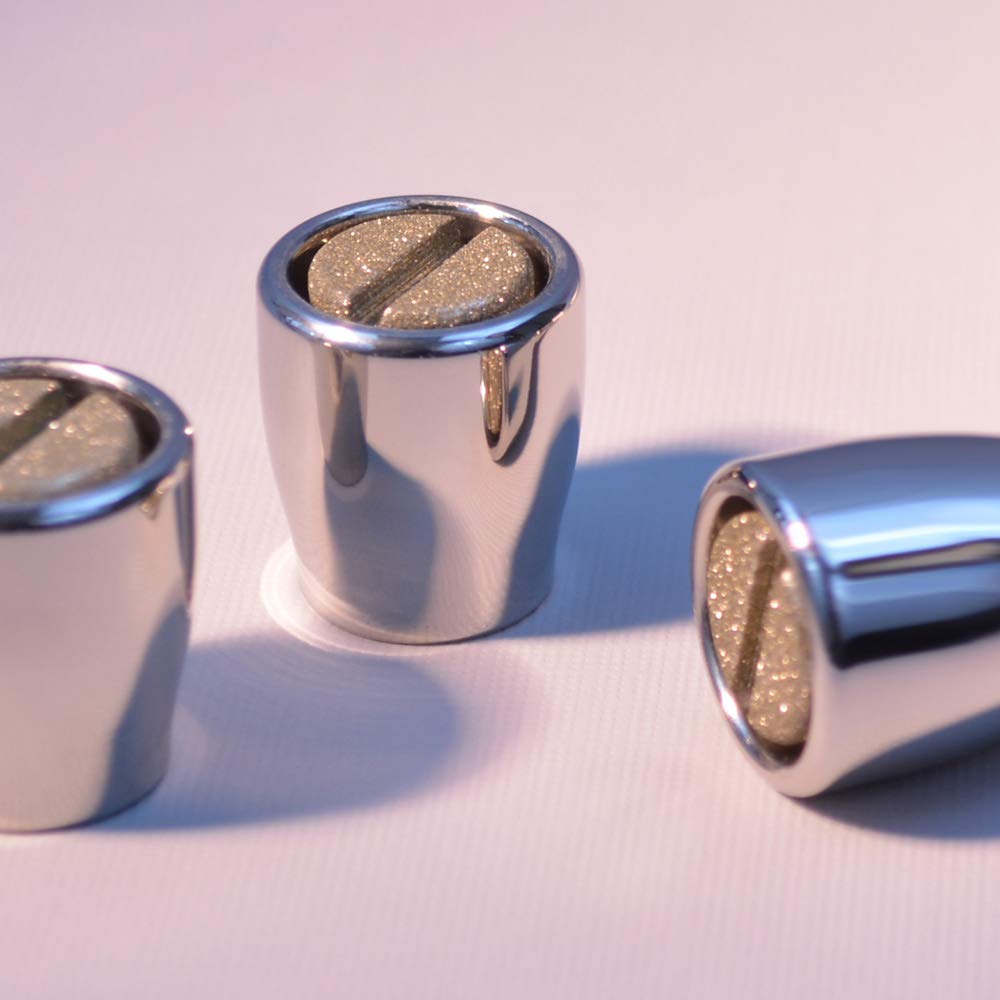
A selection of diamond tips, each designed for different skin types and treatment areas.
Operating Instructions
Before starting, ensure your skin is clean and dry. It is recommended to perform a patch test on a small, inconspicuous area of skin before a full treatment.
- Turn On: Press the power button on the main unit. The device will typically start at a low suction setting.
- Adjust Suction: Use the control dial or buttons to adjust the vacuum suction level. Start with the lowest setting and gradually increase it until you feel a gentle pull on your skin. Avoid high suction levels, especially on sensitive areas.
- Perform Treatment: Hold the diamond tip flat against your skin and glide it in short, even strokes. Do not hold the tip in one place for too long, as this can cause redness or bruising. Work in sections, ensuring you cover the entire desired area.
- Typical Treatment Areas: Face, neck, décolletage, hands.
- Additional Massage Feature: For vacuum massage without exfoliation, unscrew the diamond tip and use the handle directly on the skin. The three different diameters of the handle are suitable for various body areas, promoting circulation and lymphatic drainage.
- Post-Treatment: After treatment, apply a soothing moisturizer or serum to your skin. Avoid direct sun exposure immediately after treatment and use sunscreen.
- Turn Off: Press the power button to turn off the device.

A diamond dermabrasion tip being used on the skin, demonstrating the application technique.
Maintenance
Proper maintenance ensures the longevity and effectiveness of your device.
- Clean Diamond Tips: After each use, gently clean the diamond tips with a soft brush and mild soap, then rinse thoroughly and allow to air dry completely.
- Replace Filters: Regularly check and replace the cotton filters in the main unit and the tip handle. Dirty filters can reduce suction power and affect performance.
- Clean Main Unit: Wipe the exterior of the main unit with a soft, damp cloth. Do not use abrasive cleaners or immerse the unit in water.
- Storage: Store the device and its accessories in the provided carrying case in a cool, dry place, away from direct sunlight and extreme temperatures.
Troubleshooting
| Problem | Possible Cause | Solution |
|---|---|---|
| No suction or weak suction | Clogged filter; improperly attached hose/tip; low suction setting. | Check and replace filters; ensure all connections are secure; increase suction setting. |
| Device does not turn on | Power adapter not connected; power outlet issue; device malfunction. | Ensure power adapter is securely plugged in; try a different outlet; contact customer support if problem persists. |
| Skin redness or irritation | Excessive pressure; too high suction; prolonged use in one area; sensitive skin. | Reduce pressure and suction; move the tip continuously; discontinue use if irritation persists and consult a dermatologist. |
Specifications
- Model: B013C4MEO0
- Brand: NEW SPA Diamond Dermabrasion Machines
- GTIN/UPC: 639767600422
- Power Input: (Refer to power adapter for specific voltage/current)
- Function: Diamond Microdermabrasion, Vacuum Massage
Warranty and Support
For warranty information, technical support, or to purchase replacement parts, please refer to the official NEW SPA Diamond Dermabrasion Machines store on Amazon or contact their customer service directly.
Online Store: Visit the NEW SPA Diamond Dermabrasion Machines Store