
Rowenta SO2330F2
Rowenta Comfort Compact SO2330 2400W Heater User Manual
Model: SO2330F2
1. Introduction
Thank you for choosing the Rowenta Comfort Compact SO2330 2400W Heater. This manual provides essential information for the safe and efficient operation, maintenance, and troubleshooting of your appliance. Please read these instructions carefully before use and keep them for future reference.

A compact, dark grey and black Rowenta Comfort Compact SO2330 electric fan heater, featuring a front grille and control knobs on top.
Key Features
- Adjustable Power: Two settings (1200 W for prolonged, silent use and 2400 W for rapid heating).
- Energy Saving: Eco mode (1200 W) can save up to 50% energy compared to maximum settings.
- Silent Operation: Silence Eco function reduces noise to just 44 dBA at 1200 W.
- Year-Round Use: Features a cool air fan option for ventilation.
- Thermostat with Anti-Frost: Adjustable thermostat with an anti-frost protection setting (maintains temperature above 0 °C) and an indicator light.
- Safety Features: Double safety shut-off with alert automatically turns off the heater to prevent overheating.
- Portable Design: Compact with an integrated handle for easy transport and storage.
- Heating Coverage: Suitable for rooms approximately 20-25 m² (240 sq ft) in size.
Important Safety Instructions
- Always ensure the voltage indicated on the appliance corresponds to your mains voltage.
- Do not use the appliance near bathtubs, showers, or swimming pools. This electric heater is not suitable for bathrooms.
- Keep the appliance away from flammable materials, furniture, curtains, and other heat-sensitive objects.
- Do not cover the appliance. Overheating can occur.
- Do not insert objects into the air inlets or outlets.
- Always unplug the appliance before cleaning or moving it.
- Do not use the appliance if the power cord or plug is damaged. Contact an authorized service center.
- This appliance is not intended for use by persons (including children) with reduced physical, sensory or mental capabilities, or lack of experience and knowledge, unless they have been given supervision or instruction concerning use of the appliance by a person responsible for their safety.
2. Setup
Unpacking
Carefully remove the heater from its packaging. Retain the packaging for future storage or disposal.
Placement
Place the heater on a stable, flat surface. Ensure there is adequate space around the heater for proper air circulation (at least 50 cm from walls, furniture, and curtains). Do not place the heater directly below a power outlet.

A graphic showing a house icon with '20-25m²' inside, representing the recommended heating coverage area for the Rowenta Comfort Compact heater.
Power Connection
Plug the power cord into a suitable electrical outlet. Ensure the outlet is rated for the heater's power consumption (220V, 2400W).
3. Operating Your Heater
Control Panel Overview
The heater features two rotary knobs on the top panel for power and temperature control.

An overhead view of the heater's control panel, showing two rotary knobs for power (Eco, Turbo) and temperature adjustment, along with a red indicator light.
Power Settings
Use the left rotary knob to select the desired power mode:
- 0: Off.
- Eco (1200 W): For prolonged, energy-efficient, and silent heating.
- Turbo (2400 W): For rapid heating of the room.

A detailed view of the power selection dial, showing options for '0', 'Eco', and 'Turbo' modes.

A graphic displaying '1200W' and '2400W', indicating the two available power levels for the Rowenta Comfort Compact heater.
Thermostat Control
The right rotary knob controls the thermostat. Turn the knob to adjust the desired room temperature. The heater will automatically turn on and off to maintain the set temperature.

A detailed view of the thermostat dial, allowing users to adjust the desired temperature setting.
Silence/Eco Mode
For quiet operation, select the 'Eco' power setting. This mode reduces the noise level to approximately 44 dBA, making it ideal for use in bedrooms or offices.

A graphic featuring a finger over lips and '44dB(A)', illustrating the quiet operation of the Rowenta Comfort Compact heater in silent mode.
Fan Function (Cool Air)
The heater can also be used as a fan to circulate cool air. Turn the power knob to the fan symbol (usually indicated by a snowflake or fan icon) without selecting a heat setting. This is useful for ventilation during warmer months.

The Rowenta Comfort Compact heater in a room, with blue lines indicating the circulation of cool air, demonstrating its fan-only function.
Anti-Frost Function
To prevent the room temperature from dropping below freezing, set the thermostat to the anti-frost position (indicated by a snowflake symbol). The heater will automatically activate if the temperature falls below approximately 0 °C.

The Rowenta heater with an overlaid snowflake icon, representing its anti-frost protection setting.
4. Maintenance
Cleaning
- Always unplug the heater and allow it to cool completely before cleaning.
- Wipe the exterior surfaces with a soft, damp cloth. Do not use abrasive cleaners or solvents.
- Do not immerse the heater in water or any other liquid.
- Regularly clean the air inlets and outlets to prevent dust buildup, which can affect performance. Use a vacuum cleaner with a brush attachment.
Storage
When not in use, especially during off-season, store the heater in a cool, dry place. Its compact design and integrated handle make it easy to store.

A hand demonstrating the ease of transport by lifting the Rowenta heater using its integrated handle located at the top rear.
5. Troubleshooting
If you encounter any issues with your Rowenta heater, please refer to the following table before contacting customer support.
| Problem | Possible Cause | Solution |
|---|---|---|
| Heater does not turn on. | No power supply. Power knob set to '0'. Overheating protection activated. | Check if the plug is securely inserted and the outlet is working. Turn the power knob to 'Eco' or 'Turbo'. Unplug the heater, let it cool down for 30 minutes, then plug it back in. Ensure air inlets/outlets are clear. |
| Heater produces insufficient heat. | Low power setting selected. Thermostat set too low. Room size too large for selected power. | Switch to 'Turbo' (2400 W) mode. Increase the thermostat setting. Ensure the heater is appropriate for the room size (up to 25 m²). |
| Heater makes unusual noise. | Dust buildup. Foreign object inside. | Unplug and clean air inlets/outlets. If noise persists, discontinue use and contact customer support. |
| Heater emits a burning smell. | First use (normal). Dust buildup. Overheating. | A slight smell during first use is normal and will dissipate. Unplug and clean air inlets/outlets. If the smell is strong or persistent, unplug immediately and contact customer support. |
6. Technical Specifications
| Feature | Specification |
|---|---|
| Brand | Rowenta |
| Product Model Number | SO2330F2 |
| Electric Power | 2400 W (Max) / 1200 W (Eco) |
| Voltage | 220 V |
| Product Dimensions (L x W x H) | 26.01 x 13 x 19.51 cm |
| Product Weight | 1.8 kg |
| Sound Level | 44 Decibels (in Silent/Eco mode) |
| Color | Grey/Black |
| Special Features | Cool Air Fan, Anti-Frost Protection |
| Installation Method | Freestanding |
| Recommended Uses | Indoor Home Use |
| Heating Coverage | Approx. 20-25 m² (240 sq ft) |
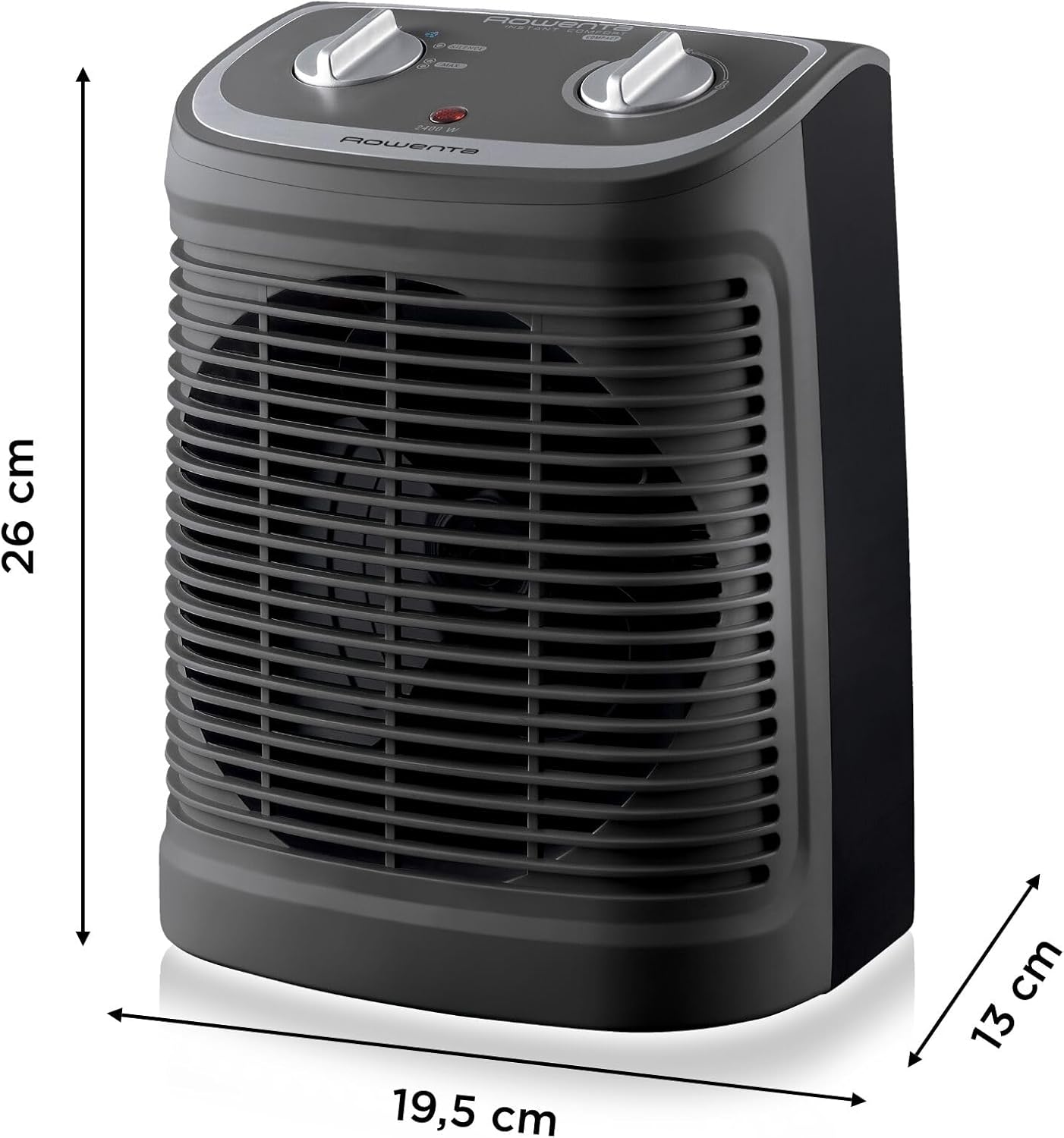
A side view of the Rowenta heater with overlaid measurements: 26 cm height, 19.5 cm width, and 13 cm depth, illustrating its compact size.
7. Warranty and Support
Warranty Information
Rowenta is committed to keeping spare parts available for 15 years after purchase for the majority of its products. Please retain your proof of purchase for warranty claims.
Customer Support
For further assistance, troubleshooting not covered in this manual, or to inquire about spare parts, please visit the official Rowenta website or contact their customer service department. You can find contact details on the Rowenta brand store page or your product's packaging.
Visit the Rowenta Brand Store for more information.
Related Documents - SO2330F2
 |
Rowenta Fan Heater User Guide: Controls, Modes, and Model Information Comprehensive user guide for Rowenta fan heaters, detailing operating controls, ECO and TURBO modes, temperature recommendations, and model compatibility. Covers models SO2210, SO5115, SO2320, SO2321, SO2330, SO6510, SO6511. |
 |
Rowenta Air Force Hot & Cool HQ7112 User Manual User guide for the Rowenta Air Force Hot & Cool HQ7112 fan heater, detailing operation modes (AUTO, ECO, FROST GUARD), timer functions, delayed start, and safety instructions. |
 |
Rowenta SPRINTO AQUA 2400W Heater User Manual and Safety Instructions Detailed user manual and safety instructions for the Rowenta SPRINTO AQUA 2400W heater. Learn how to safely operate, maintain, and store your appliance. |
 |
Rowenta SO9030 Fan Heater User Manual and Safety Guide Comprehensive user manual and safety guide for the Rowenta SO9030 fan heater, covering operation, maintenance, troubleshooting, and important safety precautions. |
 |
Rowenta Compact Steam Pro DG7623 User Manual and Instructions Comprehensive user guide for the Rowenta Compact Steam Pro DG7623 steam generator iron, covering setup, operation, maintenance, and safety features. Learn how to use the anti-calc system, steam boost, and eco mode for efficient ironing. |
 |
Rowenta SO9075 Turbo Excel Eco Energy Fan Heater User Manual User manual for the Rowenta SO9075 Turbo Excel Eco Energy fan heater, providing essential operating instructions, safety warnings, and product details. |