
Philips SB365B/37
Philips SB365B/37 Wireless Bluetooth Portable Speaker User Manual
Model: SB365B/37
Introduction
This manual provides essential information for the safe and efficient operation of your Philips SB365B/37 Wireless Bluetooth Portable Speaker. Please read this manual thoroughly before using the device and retain it for future reference.

Figure 1: Front view of the Philips SB365B/37 speaker, showcasing its black mesh grille and Philips logo.
The Philips SB365B/37 is a portable speaker designed for wireless music streaming via Bluetooth. It features a Bass Reflex Speaker System for enhanced audio, high-fidelity Bluetooth (aptX and AAC) support, and a rechargeable battery for extended use. Additionally, it includes an Audio-in port for wired connections and a USB port for charging other smart devices.
Setup
1. Initial Charging
Before first use, fully charge the speaker's internal rechargeable battery. Connect the speaker to a power source using the provided power adapter. The charging indicator will illuminate during charging and typically turn off or change color when fully charged. A full charge provides approximately 8 hours of playback time.
2. Powering On/Off
To power on the speaker, press and hold the Power button located on the top panel until the indicator light illuminates. To power off, press and hold the Power button again until the indicator light turns off.
3. Bluetooth Pairing
The speaker supports wireless music streaming via Bluetooth. Follow these steps to pair your device:
- Ensure the speaker is powered on and in Bluetooth pairing mode. The Bluetooth indicator light will typically flash rapidly.
- On your Bluetooth-enabled device (smartphone, tablet, laptop), enable Bluetooth and search for available devices.
- Select "Philips SB365B/37" from the list of found devices.
- Once paired, the Bluetooth indicator light on the speaker will become solid, and you will hear a confirmation tone.

Figure 2: Diagram illustrating the wireless Bluetooth connection capability of the speaker with various smart devices like smartphones, tablets, and laptops.
4. NFC Pairing (Near Field Communication)
For NFC-enabled devices, pairing is even simpler:
- Ensure NFC is enabled on your smartphone or tablet.
- Tap your NFC-enabled device gently against the NFC area on the top of the speaker.
- Confirm the pairing request on your device. The speaker will connect automatically.

Figure 3: Visual guide demonstrating how to use NFC for quick pairing by tapping a compatible smartphone to the speaker's NFC sensor.
5. Audio-in Connection
To connect devices without Bluetooth, use the 3.5mm audio-in port. Connect one end of a 3.5mm audio cable (not included) to your audio device's headphone jack and the other end to the "Audio-in" port on the speaker. The speaker will automatically switch to Audio-in mode.
6. USB Charging for External Devices
The speaker features a USB port that allows you to charge your smartphone or other USB-powered devices. Connect your device's USB charging cable to the USB port on the speaker. Charging will begin automatically.
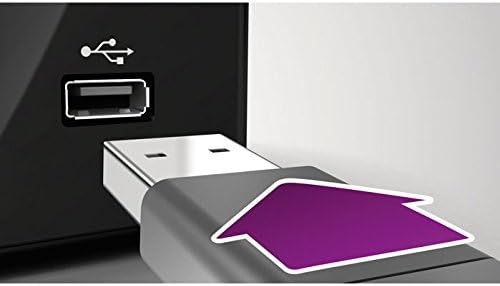
Figure 4: Detailed view of the USB charging port on the speaker, showing a USB cable being connected to charge an external device.
Operating Instructions
1. Volume Control
Adjust the volume using the volume buttons (+ and -) located on the top panel of the speaker. You can also control the volume from your connected Bluetooth device.
2. Playback Control
When connected via Bluetooth, you can typically control playback (play/pause, skip tracks) directly from your paired device. The speaker itself may have limited playback controls depending on the specific model variant.
3. Switching Audio Sources
The speaker automatically prioritizes the audio-in connection when a cable is inserted. To switch back to Bluetooth, disconnect the audio-in cable. If no audio-in cable is connected, the speaker will remain in Bluetooth mode.
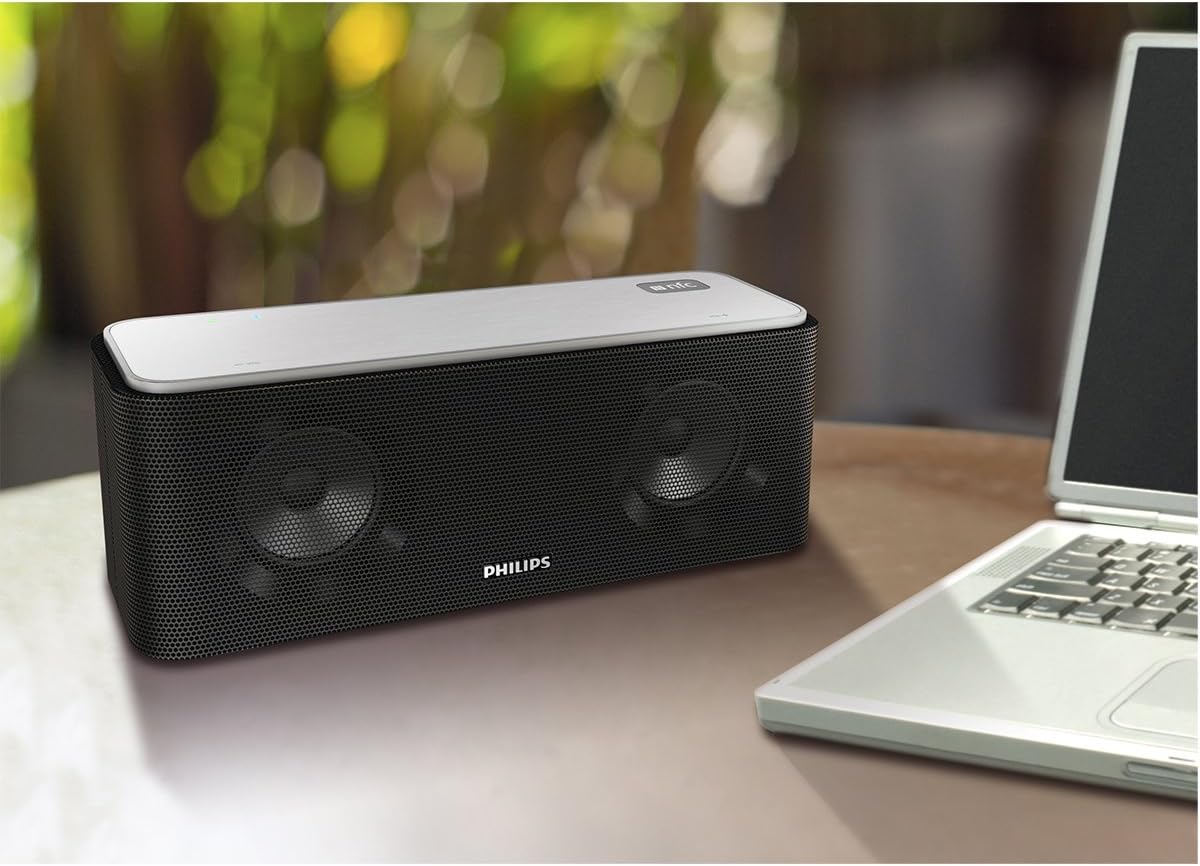
Figure 5: The Philips SB365B/37 speaker in a typical usage scenario, positioned on a wooden table alongside a laptop, demonstrating its portable nature.
Maintenance
1. Cleaning
To clean the speaker, use a soft, dry, lint-free cloth. Do not use abrasive cleaners, waxes, or solvents as they may damage the surface. Avoid getting moisture into any openings.
2. Storage
When not in use for extended periods, store the speaker in a cool, dry place away from direct sunlight and extreme temperatures. It is recommended to fully charge the battery before storing and to recharge it every few months to maintain battery health.
Troubleshooting
If you encounter issues with your speaker, refer to the following common problems and solutions:
| Problem | Possible Cause | Solution |
|---|---|---|
| Speaker does not power on. | Battery is depleted. | Connect the speaker to a power source and allow it to charge. |
| No sound from speaker. | Volume is too low or muted. Device not properly paired/connected. | Increase speaker and device volume. Re-pair Bluetooth device or check audio-in connection. |
| Bluetooth connection unstable or fails. | Device is out of range. Interference. | Move device closer to speaker (within 10 meters). Avoid obstacles. Turn off other Bluetooth devices. |
| Cannot charge external device via USB. | Speaker battery is low. Device not compatible. | Ensure speaker has sufficient charge. Verify device compatibility with USB charging. |
If the problem persists after trying these solutions, please contact customer support.
Specifications
- Model Name: SB365/37
- Speaker Type: Portable
- Connectivity Technology: Bluetooth, USB
- Wireless Communication Technology: BluetoothWireless
- Bluetooth Range: 10 Meters
- Power Source: Battery Powered
- Battery Life: 8 Hours
- Speaker Maximum Output Power: 8 Watts
- Audio Output Mode: Stereo
- Material: Plastic
- Color: blue
- Product Dimensions: 4.6 x 4.8 x 12.9 inches
- Item Weight: 0.01 Ounces
- Included Components: Bass-reflex Bluetooth Nfc Stereo Speaker
- Number of Batteries: 2 Lithium Ion batteries required. (included)
- Control Method: Touch
- UPC: 889446000351
Warranty Information
This Philips SB365B/37 speaker comes with a Limited Warranty. For specific terms and conditions, including warranty period and coverage details, please refer to the warranty card included in the product packaging or visit the official Philips support website. Keep your proof of purchase for warranty claims.
Support
For further assistance, technical support, or to access frequently asked questions (FAQs), please visit the official Philips support website. You can typically find support resources by searching for your product model number (SB365B/37) on their website.
Official Philips Website: www.philips.com/support
Related documentsSB365B/37


Ask a question about this manual
Ask about setup, troubleshooting, compatibility, parts, safety, or missing instructions. Manuals+ will review the question and use this page’s manual context to help answer it.