

1. Introduction
This manual provides detailed instructions for the installation, operation, and maintenance of your Enrock Marine KDT92MBS-PLMR60W-PLMR692 Marine Audio System. This package includes a Single DIN Marine Bluetooth USB AUX AM/FM CD Stereo Receiver, a pair of 6.5-inch 150 Watt Max 2-Way White Boat Speakers, a pair of 6x9-inch 260 Watt Max 2-Way White Boat Speakers, and a 4-Channel Amplifier. Please read this manual thoroughly before use to ensure proper functionality and longevity of your marine audio equipment.

Figure 1.1: Overview of the Enrock Marine Audio System components.
2. Product Components
Your Enrock Marine Audio System package includes the following items:
- Single DIN Marine Bluetooth USB AUX AM/FM CD Stereo Receiver: This unit serves as the central control for your audio system, offering multiple input options and Bluetooth connectivity.
- 6.5-inch 150 Watt Max 2-Way White Boat Speakers (Pair): Designed for marine environments, these speakers provide clear audio output.
- 6x9-inch 260 Watt Max 2-Way White Boat Speakers (Pair): Larger speakers for enhanced sound reproduction, also built for marine use.
- 4-Channel Amplifier: Provides power to the speakers for optimal performance.
3. Setup and Installation
Proper installation is crucial for the performance and longevity of your marine audio system. It is recommended that installation be performed by a qualified marine audio technician.
3.1. Receiver Installation
The Single DIN receiver is designed to fit into a standard single DIN opening. Ensure adequate space for wiring and ventilation. Connect the power, ground, speaker outputs, and antenna according to the wiring diagram provided with the receiver's specific manual.

Figure 3.1: Front view of the Marine Stereo Receiver.
3.2. Speaker Installation
Mount the 6.5-inch and 6x9-inch speakers in suitable locations on your vessel, ensuring they are securely fastened and have clear sound projection. Connect the speaker wires from the amplifier to the corresponding speaker terminals, observing correct polarity (+/-).

Figure 3.2: A pair of 6.5-inch marine speakers.

Figure 3.3: A pair of 6x9-inch marine speakers.
3.3. Amplifier Installation
Install the 4-channel amplifier in a dry, well-ventilated area, away from direct sunlight and excessive heat. Connect the amplifier to the receiver's RCA outputs and provide a direct power connection from the battery, ensuring proper fusing. Connect the speaker wires from the amplifier to the speakers.

Figure 3.4: The 4-Channel Marine Amplifier.
3.4. Initial Power-Up and Testing
After all components are connected, carefully power on the system. Test all functions: AM/FM radio, CD playback, USB, AUX, and Bluetooth connectivity. Adjust volume and balance settings as needed.
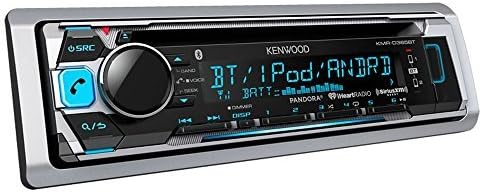
Figure 3.5: Example of a marine stereo receiver installed on a boat dashboard.
4. Operating Instructions
4.1. Receiver Functions
- Power On/Off: Press the SRC button to turn the unit on or off.
- Source Selection: Press the SRC button repeatedly to cycle through available sources (AM/FM, CD, USB, AUX, Bluetooth).
- Volume Control: Use the rotary knob to adjust the volume level.
- Bluetooth Pairing: Activate Bluetooth on your mobile device and search for the receiver's name (refer to the receiver's specific manual for the exact name, often 'KENWOOD BT'). Select it to pair. Once paired, you can stream audio wirelessly.
- USB/AUX Input: Connect a USB device or an audio player via the AUX input for wired playback.
- CD Playback: Insert a CD into the slot for automatic playback.
- Remote App Control: Download the compatible remote control application for your smartphone to control basic functions of the receiver via Bluetooth.
4.2. Amplifier and Speaker Operation
The amplifier powers the speakers, enhancing the audio output from the receiver. Ensure the amplifier is receiving power and its gain settings are appropriately adjusted to match the receiver's output and speaker sensitivity. The speakers will reproduce audio from the source selected on the receiver.
5. Maintenance
To ensure the longevity and optimal performance of your marine audio system, follow these maintenance guidelines:
- Cleaning: Regularly wipe down the receiver and speaker grilles with a soft, damp cloth. Avoid abrasive cleaners or solvents.
- Water Exposure: While components are designed for marine use and are waterproof/weather-resistant, avoid direct high-pressure water spray. Ensure all covers and caps are securely in place.
- Connections: Periodically check all wiring connections for corrosion or looseness. Clean any corroded terminals.
- Storage: If the vessel is stored for extended periods, especially in harsh conditions, consider covering the audio components or removing the receiver for indoor storage.
6. Troubleshooting
If you encounter issues with your marine audio system, refer to the following common troubleshooting steps:
| Problem | Possible Cause | Solution |
|---|---|---|
| No Power to Receiver/Amplifier | Blown fuse, loose power connection, dead battery. | Check fuses, verify power and ground connections, ensure battery is charged. |
| No Sound from Speakers | Incorrect speaker wiring, amplifier not powered, receiver output issues, incorrect source selected. | Check speaker connections and polarity, verify amplifier power, ensure correct source is selected on receiver. |
| Bluetooth Connection Issues | Device not in pairing mode, interference, previously paired device connected. | Ensure receiver is in Bluetooth mode, put device in pairing mode, disconnect other Bluetooth devices, try re-pairing. |
| Distorted Audio | Volume too high, improper gain settings on amplifier, damaged speakers/wiring. | Reduce volume, adjust amplifier gain, inspect speakers and wiring for damage. |
If these steps do not resolve the issue, consult a professional marine audio technician.
7. Specifications
Key specifications for the Enrock Marine KDT92MBS-PLMR60W-PLMR692 Marine Audio System:
- Product Dimensions: 18 x 14 x 10 inches
- Item Weight: 19.36 pounds
- Model Number: KDT92MBS-PLMR60W-PLMR692
- Connectivity Technology: Auxiliary, Bluetooth, USB
- Special Feature: Waterproof
- Controller Type: App Control, Remote Control
- Compatible Devices: Smartphone, Speaker
- Connector Type: 3.5mm Jack, USB
- Surround Sound Channel Configuration: 2.0
- Amplifier Wattage: 300 watts (System Total), 260 Watts (Output)
- Number of Amplifier Channels: 4
- 6.5" Speakers: 150 Watt Max, 2-Way, Polypropylene injection cone, Santoprene rubber surrounds, Polymer dome tweeter.
- 6x9" Speakers: 260 Watt Peak, 2-Way, 40 oz. magnet structure, 1.5 inch high temperature voice coil, ½" neodymium dome tweeter, Frequency response: 55 Hz to 20 kHz.
8. Warranty and Support
Enrock Marine products are designed for durability and performance. For specific warranty details, please refer to the warranty card included with your product or visit the official Enrock Marine website. If you require technical assistance or support, please contact Enrock Marine customer service through their official channels.