
Proctor Silex 6261048
Proctor Silex 0.7 cu. ft. 700 Watt Microwave Oven
Model: 6261048
Important Safety Instructions
When using electrical appliances, basic safety precautions should be followed, including the following:
- Read all instructions before using the appliance.
- Do not operate any appliance with a damaged cord or plug, or after the appliance malfunctions or has been damaged in any manner.
- Do not use outdoors.
- Do not immerse cord, plugs, or appliance in water or other liquid.
- Close supervision is necessary when any appliance is used by or near children.
- Always unplug from outlet when not in use and before cleaning.
- Do not use attachments not recommended by the appliance manufacturer.
- Do not place on or near a hot gas or electric burner, or in a heated oven.
- Do not use appliance for other than intended use.
- Always attach plug to appliance first, then plug cord into the wall outlet. To disconnect, turn any control to "off", then remove plug from wall outlet.
- Do not use this appliance for commercial purposes.
Product Overview
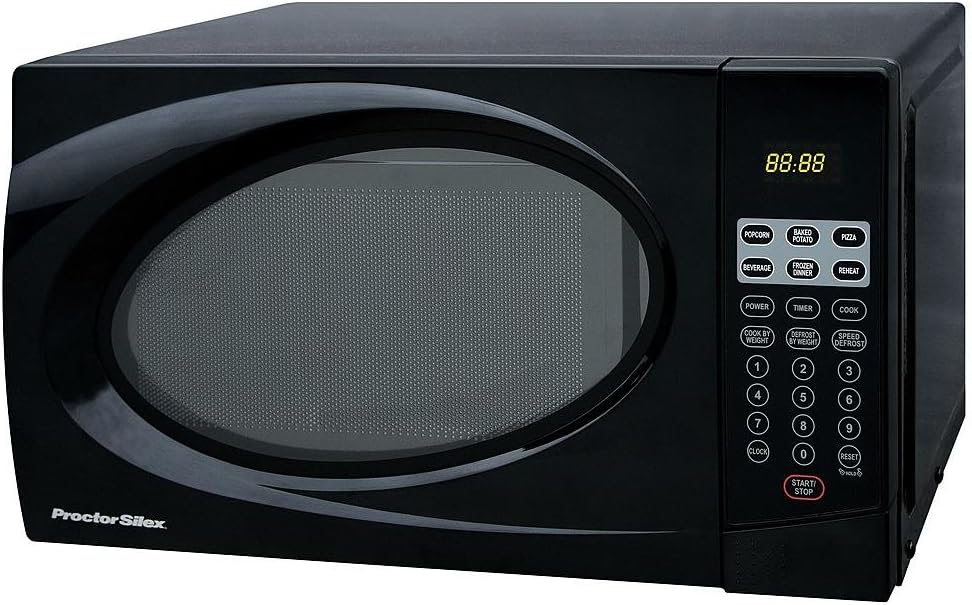
Front view of the Proctor Silex 0.7 cu. ft. 700 Watt Microwave Oven, showcasing its black finish and digital display.

The microwave oven shown with a bowl of popcorn, illustrating its capacity and typical use.

Diagram showing the dimensions of the microwave oven: 18 inches wide, 12 inches deep, and 10 inches high.
Setup and Installation
1. Unpacking
Carefully remove the microwave oven and all packing materials from the carton. Check for any damage, such as dents or a broken door. Do not operate the microwave if it appears damaged. Contact customer support for assistance.
2. Placement
Place the microwave oven on a flat, stable surface that is strong enough to hold the oven and the food you place in it. Ensure there is adequate ventilation around the unit. Maintain a minimum of 4 inches (10 cm) of space on the top, back, and sides for proper airflow. The dimensions of the unit are approximately 18 inches (W) x 12 inches (D) x 10 inches (H).
3. Electrical Requirements
The microwave oven operates on a standard 120 Volt, 60 Hz AC power supply. Ensure the electrical outlet is properly grounded and can support 700 Watts of power. Do not use an extension cord unless absolutely necessary, and if so, ensure it is a grounded 3-wire cord with a rating equal to or greater than the appliance's rating.
4. Turntable Assembly
The microwave oven includes a glass turntable and a turntable support ring. Place the turntable support ring in the center of the microwave cavity. Then, place the glass turntable securely on top of the support ring, ensuring it sits properly in the center hub. The turntable must be in place for all cooking operations.
Operating Instructions
Control Panel Overview
The control panel features a digital display and various function buttons:
- Digital Display: Shows time of day, cooking time, and other indicators.
- Number Pads (0-9): Used to enter cooking times, clock time, and other numerical inputs.
- Popcorn: One-touch cooking for popcorn.
- Baked Potato: One-touch cooking for baked potatoes.
- Pizza: One-touch cooking for pizza.
- Beverage: One-touch cooking for beverages.
- Frozen Dinner: One-touch cooking for frozen dinners.
- Reheat: One-touch reheating function.
- Power: Adjusts cooking power level.
- Timer: Sets a kitchen timer.
- Cook: Initiates manual cooking.
- Cook by Weight: Cooks food based on entered weight.
- Defrost by Weight: Defrosts food based on entered weight.
- Speed Defrost: Quick defrost function.
- Clock: Sets the time of day.
- Reset: Clears current settings.
- Start/Stop: Starts or stops cooking.
Basic Microwave Cooking
- Place food in a microwave-safe container on the turntable.
- Close the microwave door securely.
- Enter the desired cooking time using the number pads.
- Press the Start/Stop button to begin cooking.
- To adjust power level: After entering time, press Power, then enter a power level (e.g., 9 for 90%, 5 for 50%). Press Start/Stop.
Using One-Touch Cooking Functions
For convenience, the microwave offers several pre-programmed settings:
- Press the desired one-touch button (e.g., Popcorn, Baked Potato). The microwave will automatically set the appropriate cooking time and power level.
- Press Start/Stop to begin.
Defrosting
The microwave offers two defrosting methods:
- Speed Defrost: Press Speed Defrost, then enter the desired defrosting time using the number pads. Press Start/Stop.
- Defrost by Weight: Press Defrost by Weight, then enter the weight of the food in pounds (e.g., 1.5 for 1.5 lbs). Press Start/Stop.
Maintenance and Care
Cleaning the Microwave Oven
Regular cleaning helps maintain the performance and appearance of your microwave oven.
- Interior: After each use, wipe the interior with a damp cloth and mild detergent. For stubborn stains, place a bowl of water with lemon slices inside and microwave for 2-3 minutes to loosen food particles, then wipe clean.
- Exterior: Clean the exterior surfaces with a soft, damp cloth. Avoid abrasive cleaners or scouring pads.
- Turntable and Support Ring: The glass turntable and support ring can be washed in warm, soapy water or in the dishwasher. Ensure they are completely dry before placing them back in the microwave.
- Door Seal: Keep the door seal and adjacent parts clean. Wipe with a damp cloth.
Caution: Always unplug the microwave oven before cleaning. Do not use harsh chemicals or abrasive materials on any part of the microwave.
Troubleshooting
If you experience issues with your microwave oven, consult the following table before contacting customer support.
| Problem | Possible Cause | Solution |
|---|---|---|
| Microwave does not start. | Door is not closed properly. Power cord is not plugged in. Fuse is blown or circuit breaker tripped. | Ensure the door is securely latched. Plug the power cord firmly into a grounded outlet. Check your household fuse/circuit breaker box. |
| Food is not cooking or heating properly. | Cooking time is too short. Power level is set too low. Food quantity is too large. | Increase cooking time. Adjust power level to a higher setting. Reduce food quantity or increase cooking time. |
| Turntable does not rotate. | Turntable is not properly seated on the support ring. Debris under the turntable or support ring. | Remove and re-seat the turntable and support ring. Ensure they are correctly aligned. Clean the area beneath the turntable and support ring. |
| Control panel is unresponsive or erratic. | Temporary electronic glitch. | Unplug the microwave from the power outlet for 30 seconds, then plug it back in. This may reset the control panel. |
Specifications
- Brand: Proctor Silex
- Model Number: 6261048
- Capacity: 0.7 Cubic Feet
- Wattage: 700 Watts
- Voltage: 120 Volts
- Product Dimensions (W x D x H): 18" x 12" x 10"
- Installation Type: Countertop
- Included Components: Turntable
- Controller Type: Touch
Warranty and Support
For warranty information or technical support, please contact Proctor Silex customer service. Keep your purchase receipt and model number (6261048) handy for faster service.
You can typically find contact information on the manufacturer's official website or within the product packaging.
Note: Warranty terms and conditions may vary. Please refer to the warranty card included with your product for specific details.
Related Documents - 6261048
 |
Proctor Silex 700-Watt Countertop Microwave Oven Installation Guide Installation guide for the Proctor Silex 17.5-inch wide, 0.7 cu. ft., 700-Watt countertop microwave oven in black. Includes safety precautions, installation steps, electrical requirements, and basic troubleshooting. |
 |
Proctor Silex Panini Press & Compact Grill (Model 25440PS) - Use and Care Manual This document provides instructions, safety precautions, and warranty information for the Proctor Silex Panini Press & Compact Grill, Model 25440PS. It covers operation, cleaning, and maintenance in English, French, and Spanish. |
 |
Proctor Silex 87036 Microwave Oven Owner's Manual and User Guide Comprehensive owner's manual for the Proctor Silex 87036 Microwave Oven. Includes setup, operation, safety instructions, features, specifications, care, troubleshooting, and warranty information. |
 |
Proctor Silex 87042 Microwave Oven Owner's Manual and User Guide This comprehensive owner's manual provides essential information for the Proctor Silex 87042 Microwave Oven, covering safe operation, features, maintenance, troubleshooting, and warranty details. |
 |
Proctor Silex 87026 Microwave Oven Owner's Manual Comprehensive owner's manual for the Proctor Silex 87026 Microwave Oven, detailing safety instructions, operating procedures, features, specifications, troubleshooting tips, and warranty information. |
 |
Proctor Silex Microwave Oven Owner's Manual - Model 87025 Comprehensive owner's manual for the Proctor Silex Microwave Oven (Model 87025). Includes safety instructions, operating guide, features, care, troubleshooting, and warranty information. |