
Introduction
The CASIO G-Shock MUDMASTER GWG-1000-1A3 is engineered for durability and functionality in challenging environments. This timepiece is designed to withstand exposure to rubble, dirt, and debris, making it suitable for demanding outdoor activities and professional use. This manual provides essential instructions for setup, operation, maintenance, and understanding the watch's features.
Setup
Initial Charging (Tough Solar)
Your MUDMASTER GWG-1000-1A3 features a Tough Solar power system. To ensure optimal performance, expose the watch face to light for several hours before initial use. The watch will charge automatically when exposed to light, converting it into electrical power. Avoid prolonged storage in dark conditions to prevent battery depletion.
Time Synchronization (Radio Wave Reception)
The watch is equipped with automatic radio wave reception to maintain accurate time. It attempts to receive calibration signals up to six times a day (five times in China). For manual reception, refer to the detailed instructions in the full user guide available on the Casio website. Ensure the watch is placed in an area with good signal reception, away from electronic interference.
Smartphone Connectivity (Bluetooth)
The MUDMASTER GWG-1000-1A3 can connect to your smartphone via Bluetooth. Download the official G-Shock Connected app to access additional features, simplify settings configuration, and record mission logs. Follow the in-app instructions for pairing your watch with your smartphone.
Operating Instructions
The MUDMASTER GWG-1000-1A3 offers a range of functions accessible via its buttons and crown. Familiarize yourself with the button layout for efficient operation.
Triple Sensor Functions
- Digital Compass: Measures and displays direction as one of 16 points using the second hand. Measuring range: 0 to 359 degrees.
- Altimeter: Measures altitude from -700 m to 10,000 m (-2,300 ft to 32,800 ft) with a measuring unit of 1 m (5 ft). Includes manual memory measurements (up to 30 records) and auto log data (high/low altitudes, cumulative ascent and descent).
- Barometer: Provides barometric pressure readings.
- Thermometer: Measures ambient temperature. Note that body heat can affect readings; remove the watch for accurate ambient temperature measurements.
Timekeeping Functions
- World Time: Displays the current time in 38 time zones (38 cities + Coordinated Universal Time).
- Countdown Timer: Measures in 1-second units, up to a maximum of 60 minutes.
- Alarms: Features 5 independent daily alarms and an hourly time signal.
- Stopwatch: Standard stopwatch functionality.
- Full Auto-Calendar: Automatically adjusts for month lengths and leap years.
- 12/24-Hour Format: Select your preferred time display format.
- Hand Shift Feature: Temporarily moves the analog hands to clear the digital display for easier viewing.
- LED Backlight: Full auto double LED backlight for illumination in low-light conditions.

Care and Maintenance
Durability Features
- Shock-Resistant: Built with G-Shock's renowned shock-resistant construction to protect against impacts.
- Vibration-Resistant: Designed to withstand vibrations encountered in harsh environments.
- 200-Meter Water Resistance: Suitable for swimming, snorkeling, and other water activities. Do not operate buttons underwater.
- Low-Temperature Resistance: Operates reliably in temperatures down to -10°C / 14°F.
- Mud-Resistant Structure: The case features a filter to protect against mud and dust ingress, ensuring reliable operation in dirty conditions. The back cover is made of shock-resistant fine resin embedded with glass fibers for enhanced durability.
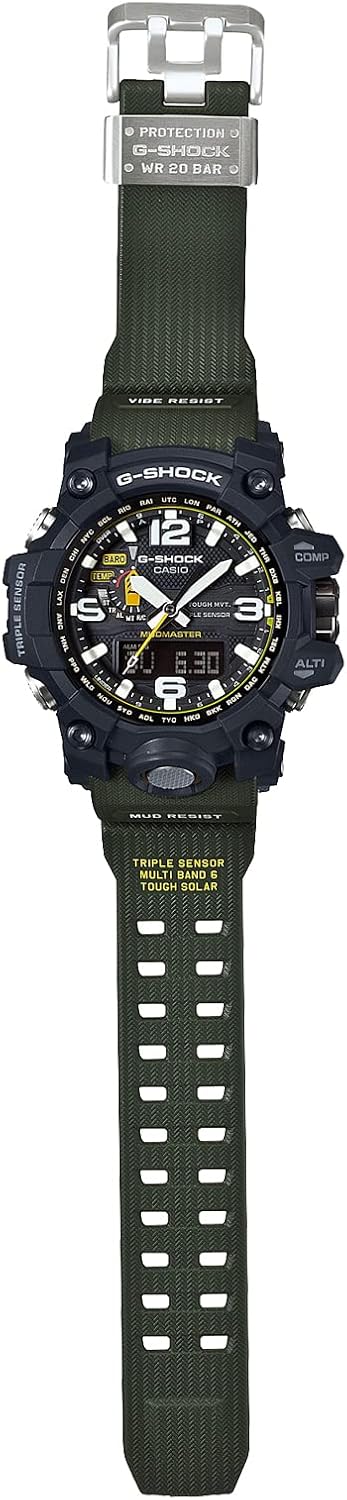
Cleaning and Storage
Regularly clean your watch with a soft, damp cloth to remove dirt and debris. For stubborn mud, rinse under running water and use a soft brush. Avoid using harsh chemicals or solvents. Store the watch in a well-lit area to ensure continuous solar charging.
Troubleshooting
- Incorrect Time: Ensure the watch is receiving radio wave signals correctly. Manually initiate reception if needed. Verify your home city setting is accurate.
- Digital Display Obscured: Use the Hand Shift Feature to temporarily move the analog hands away from the digital display.
- Sensor Readings Inaccurate: Calibrate sensors as per the full user guide. Ensure the watch is removed from your wrist for accurate temperature readings.
- Low Battery Indicator: Expose the watch to strong light for an extended period to charge the Tough Solar battery.
Specifications
| Feature | Detail |
|---|---|
| Model Number | GWG-1000-1A3JF |
| Dimensions | 55.4 x 51.3 x 19.4 mm (2.34 x 0.71 x 2.21 inches) |
| Weight | 92 grams (4.2 ounces) |
| Water Resistance | 200 meters |
| Power Source | Tough Solar power system (high-capacity solar-charging) |
| Low-Temperature Resistance | -10°C / 14°F |
| Crystal Material | Mineral Glass |
| Battery Type | 1 CR2 battery (for specific functions, refer to full manual) |

Official Product Videos
CASIO G-Shock MUDMASTER GWG-1000-1A3 Overview
This video provides a brief overview of the CASIO G-Shock MUDMASTER GWG-1000-1A3, highlighting its key features and robust design.
Warranty and Support
Your CASIO G-Shock MUDMASTER GWG-1000-1A3 comes with an international warranty. For detailed warranty information, service requests, or to download the full user manual, please visit the official Casio website or contact their customer support.
Official Casio Website: www.casio.com