
1. Introduction
Thank you for choosing the Epilady EP720-01SC Laser Epilator. This manual provides essential information for the safe and effective use of your device. Please read these instructions carefully before operating the epilator and retain them for future reference. This device is designed for personal hair removal using laser technology.
2. Safety Information
Your safety is paramount. Please observe all warnings and precautions.
- Skin Tone Suitability: This device is not recommended for dark skin tones. Using it on unsuitable skin tones may cause adverse reactions such as burns, blistering, or permanent skin discoloration. Consult the skin tone chart in the full manual (if available) or a dermatologist if unsure.
- Eye Protection: Never look directly into the laser aperture when the device is active. Direct exposure to laser light can cause serious eye injury.
- Patch Test: Before full treatment, perform a patch test on a small, inconspicuous area of skin. Wait 24-48 hours to check for any adverse reactions.
- Medical Conditions: Do not use if you have certain medical conditions, skin disorders, or are pregnant/breastfeeding. Consult a healthcare professional if you have concerns.
- Children and Pets: Keep the device out of reach of children and pets.
- Water Exposure: Do not use the device near water or immerse it in water.
- Damaged Device: Do not use if the device or its power cord is damaged. Contact customer support for assistance.
- Protective Cap: Always use the protective cap when the device is not in use to prevent accidental activation or damage to the laser aperture.
3. Product Overview
The Epilady EP720-01SC is a compact, handheld laser epilator designed for convenient at-home hair removal.

Figure 1: Epilady EP720-01SC Laser Epilator, showing the main body and power button.
Package Contents:
- Epilady EP720-01SC Laser Epilator
- Protective Cap
- USB Cable
- USB Stick (for data/software, if applicable)
- Instruction Manual
Device Features:
- Ergonomic design for comfortable handling.
- Single power/activation button.
- Laser aperture for targeted hair removal.
- USB charging port.
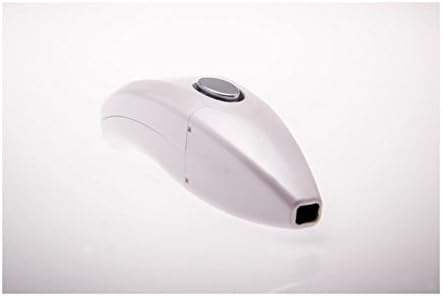
Figure 2: Front view of the Epilady EP720-01SC, highlighting the laser aperture.
4. Setup
4.1 Charging the Device
- Connect the provided USB cable to the charging port on the epilator.
- Plug the other end of the USB cable into a compatible USB power adapter (not included) or a computer USB port.
- Allow the device to charge fully before first use. An indicator light (if present) will typically change color or turn off when charging is complete.
4.2 Initial Preparation
- Ensure your skin is clean, dry, and free of any lotions, oils, or deodorants.
- Shave the area to be treated. The laser targets the hair follicle, so surface hair should be removed for optimal results and to prevent burning of surface hair. Do not wax or pluck, as this removes the follicle.
5. Operating Instructions
5.1 Powering On/Off
- To turn on, press and hold the power button (typically the large button on top) for a few seconds until an indicator light illuminates.
- To turn off, press and hold the power button again until the indicator light turns off.
5.2 Treatment Procedure
- Ensure the device is fully charged and your skin is prepared as described in Section 4.2.
- Place the laser aperture firmly against the skin in the area you wish to treat. Ensure full contact to activate the laser.
- Press the activation button (often the same as the power button, or a separate trigger). A laser pulse will be emitted. You may feel a slight warmth or tingling sensation.
- Lift the device and move it to an adjacent, untreated area. Overlap slightly to ensure full coverage, but avoid treating the exact same spot multiple times in one session.
- Continue this process until the desired area has been treated.
- After treatment, turn off the device and replace the protective cap.
5.3 Treatment Schedule
For optimal results, follow a consistent treatment schedule. Typically, initial treatments are performed every 2-4 weeks. Hair growth cycles vary, so consistent use over several months is usually required to see significant reduction. Consult the full product manual for specific recommendations.
5.4 Post-Treatment Care
- Avoid direct sun exposure on treated areas for at least 24-48 hours. Use sunscreen if sun exposure is unavoidable.
- Avoid hot baths, saunas, or strenuous exercise immediately after treatment.
- Moisturize the treated area with a gentle, non-irritating lotion if desired.
6. Maintenance and Care
6.1 Cleaning the Device
- Ensure the device is turned off and unplugged before cleaning.
- Wipe the laser aperture and the device body with a soft, dry, lint-free cloth.
- Do not use abrasive cleaners, alcohol, or harsh chemicals, as these can damage the device.
6.2 Storage
- Store the epilator in a cool, dry place, away from direct sunlight and moisture.
- Always replace the protective cap over the laser aperture when storing.
- Keep out of reach of children.
7. Troubleshooting
If you encounter issues with your Epilady EP720-01SC, refer to the following common problems and solutions:
| Problem | Possible Cause | Solution |
|---|---|---|
| Device does not turn on. | Battery is depleted. | Charge the device fully using the provided USB cable. |
| Device does not turn on. | Power button not pressed correctly. | Press and hold the power button for a few seconds. |
| No laser pulse emitted. | Insufficient skin contact. | Ensure the laser aperture is in full and firm contact with the skin. |
| No laser pulse emitted. | Device malfunction. | If the problem persists after checking other solutions, contact customer support. |
| Skin irritation after use. | Incorrect skin tone, over-treatment, or sensitivity. | Review skin tone suitability. Reduce treatment frequency or intensity. Perform a patch test. If irritation is severe or persistent, discontinue use and consult a healthcare professional. |
8. Specifications
| Feature | Detail |
|---|---|
| Model | EP720-01SC |
| Brand | Epilady |
| Laser Wavelength | 810 nm |
| Pulse Duration | 10 to 1000 ms |
| Repetition Rate | Less than 1/3 Hz |
| Power Source | Rechargeable (via USB) |
| Package Dimensions | 27.4 x 19.2 x 6.8 cm |
| Package Weight | 1.14 kg |
9. Warranty and Support
For information regarding warranty coverage, product registration, or technical support, please refer to the warranty card included with your purchase or visit the official Epilady website. Keep your proof of purchase for warranty claims.
If you have questions not covered in this manual, please contact Epilady customer service.
