
LG AKB74115501
LG AKB74115501 Remote Controller Assembly
Official Instruction Manual
Introduction
This manual provides essential information for the proper setup, operation, and maintenance of your LG AKB74115501 Remote Controller Assembly. This genuine LG replacement part is designed to function seamlessly with compatible LG televisions, ensuring a reliable and intuitive user experience. Please read this manual thoroughly before use.
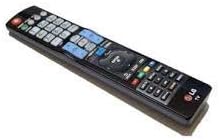
An image of the LG AKB74115501 Remote Controller Assembly, a black rectangular remote with numerous buttons, including a numeric keypad, navigation controls, and dedicated function buttons.
Setup
The LG AKB74115501 Remote Controller Assembly is designed for straightforward setup. No complex programming is typically required for compatible LG televisions.
Battery Installation
- Locate the battery compartment on the back of the remote control.
- Slide the battery compartment cover downwards or in the direction indicated by an arrow to open it.
- Insert two (2) AAA batteries, ensuring the positive (+) and negative (-) terminals align correctly with the markings inside the compartment.
- Close the battery compartment cover by sliding it back into place until it clicks securely.
Once batteries are installed, the remote should be ready for immediate use with your compatible LG television.
Operating Instructions
This remote control provides full functionality for your LG television. Familiarize yourself with the key buttons and their functions:
- Power Button (●): Turns the television on or off.
- Number Pad (0-9): Directly enters channel numbers or other numerical inputs.
- Channel Up/Down (CH▲/CH▼): Changes television channels sequentially.
- Volume Up/Down (VOL▲/VOL▼): Adjusts the television's audio volume.
- Mute (🔇): Toggles the audio mute function.
- Input/Source: Selects different input sources (e.g., HDMI 1, AV, Component).
- Menu/Settings: Accesses the television's main menu or settings.
- Navigation Buttons (Up, Down, Left, Right, OK/Enter): Used to navigate menus and confirm selections.
- Back/Exit: Returns to the previous screen or exits the current menu.
- 3D Option: Activates or deactivates 3D mode on compatible LG 3D televisions.
- Color Buttons (Red, Green, Yellow, Blue): Used for specific functions within certain applications or menus, as indicated on screen.
Point the remote control directly at the television's remote sensor for optimal performance.
Maintenance
Proper care will extend the life and functionality of your remote control.
Cleaning
- Wipe the remote control with a soft, dry cloth.
- For stubborn dirt, slightly dampen the cloth with water or a mild, non-abrasive cleaner. Do not spray cleaner directly onto the remote.
- Avoid using harsh chemicals, solvents, or abrasive cleaning materials, as these can damage the remote's surface or internal components.
Battery Replacement
Replace batteries when the remote's response becomes sluggish or it stops functioning. Always replace both batteries at the same time with new AAA batteries. Do not mix old and new batteries, or different types of batteries.
Storage
Store the remote control in a cool, dry place away from direct sunlight, extreme temperatures, and high humidity. If storing for an extended period, remove the batteries to prevent leakage.
Troubleshooting
If you experience issues with your remote control, try the following solutions:
- Remote not responding:
- Ensure batteries are inserted correctly with the correct polarity (+/-).
- Replace old batteries with new ones.
- Check for any obstructions between the remote and the television's sensor.
- Ensure you are within the effective operating range and pointing the remote directly at the TV.
- Specific buttons not working:
- Clean the remote's surface, especially around the unresponsive buttons, to remove any dirt or debris that might be preventing proper contact.
- If only certain buttons fail, it might indicate internal damage. Consider contacting LG support.
- Intermittent operation:
- This often indicates low battery power. Replace the batteries.
- Ensure no strong light sources (like direct sunlight or bright fluorescent lights) are interfering with the remote's infrared signal.
If problems persist after trying these steps, please refer to the Warranty and Support section.
Specifications
| Feature | Detail |
|---|---|
| Model Number | AKB74115501 |
| Manufacturer | LG |
| Compatible Devices | Television |
| Max Number of Supported Devices | 1 |
| Color | Black |
| Special Feature | Ergonomic |
| Item Weight | 4.5 ounces |
| Package Dimensions | 9.76 x 2.52 x 1.02 inches |
| Date First Available | July 15, 2015 |
Warranty and Support
For specific warranty details regarding your LG AKB74115501 Remote Controller Assembly, please refer to the documentation included with your purchase or visit the official LG website. Warranty terms may vary by region and retailer.
Customer Support
If you require further assistance, technical support, or have questions not covered in this manual, please contact LG customer service or visit their official support page:
- LG Official Website: www.lg.com
- LG Support Page: Search for "LG Support" on their website for contact numbers and online resources specific to your region.
When contacting support, please have your product model number (AKB74115501) and purchase information readily available.
Ask a question about this manual
Ask about setup, troubleshooting, compatibility, parts, safety, or missing instructions. Manuals+ will review the question and use this page’s manual context to help answer it.