
Samsung SM-T116
Samsung Galaxy Tab 3 Lite SM-T116 User Manual
Your comprehensive guide to operating and maintaining your device.
Introduction
Welcome to the user manual for your Samsung Galaxy Tab 3 Lite SM-T116. This guide provides detailed instructions on how to set up, operate, maintain, and troubleshoot your tablet. Designed for ease of use, the Galaxy Tab 3 Lite features a 7-inch display, 8GB of internal storage, and supports 3G and Wi-Fi connectivity, allowing you to stay connected and productive on the go.
Please read this manual carefully to ensure proper use and to maximize the performance and longevity of your device.
1. Setup
1.1 Package Contents
Ensure all items are present in the product box:
- Samsung Galaxy Tab 3 Lite SM-T116
- Travel Adapter
- USB Cable
- Quick Start Guide (this manual serves as a detailed guide)
1.2 Device Layout

Figure 1.1: Front view of the Samsung Galaxy Tab 3 Lite SM-T116, showing the 7-inch display, front camera, and physical home button.
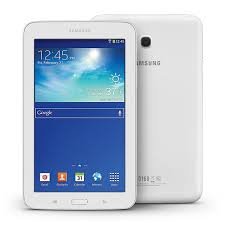
Figure 1.2: Front and back view of the Samsung Galaxy Tab 3 Lite SM-T116, highlighting the rear camera and speaker grille on the back panel.
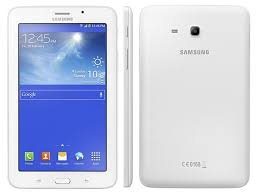
Figure 1.3: Side view of the Samsung Galaxy Tab 3 Lite SM-T116, illustrating the slim profile and placement of buttons and ports.
Familiarize yourself with the location of buttons, ports, and cameras. Typically, the power button and volume controls are on the side, the charging port at the bottom, and the front/rear cameras on the respective sides.
1.3 Charging the Battery
Before first use, fully charge the tablet. Connect the USB cable to the tablet's charging port and the other end to the travel adapter. Plug the travel adapter into a power outlet. The battery indicator will show charging progress. A full charge typically takes approximately 3-4 hours.
1.4 Powering On/Off
- To Power On: Press and hold the Power button until the Samsung logo appears.
- To Power Off: Press and hold the Power button until the power options menu appears, then tap "Power off".
1.5 Inserting SIM and microSD Cards
The Galaxy Tab 3 Lite SM-T116 supports a SIM card for 3G connectivity and a microSD card for expandable storage.
- Locate the SIM card slot and microSD card slot on the side or back of the tablet.
- Carefully open the cover(s).
- Insert the SIM card with the gold contacts facing down, ensuring it clicks into place.
- Insert the microSD card into its slot until it is securely seated.
- Close the covers firmly.
Note: Always power off the tablet before inserting or removing SIM or microSD cards to prevent data corruption.
2. Operating
2.1 Basic Navigation
Your tablet runs on the Android operating system. Navigation is primarily touch-based:
- Tap: To open an app, select an item, or press a button.
- Touch and Hold: To access contextual menus or move items.
- Swipe: To scroll through screens, lists, or pages.
- Pinch-to-Zoom: To zoom in or out on images or web pages.
- Home Button: Returns to the home screen.
- Back Button: Returns to the previous screen.
- Recent Apps Button: Displays recently used applications.
2.2 Connecting to Wi-Fi
To access the internet via Wi-Fi:
- Go to Settings > Wi-Fi.
- Toggle Wi-Fi On.
- Select your desired Wi-Fi network from the list.
- If prompted, enter the network password and tap Connect.
2.3 Using 3G Data
If you have a SIM card with a data plan, you can use 3G for internet access:
- Go to Settings > Data usage or Mobile networks.
- Ensure Mobile data is toggled On.
- Configure APN settings if necessary (refer to your mobile carrier for details).
2.4 Camera Functionality
The tablet features a 5MP primary camera.
- Open the Camera app from the home screen or app drawer.
- Tap the shutter button to take a photo.
- Switch between photo and video modes as desired.
- Access settings within the camera app to adjust resolution, flash, and other options.
3. Maintenance
3.1 Cleaning Your Device
To keep your tablet clean and in good condition:
- Use a soft, lint-free cloth to wipe the screen and body.
- For stubborn smudges, slightly dampen the cloth with water or a screen cleaner specifically designed for electronics.
- Avoid using harsh chemicals, abrasive materials, or excessive moisture.
3.2 Battery Care
- Avoid extreme temperatures, as they can degrade battery life.
- Do not leave the tablet charging for extended periods after it's fully charged.
- If storing the tablet for a long time, charge it to about 50% before turning it off.
3.3 Software Updates
Regularly check for and install software updates to ensure optimal performance and security:
- Go to Settings > About device > Software update.
- Tap Check for updates.
- Follow on-screen instructions to download and install any available updates.
4. Troubleshooting
This section addresses common issues you might encounter with your Samsung Galaxy Tab 3 Lite SM-T116.
4.1 Device Not Turning On
- Ensure the battery is sufficiently charged. Connect the charger and wait a few minutes before attempting to power on.
- Perform a forced restart: Press and hold the Power button and Volume Down button simultaneously for about 7-10 seconds.
4.2 Wi-Fi Connectivity Issues
- Ensure Wi-Fi is enabled in Settings.
- Restart your Wi-Fi router and the tablet.
- Forget the network in Wi-Fi settings and reconnect.
- Ensure you are within range of the Wi-Fi signal.
4.3 Slow Performance
- Close unused applications running in the background.
- Clear cache data from apps and the system (Settings > Storage > Cached data).
- Uninstall unnecessary applications.
- Consider a factory reset as a last resort (back up your data first).
4.4 Apps Crashing or Not Responding
- Force close the app (Settings > Apps > [App Name] > Force Stop).
- Clear the app's cache and data (Settings > Apps > [App Name] > Storage > Clear cache/Clear data).
- Update the app from the Google Play Store.
- Reinstall the app.
5. Specifications
| Feature | Specification |
|---|---|
| Model Name | Samsung Galaxy Tab 3 Lite SM-T116 |
| Display | 7-inch LCD, 1024 x 600 pixels (WSVGA) |
| Processor | Samsung Processor |
| RAM | 1 GB |
| Internal Storage | 8 GB (expandable via microSD) |
| Operating System | Android |
| Rear Camera | 5 MP |
| Connectivity | 3G, Wi-Fi (802.11g), Bluetooth, USB |
| Battery | (Specific mAh not provided, but it's a standard tablet battery) |
| Dimensions | Approximately 20.4 x 13 x 5.1 cm |
| Weight | Approximately 350 g |
6. Warranty and Support
6.1 Warranty Information
Your Samsung Galaxy Tab 3 Lite SM-T116 comes with a standard manufacturer's warranty, typically covering defects in materials and workmanship for a period of 12 months from the date of purchase. Please refer to the warranty card included in your product packaging for specific terms and conditions, as warranty periods and coverage may vary by region.
Keep your proof of purchase (receipt or invoice) as it will be required for any warranty claims.
6.2 Customer Support
For technical assistance, service, or further inquiries, please contact Samsung Customer Support:
- Online Support: Visit the official Samsung support website for FAQs, troubleshooting guides, and software downloads. www.samsung.com/support
- Phone Support: Refer to your regional Samsung website or product packaging for local customer service contact numbers.
- Service Centers: Locate authorized Samsung service centers near you through the Samsung support website.
When contacting support, please have your tablet's model number (SM-T116) and serial number ready.
Related Documents - SM-T116
 |
Korisnički priručnik za Samsung Galaxy Tab S6 Lite (SM-P620/SM-P625) Detaljan korisnički priručnik za tablete Samsung Galaxy Tab S6 Lite, modeli SM-P620 i SM-P625. Sadrži upute za postavljanje, korištenje aplikacija, postavki, značajki i rješavanje problema. |
 |
Samsung Galaxy Tab A9 Brugervejledning: Kom godt i gang og brug af din tablet Udforsk den komplette brugervejledning til Samsung Galaxy Tab A9 tablets (modeller SM-X130, SM-X135F, SM-X110, SM-X115, SM-X210, SM-X210R, SM-X216B, SM-X216R). Lær om opsætning, funktioner, indstillinger og fejlfinding. |
 |
Ръководство за ремонт Samsung Galaxy Tab S10 Lite (SM-X400, SM-X406B) Подробно ръководство за ремонт на таблети Samsung Galaxy Tab S10 Lite (SM-X400, SM-X406B). Включва инструкции за разглобяване, сглобяване, калибриране, актуализация на софтуера и тестове за качество. |
 |
三星 Galaxy Tab S7/S7+ 用户手册 (SM-T870/T875/T970/T975/T976B) 三星 Galaxy Tab S7 和 Galaxy Tab S7+ 系列平板电脑的官方用户手册。包含 SM-T870、SM-T875、SM-T970、SM-T975、SM-T976B 等型号的详细设置、功能使用、故障排除和维护指南。 |
 |
Guia do Utilizador Samsung Galaxy Tab A9 Wi-Fi | Manuais Samsung Explore o Guia do Utilizador completo para os dispositivos Samsung Galaxy Tab A9 Wi-Fi (modelos SM-X130, SM-X135F, SM-X110, SM-X115, SM-X210, SM-X210R, SM-X216B, SM-X216R). Saiba como configurar, utilizar e gerir o seu tablet Samsung. |
 |
Οδηγός Χρήστη Samsung Galaxy Tab A11+ Wi-Fi (SM-X230, SM-X236B) Ανακαλύψτε πώς να χρησιμοποιήσετε πλήρως το Samsung Galaxy Tab A11+ Wi-Fi (SM-X230, SM-X236B) με αυτόν τον αναλυτικό οδηγό χρήστη. Βρείτε πληροφορίες για την αρχική εγκατάσταση, τις ρυθμίσεις, τις εφαρμογές και την αντιμετώπιση προβλημάτων. |