
Product Overview
The CAMLOCKbox Security Box is engineered to provide robust protection for your Bushnell Aggressor 119774C/119776C Trail Camera. Constructed from heavy 16-gauge steel, this security box safeguards your camera from environmental elements, animal interference, and potential theft. Its precise design ensures a snug fit, allowing for easy camera removal and re-installation without altering its original field of view.
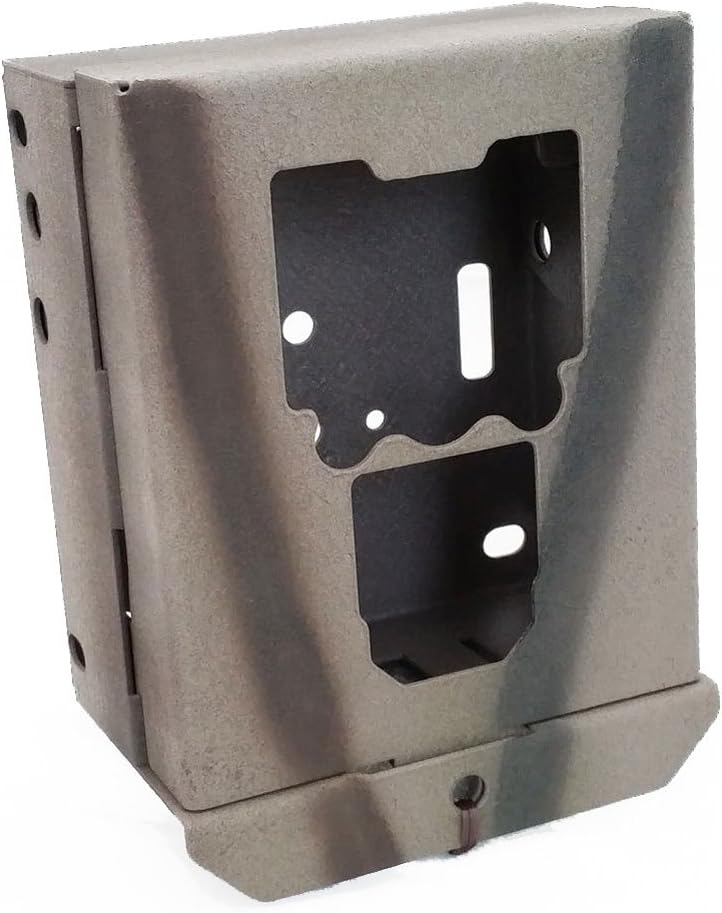
Image: Front view of the CAMLOCKbox security box, showcasing its grey camouflage finish.
Key Features
- Steel Construction: Manufactured from heavy 16-gauge steel for exceptional durability and an exact camera fit.
- Powder Coating: Features a durable powder coating with a Camo Break-up paint finish, offering protection against natural elements and aiding in camouflage.
- Versatile Attachment Options: Designed to be lagbolted, bungeed, or belted to trees, providing flexible mounting solutions.
- Easy Camera Access: Allows for convenient camera removal and installation without disturbing the box's mounted position, preserving the camera's original setup.
- Locking Compatibility: Fully compatible with 5/16 inch Python cable locks and standard padlocks for enhanced security against tampering and theft.
- External Power Access: Includes pre-cut holes to facilitate external power hookup to your trail camera, if supported by your camera model.
- Animal Protection: Helps prevent damage to your trail camera from animals chewing or interfering with the device.
Setup and Installation
Follow these steps to properly install your CAMLOCKbox Security Box and secure your Bushnell Aggressor Trail Camera.
Step 1: Prepare the Security Box
Ensure the security box is clean and free of debris before installation.
Step 2: Insert the Trail Camera
Carefully slide your Bushnell Aggressor 119774C/119776C Trail Camera into the security box. The box is designed for a snug fit, ensuring the camera is held securely.

Image: A Bushnell Aggressor Trail Camera being inserted into the CAMLOCKbox security box, demonstrating the precise fit.
Step 3: Secure the Box to a Mounting Surface
The security box offers multiple attachment methods:
- Lagbolting: Use lag bolts through the designated holes to secure the box directly to a tree or post. Ensure sufficient clearance for large-headed bolts.
- Belting/Bungeeing: Utilize straps or bungee cords through the slots on the box to attach it to a tree. This method is suitable for public lands where tree defacement is prohibited.
- Python Cable Lock: The box is compatible with 5/16 inch Python cable locks. Thread the cable through the appropriate openings and around the mounting surface.

Image: A CAMLOCKbox security box mounted to a tree, with a cable lock securing a Bushnell trail camera inside. This demonstrates a typical outdoor installation.
Step 4: Lock the Security Box
For added security, use a standard padlock or a 5/16 inch Python cable lock to secure the box. The box features specific points for locking mechanisms.

Image: Front view of the CAMLOCKbox security box, highlighting the padlock loop at the bottom for securing the enclosure.
Operation
Once installed, the CAMLOCKbox allows for convenient operation of your trail camera.
Camera Access
To access your trail camera for battery changes or memory card retrieval, simply unlock the security box. The camera can be removed and re-inserted without disturbing the box's mounted position, ensuring the camera maintains its original field of view.
External Power Connection
Utilize the pre-cut holes on the security box to connect an external power source to your trail camera, if supported by your camera model.
Maintenance
The CAMLOCKbox Security Box requires minimal maintenance to ensure its longevity and effectiveness.
- Regular Inspection: Periodically check the box for any signs of wear, damage, or tampering.
- Cleaning: Wipe down the exterior with a damp cloth to remove dirt, dust, or mud. Avoid abrasive cleaners that could damage the powder coating.
- Lock Mechanism: Ensure any padlocks or cable locks are functioning correctly and lubricate them if necessary.
- Mounting Integrity: Verify that the box remains securely attached to its mounting surface. Tighten lag bolts or adjust straps as needed.
Troubleshooting
This section addresses common issues you might encounter with your security box.
Camera Does Not Fit
Ensure your trail camera is a Bushnell Aggressor 119774C or 119776C model. This security box is specifically designed for these models. Refer to your camera's manual for model verification.
Box Feels Loose After Installation
Re-check all attachment points. If using lag bolts, ensure they are fully tightened. If using straps or bungee cords, confirm they are taut and properly secured.
Difficulty with Locking Mechanism
Ensure the padlock or cable lock is correctly aligned with the designated holes. If using a padlock, check for any obstructions or debris in the shackle area.
Product Specifications
| Property | Value |
|---|---|
| Model Number | 10102 |
| Material | 16-gauge Steel |
| Color | Grey (with Camo Break-up paint) |
| Product Dimensions | 1 x 1 x 1 inches (approximate external) |
| Item Weight | 2.1 pounds |
| Compatibility | Bushnell Aggressor 119774C/119776C Trail Cameras |
| Lock Compatibility | 5/16 inch Python Cable Locks, Standard Padlocks |

Image: Side view of the CAMLOCKbox security box, illustrating the robust 16-gauge steel construction and side ventilation/attachment holes.
Warranty and Support
For specific warranty information or technical support regarding your CAMLOCKbox Security Box, please contact the manufacturer directly. Refer to the product packaging or the official CAMLOCKbox website for contact details.
Manufacturer: Camlockbox
Date First Available: July 9, 2015