
1. Introduction
The BV-Tech POE-SW801 is a Fast Ethernet Switch featuring 8 10/100Mbps Power over Ethernet (PoE) ports and 1 Ethernet uplink port. This unmanaged switch provides up to 150W of total power, supplying industry-standard IEEE 802.3af power over a single Cat-5 cable (sold separately). Ports automatically detect connected devices, PoE requirements, speed, duplex mode, and cable type. It is suitable for various applications including IP security cameras, wireless access points, VoIP phones, and other PoE-compatible devices.
2. Key Features
- 8 10/100Mbps PoE ports plus 1 10/100Mbps Ethernet uplink port.
- Complies with IEEE 802.3af PoE Standard.
- Compact size for versatile placement.
- Maximum power budget of 150W (up to 15.4W per port).
- Auto-MDI/MDI-X function on all ports.
3. Package Contents
Upon opening the package, you should find the following items:
- BV-Tech POE-SW801 8 Port PoE Unmanaged Switch
- Power Adapter Plug (North American style, 3-prong grounded)
- Adhesive stand-offs (for unit placement)
For a visual guide to the package contents and initial overview, please watch the video below:
Video: Unboxing and Overview of the BV-Tech POE-SW801 8-Port PoE Switch. This video demonstrates the contents of the product packaging and provides a first look at the device's physical features.
4. Physical Overview
The POE-SW801 switch features a durable aluminum design with the BV-Tech logo stamped on the top. It includes various ports and indicators for easy operation.

Image: Front and back panels of the BV-Tech POE-SW801 switch. The front panel displays 8 PoE ports and 1 uplink port with corresponding LED indicators. The back panel shows the AC power input (100-240V AC 50-60Hz) and a grounding screw.
Front Panel
- PoE Ports (1-8): These 8 ports provide both data and power to IEEE 802.3af compatible devices. Each port supports 10/100Mbps data transfer.
- Uplink Port: A dedicated 10/100Mbps Ethernet port for connecting to a router or network switch. This port does not provide PoE.
- LED Indicators:
- PoE in Use (Orange): Indicates that PoE power is being supplied through the port.
- Link/Act (Green): Indicates a successful network connection and data activity.
- PWR: Power indicator for the unit.

Image: Detailed view of the LED indicators. The orange LED signifies Power over Ethernet is active on a port, while the green LED indicates a network link and data activity.
Back Panel
- AC Input: Standard AC power connector (100-240V AC, 50-60Hz). The power supply is internal to the switch.
- Grounding Screw: An additional grounding point for enhanced safety, if required.
Dimensions
The switch features a compact design for easy integration into various environments.
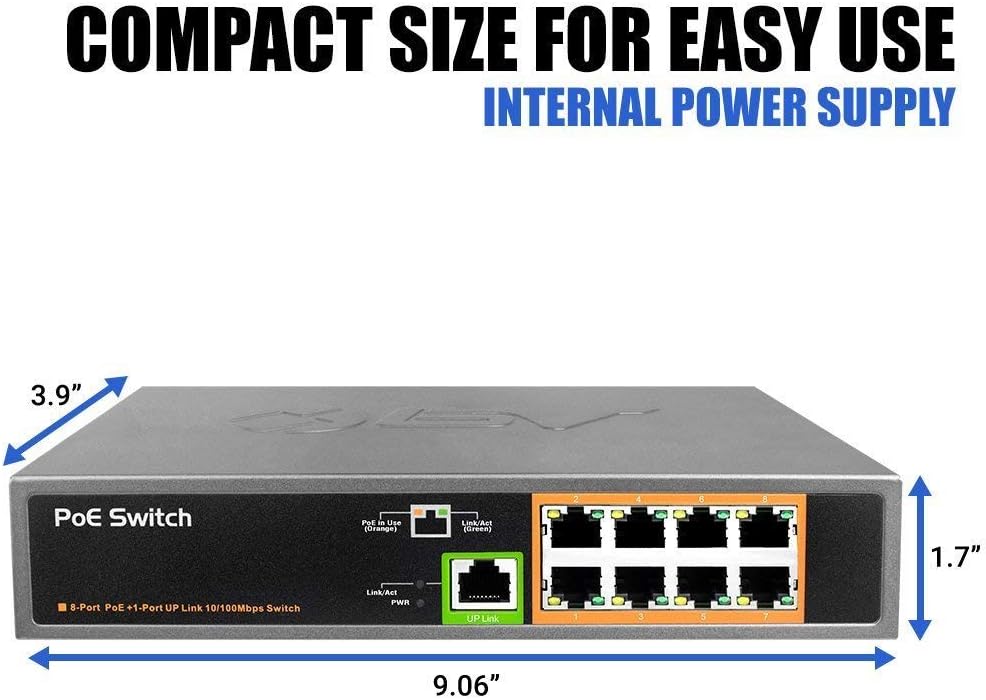
Image: Physical dimensions of the switch. The unit measures approximately 9.06 inches in length, 3.9 inches in width, and 1.7 inches in height.
5. Setup Instructions
The BV-Tech POE-SW801 is designed for plug-and-play operation, requiring minimal configuration.
- Power Connection: Connect the provided power cable to the AC input on the back of the switch and then to a standard AC outlet (100-240V AC, 50-60Hz). Ensure the PWR LED on the front panel illuminates.
- Uplink Connection: Connect an Ethernet cable from your router or existing network switch to the dedicated "UP Link" port on the front of the POE-SW801. The Link/Act LED for the uplink port should illuminate green, indicating a successful connection.
- Connect PoE Devices: Connect your PoE-compatible devices (e.g., IP cameras, wireless access points, VoIP phones) to any of the 8 PoE ports (1-8) using standard Cat-5 or higher Ethernet cables. The switch will automatically detect the device and supply power if it is PoE-compatible. The "PoE in Use" (orange) and "Link/Act" (green) LEDs for the respective port should illuminate.
- Connect Non-PoE Devices (Optional): While primarily a PoE switch, you can also connect non-PoE network devices to the PoE ports. These devices will receive data connectivity but no power.

Image: Illustration of plug-and-play functionality, demonstrating how the switch supports both PoE and non-PoE devices for network connectivity.

Image: Example network setup. The diagram shows the PoE switch connected to an AC outlet, an uplink to a router/network switch, and then providing power and data to an IP camera, IP phone, and access point. Transmission distance is up to 100m.
6. Operating Instructions
Once properly set up, the BV-Tech POE-SW801 operates automatically. It is an unmanaged switch, meaning it does not require software configuration.
- Automatic Device Detection: The switch automatically detects if a connected device is PoE-compatible and supplies the necessary power (up to 15.4W per port, with a total budget of 150W).
- Data Transfer: All ports support 10/100Mbps Fast Ethernet for efficient data transfer.
- LED Status: Monitor the LED indicators on the front panel to confirm power (PWR), network link/activity (Link/Act), and PoE power delivery (PoE in Use) for each port.

Image: The switch is capable of powering up to 8 IP cameras, with each port providing up to 15.4W. The total power budget for PoE devices is 150W.
7. Maintenance
To ensure optimal performance and longevity of your BV-Tech POE-SW801 switch, follow these maintenance guidelines:
- Cleaning: Regularly clean the exterior of the switch with a soft, dry cloth. Avoid using liquid or aerosol cleaners.
- Ventilation: Ensure that the ventilation slots on the sides of the unit are not obstructed to prevent overheating. The aluminum casing is designed for efficient heat dissipation.
- Cable Management: Keep network cables neatly organized to prevent strain on ports and accidental disconnections.
- Environmental Conditions: Operate the switch within recommended temperature and humidity ranges to avoid damage.
8. Troubleshooting
If you encounter issues with your POE-SW801 switch, refer to the following common troubleshooting steps:
- No Power (PWR LED Off):
- Verify the power cable is securely connected to both the switch and the AC outlet.
- Ensure the AC outlet is functional by testing it with another device.
- No Link/Activity (Link/Act LED Off):
- Check the Ethernet cable connection between the switch port and the connected device. Try a different cable.
- Ensure the connected device is powered on and functioning correctly.
- For the uplink port, verify the connection to your router or main network switch.
- PoE Device Not Receiving Power (PoE in Use LED Off):
- Confirm that the connected device is IEEE 802.3af PoE compatible.
- Check the Ethernet cable for damage; a faulty cable can prevent PoE delivery.
- Ensure the total power consumption of all connected PoE devices does not exceed the switch's 150W power budget.
- Slow Network Speed:
- Verify that all connected devices and cables support 10/100Mbps speeds.
- Check for network congestion on your main network.
9. Specifications
| Model Number | POE-SW801 |
| Ports | 8 x 10/100Mbps PoE Ports, 1 x 10/100Mbps Ethernet Uplink Port |
| PoE Standard | IEEE 802.3af |
| Total PoE Power Budget | 150W |
| Max Power Per Port | 15.4W |
| Data Transfer Rate | 100 Megabytes Per Second (Mbps) |
| Voltage Input | 100-240V AC, 50-60Hz |
| Dimensions (LxWxH) | 9 x 1.7 x 5.85 inches (approx. 22.86 x 4.32 x 14.86 cm) |
| Item Weight | 2.5 pounds (approx. 1.13 kg) |
| Manufacturer | BV USA |
10. Warranty and Support
For warranty information, technical support, or any inquiries regarding your BV-Tech POE-SW801 switch, please contact BV-Tech directly.
- Email: sales@poedepot.com
- Phone (Toll-Free): 866-514-8998
- Operating Hours: Monday - Friday, 9 AM - 5 PM Central Standard Time
Additional protection plans may be available for purchase. Please refer to your retailer for details.