
TANITA BC-730
Tanita BC-730 Digital Body Composition Scale User Manual
Model: BC-730 | Brand: TANITA
Product Overview
The Tanita BC-730 Green Digital Body Composition Scale is designed to provide comprehensive health insights. It utilizes Bioelectrical Impedance Analysis (BIA) to measure various body metrics. This compact and lightweight device is suitable for home use and supports multiple users.
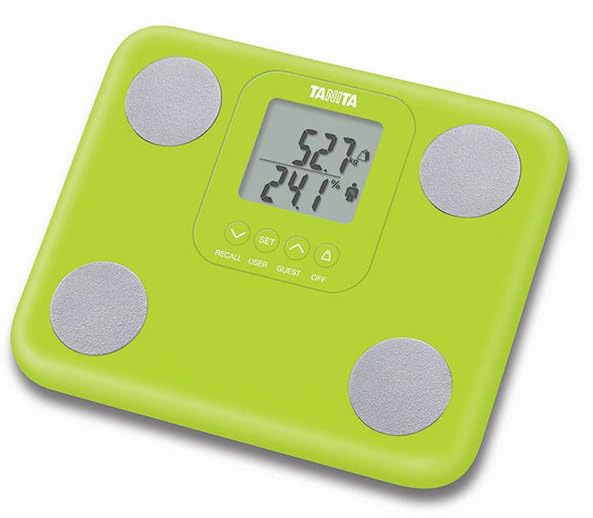
Figure 1: Tanita BC-730 Green Digital Body Composition Scale. The scale is green with a central digital display showing measurements and four silver electrode pads for body composition analysis.
Key Features
- 9 Key Body Composition Metrics: Measures weight, body fat, muscle mass, body water, bone mass, visceral fat, physique rating, Basal Metabolic Rate (BMR), and metabolic age.
- Compact & Lightweight Design: Facilitates easy storage and portability.
- Advanced Japan Technology: Utilizes Bioelectrical Impedance Analysis (BIA) for accurate readings.
- 5-User Memory & Auto Recognition: Stores data for up to five users and automatically recognizes individuals.
- Fast & Reliable Performance: Features tap-on activation for instant readings and long battery life.
Setup
1. Unpacking and Battery Installation
Carefully remove the scale from its packaging. Locate the battery compartment on the underside of the scale. Insert 4 AA batteries (included) ensuring correct polarity as indicated within the compartment.
2. Initial Placement
Place the scale on a hard, flat, and stable surface. Avoid carpets or uneven flooring, as this can affect measurement accuracy.
3. Power On and Unit Selection
Tap the center of the scale with your foot to activate it. The display will light up. If necessary, use the unit selection button (often located on the underside or near the display) to choose your preferred unit of measurement (e.g., kg/lb).
Operating Instructions
1. User Registration (for first-time use)
- With the scale off, press the SET button.
- Use the UP or DOWN arrows to select a personal data number (P1-P5). Press SET to confirm.
- Enter your gender, height, and age using the arrows and SET button.
- Once all data is entered, the scale will display "0.0" and is ready for measurement.
2. Taking a Measurement
- Ensure the scale is on a flat, hard surface.
- Step onto the scale barefoot, ensuring your feet are positioned on the four electrode pads. Stand still.
- The scale will first display your weight, then proceed to measure and display other body composition metrics sequentially.
- Step off the scale once all measurements are displayed. The scale will automatically turn off after a few seconds.
3. Guest Mode
For a single measurement without storing personal data, press the GUEST button after activating the scale. Enter your gender, height, and age, then proceed with the measurement as usual.
4. Recalling Previous Measurements
To view previous measurements for a registered user, press the RECALL button and select the desired user number. The scale will cycle through the stored data.
Maintenance
- Cleaning: Wipe the scale surface with a soft, damp cloth. Do not use abrasive cleaners or immerse the scale in water.
- Storage: Store the scale in a cool, dry place, away from direct sunlight and extreme temperatures.
- Battery Replacement: Replace all 4 AA batteries when the low battery indicator appears on the display. Ensure proper disposal of old batteries.
- Calibration: The scale is factory calibrated. If you move the scale, it is recommended to perform a "zero" calibration by tapping it on, waiting for "0.0" to appear, and then stepping off before your first measurement.
Troubleshooting
| Problem | Possible Cause | Solution |
|---|---|---|
| No display / Scale won't turn on | Dead or incorrectly installed batteries. | Check battery polarity; replace all 4 AA batteries. |
| Inaccurate readings | Scale on uneven surface; not standing still; dirty electrodes; recent heavy meal/exercise. | Place on hard, flat surface; stand still; clean electrodes; measure at consistent times. |
| "Error" message on display | Measurement outside capacity; poor contact with electrodes. | Ensure weight is within 330 lbs (150 kg); ensure bare feet are firmly on electrodes. |
| Body composition data not displayed | Not barefoot; feet not making proper contact with electrodes; user data not registered. | Ensure bare feet are on all four electrodes; register user data if not already done. |
Specifications
- Product Model: BC-730
- Product Weight: 3 lbs
- Maximum Capacity: 330 lbs (150 kg)
- Power Supply: 4 AA batteries (included)
- Dimensions: 10" x 8.5" x 1.2"
- Material: Durable plastic
- User Modes: Athlete Mode, Guest Mode, Kids Mode
- Supported Languages: EN, DE, FR, ES
Warranty and Support
The Tanita BC-730 Digital Body Composition Scale comes with a 3-year warranty from the date of purchase. This warranty covers defects in materials and workmanship under normal use.
For technical support, warranty claims, or further inquiries, please contact Tanita customer service. Refer to the official Tanita website or your purchase documentation for the most current contact information.
Online Resources: For additional information, FAQs, and product registration, visit the official TANITA Store on Amazon.