
1. Introduction
Thank you for choosing the LCN 8310-867S Surface Mount Box. This product is a durable mechanical component designed for surface mounting applications, providing a secure enclosure for various door fixture options. Manufactured in the United States, it offers a reliable solution for commercial door hardware installations.
This manual provides essential information for the safe and correct installation, operation, and maintenance of your LCN 8310-867S Surface Mount Box. Please read it thoroughly before installation and retain it for future reference.
2. Safety Information
Always observe the following safety precautions to prevent injury or damage to the product:
- Ensure all local and national building codes are followed during installation.
- Wear appropriate personal protective equipment (PPE), such as safety glasses and gloves, during installation.
- Use only the tools and hardware specified or recommended for installation.
- Do not modify the product in any way, as this may compromise its integrity and void the warranty.
- Keep children and unauthorized personnel away from the installation area.
- If you are unsure about any part of the installation process, consult a qualified professional.
3. Package Contents
Carefully unpack the box and verify that all components are present and undamaged. If any items are missing or damaged, contact your supplier immediately.
- LCN 8310-867S Surface Mount Box (1 unit)
- Mounting Hardware (screws, anchors, etc. - specific items may vary)
- Instruction Manual (this document)
Note: The package dimensions are approximately 5.08 cm L x 15.24 cm W x 15.24 cm H, with an item package weight of 0.272 kg.
4. Setup and Installation
The LCN 8310-867S is designed for surface-mount installation. Follow these general steps for proper setup:
- Prepare the Mounting Surface: Ensure the surface where the box will be mounted is clean, flat, and structurally sound. Mark the desired location for the box.
- Mark Mounting Points: Hold the surface mount box in position and use a pencil or marker to accurately mark the locations for drilling mounting holes.
- Drill Pilot Holes: Using an appropriate drill bit size for your mounting hardware and surface material, drill pilot holes at the marked locations. If mounting into masonry or concrete, use suitable anchors.
- Secure the Box: Align the box with the drilled holes. Insert the mounting screws through the box's mounting holes and into the pilot holes/anchors. Tighten the screws securely, but do not overtighten, to avoid damaging the box or the mounting surface.
- Verify Stability: After securing, gently test the box to ensure it is firmly attached to the surface and does not wobble.
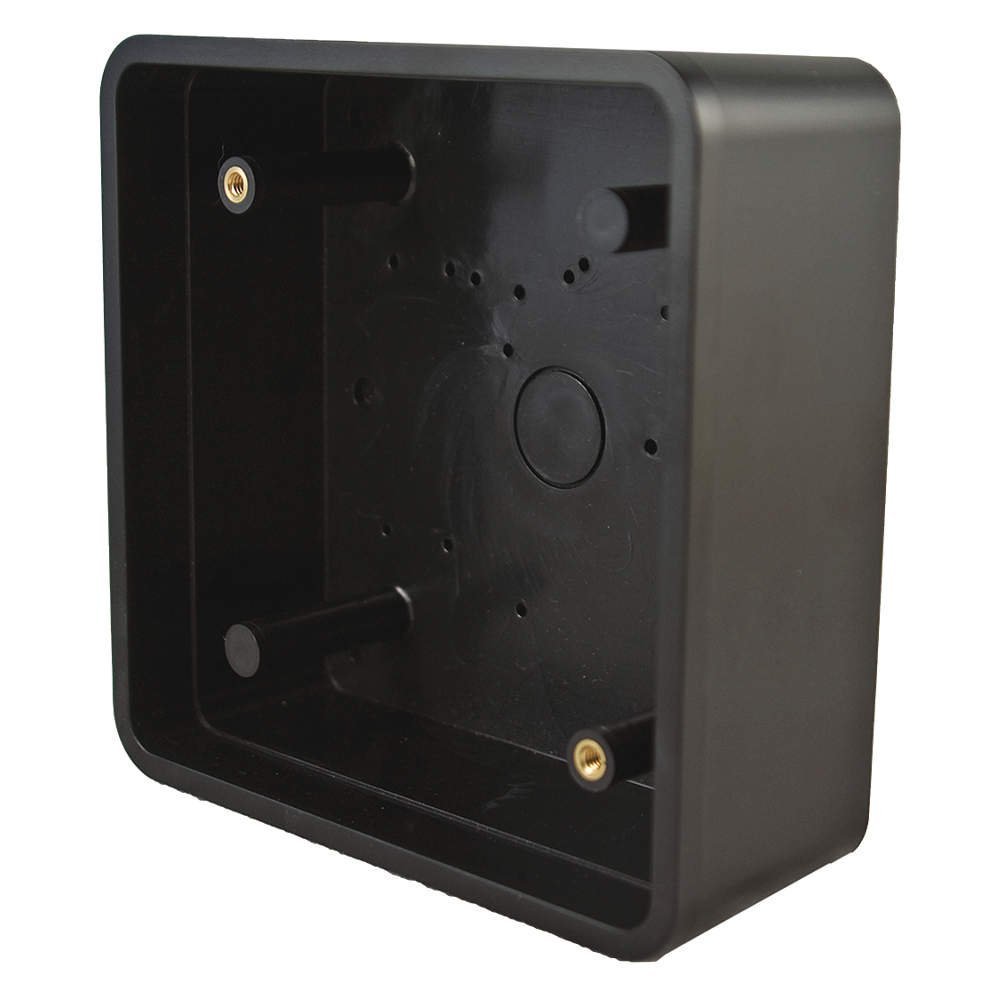 Figure 1: LCN 8310-867S Surface Mount Box. This image shows the compact black metal enclosure designed for surface installation.
5. Operating Instructions
The LCN 8310-867S Surface Mount Box is a passive mechanical component. Once properly installed, it functions as a protective enclosure or mounting point for other door hardware components. There are no active operational controls for the box itself.
Ensure that any components installed within or on the box are correctly integrated and secured according to their respective instruction manuals.
6. Maintenance
Regular maintenance helps ensure the longevity and proper function of your LCN 8310-867S Surface Mount Box:
- Cleaning: Periodically wipe the exterior of the box with a soft, damp cloth to remove dust and dirt. Avoid abrasive cleaners or solvents that could damage the finish.
- Inspection: Annually inspect the mounting screws and the box itself for any signs of loosening, corrosion, or damage. Tighten any loose screws.
- Damage: If the box shows signs of significant damage or structural compromise, it should be replaced to maintain safety and functionality.
7. Troubleshooting
This section addresses common issues you might encounter with the LCN 8310-867S Surface Mount Box.
| Problem | Possible Cause | Solution |
|---|---|---|
| Box feels loose after installation. | Mounting screws are not tight enough or pilot holes are too large. | Tighten mounting screws. If still loose, consider using larger screws or appropriate wall anchors. |
| Box is damaged (e.g., dented, cracked). | Impact during installation or use. | Replace the damaged box to ensure proper function and aesthetics. |
| Difficulty aligning box during installation. | Inaccurate marking of pilot holes. | Re-measure and re-mark pilot holes carefully. Use a level to ensure straight alignment. |
8. Specifications
| Attribute | Detail |
|---|---|
| Product Type | Mechanical Component |
| Model Number | 8310867S |
| Brand | LCN |
| Material | Metal |
| Color | Black |
| Style | Compact |
| Installation Type | Surface-Mount |
| Finish Type | Painted |
| Product Dimensions (Approx.) | 4.75" x 4.75" (as per product title) |
| Item Package Dimensions | 5.08 cm L x 15.24 cm W x 15.24 cm H |
| Item Weight | 9.6 ounces (0.272 kg) |
| Country of Origin | United States |
| ASIN | B010NMHP16 |
| Date First Available | May 20, 2010 |
9. Warranty and Support
LCN products are manufactured to high standards. While specific warranty details are not provided in this document, please refer to the official LCN website or contact their customer support for information regarding product warranty and technical assistance.
For support, please visit the official LCN website or contact your authorized LCN dealer.