
SKMEI 0989
SKMEI 0989 Digital Sports Watch User Manual
Model: 0989
Introduction
This manual provides detailed instructions for the setup, operation, and maintenance of your SKMEI 0989 Digital Sports Watch. Please read this manual thoroughly to ensure proper use and to maximize the lifespan of your watch.
The SKMEI 0989 is a 5ATM water-resistant digital watch designed for sports and daily wear, featuring time, date, alarm, and stopwatch functions.
Product Overview
Familiarize yourself with the watch's components and button functions:
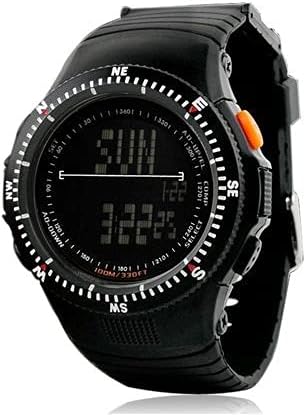
This image displays the SKMEI 0989 digital sports watch. The watch features a black case and strap, a digital display showing time, day, and compass markings on the bezel. Key buttons are visible on the sides, labeled 'AD-UP/EL', 'COMP', 'SELECT', and 'AD-DOWN'.
- AD-UP/EL (Top Left): Used to adjust values upwards or activate the EL (Electro-Luminescent) backlight.
- AD-DOWN (Bottom Left): Used to adjust values downwards.
- COMP (Top Right): Used to cycle through different modes (e.g., Time, Alarm, Stopwatch).
- SELECT (Bottom Right): Used to select items or confirm settings.
Setup and Initial Settings
1. Setting Time and Date
- From the Time Mode display, press the COMP button repeatedly until the time digits begin to flash. This indicates you are in setting mode.
- Press the SELECT button to cycle through the settings: Seconds → Hour → Minute → Year → Month → Day.
- Use the AD-UP/EL and AD-DOWN buttons to adjust the flashing value.
- Once all settings are correct, press the COMP button to exit the setting mode and return to the Time Mode.
2. Setting the Alarm
- From the Time Mode, press the COMP button once to enter Alarm Mode.
- Press the SELECT button to make the hour digits flash.
- Use the AD-UP/EL and AD-DOWN buttons to set the desired alarm hour.
- Press SELECT again to make the minute digits flash. Use AD-UP/EL and AD-DOWN to set the desired alarm minute.
- Press COMP to exit alarm setting mode.
- To activate/deactivate the alarm, press AD-UP/EL while in Alarm Mode. An alarm icon will appear/disappear on the display.
3. Using the Backlight
Press the AD-UP/EL button briefly to illuminate the display for a few seconds, improving visibility in low-light conditions.
Operating Modes
The watch has several operating modes. Press the COMP button to cycle through them:
- Time Mode: Displays the current time, day of the week, and date. This is the default mode.
- Alarm Mode: Allows you to view and set the alarm time, and activate/deactivate the alarm.
- Stopwatch Mode: Used for measuring elapsed time.
Stopwatch Function
- From Time Mode, press COMP twice to enter Stopwatch Mode. The display will show '00:00:00'.
- Press SELECT to start the stopwatch.
- Press SELECT again to pause the stopwatch.
- While paused, press COMP to reset the stopwatch to '00:00:00'.
- Press COMP to exit Stopwatch Mode and return to the next mode in the cycle.
Water Resistance (5ATM)
Your SKMEI 0989 watch is rated 5ATM (50 meters / 165 feet) water resistant. This means it is suitable for everyday use, including showering, swimming in shallow water, and light rain exposure. It is not suitable for diving, snorkeling, or high-pressure water activities.
Important: Do not operate any buttons while the watch is submerged in water, as this can compromise the water resistance seal.
Maintenance
- Cleaning: Wipe the watch regularly with a soft, dry cloth. For stubborn dirt, use a slightly damp cloth and mild soap, then dry thoroughly. Avoid harsh chemicals.
- Battery: The watch uses a Japanese battery. When the display becomes dim or functions become erratic, it may be time for a battery replacement. It is recommended to have the battery replaced by a qualified watch technician to ensure the water resistance seal is maintained.
- Storage: Store your watch in a cool, dry place away from direct sunlight and extreme temperatures when not in use.
Troubleshooting
- Display is blank or dim: The battery may be low or depleted. Replace the battery.
- Time is incorrect: Re-set the time and date following the instructions in the 'Setup and Initial Settings' section.
- Buttons are unresponsive: Ensure the watch is not in a locked mode (if applicable, though this model typically does not have one). If issues persist, a battery replacement or professional inspection may be required.
- Water inside the watch: Immediately take the watch to a professional for inspection and repair to prevent further damage.
Specifications
| Feature | Detail |
|---|---|
| Model Number | SKMEI 0989 |
| Display Type | Digital |
| Movement | Japanese movement |
| Battery | Japanese battery |
| Water Resistance | 5ATM (50 meters / 165 feet) |
| Case Material | Stainless steel |
| Strap Material | Soft plastic (Rubber) |
| Surface Material | Tempered glass |
| Dial Dimensions | 4 x 3.4 cm |
| Thickness | 2 cm |
| Total Length | 23 cm |
| Strap Width | 2.5 cm |
| Item Weight | 11 g |
Warranty Information
Please refer to the warranty card included with your purchase for specific warranty terms and conditions. Typically, SKMEI products come with a limited warranty covering manufacturing defects from the date of purchase. Damage resulting from improper use, accidents, or unauthorized repairs is generally not covered.
Customer Support
For further assistance, technical support, or inquiries regarding your SKMEI 0989 Digital Sports Watch, please contact your retailer or the official SKMEI customer service channels. Contact information can usually be found on the product packaging or the official SKMEI website.