
Introduction
This manual provides detailed instructions for the setup, operation, and maintenance of your EagleTec MG010 Wireless Gaming Mouse. Please read this manual thoroughly before using the product to ensure proper functionality and longevity.
Package Contents
- EagleTec MG010 Wireless Gaming Mouse
- Wireless Nano USB Receiver
- User Guide (this document)
Note: 1 AA battery is required for operation and is not included in the package.
Product Overview
Familiarize yourself with the components of your EagleTec MG010 Wireless Gaming Mouse.
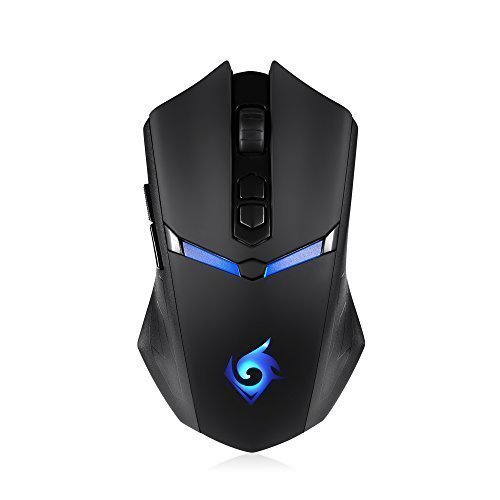
Figure 1: Top-down view of the EagleTec MG010 Wireless Gaming Mouse and its Nano USB receiver.
The mouse features 7 buttons, including the left click, right click, scroll wheel, DPI adjustment buttons, and two side buttons. It also includes an LED backlight for visual feedback.
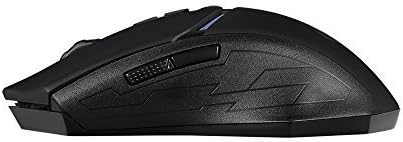
Figure 2: Side view showing the two programmable side buttons (defaulted to forward and backward).

Figure 3: Bottom view displaying the battery compartment, power switch, and Nano USB receiver storage slot.
Setup
- Install Battery: Open the battery compartment on the underside of the mouse. Insert one AA battery, ensuring correct polarity. Close the compartment securely.
- Connect USB Receiver: Locate the Nano USB receiver stored in its slot on the bottom of the mouse. Remove it and plug it into an available USB port on your computer.
- Power On: Slide the power switch on the bottom of the mouse to the "ON" position. The mouse should automatically connect to your computer.
- Driver Installation: The mouse is plug-and-play and typically does not require additional driver installation for basic functionality on supported Windows operating systems.
Operating Instructions
DPI Adjustment
The mouse features quick-change DPI settings to adjust cursor sensitivity. Use the DPI buttons (usually located near the scroll wheel) to cycle through the available DPI levels:
- 800 DPI
- 1200 DPI
- 1600 DPI
- 2000 DPI
- 2400 DPI
Programmable Side Buttons
The two side buttons are defaulted to "Forward" and "Backward" functions for web browsing and file navigation. These buttons may be programmable through third-party software, if available, for custom functions.
LED Backlight
The mouse features an LED backlight. Some models may include a switch on the bottom to turn the LED on or off, or a mode that disables LEDs to conserve battery life.
Automatic Sleep Function
To conserve battery power, the mouse is equipped with an automatic sleep function. If inactive for a period, the mouse will enter sleep mode. To wake it up, simply click any button.
Report Rate
The mouse supports switchable report rates of 125Hz or 250Hz. Refer to the product's specific documentation or software (if applicable) for instructions on how to adjust this setting.
Maintenance
- Cleaning: Use a soft, dry cloth to clean the mouse. For stubborn dirt, a slightly damp cloth can be used, but ensure no moisture enters the mouse. Avoid harsh chemicals or abrasive cleaners.
- Battery Replacement: When the low battery LED indicator illuminates, replace the AA battery promptly to ensure uninterrupted operation.
- Storage: When not in use, especially during travel, store the Nano USB receiver in its designated slot on the bottom of the mouse to prevent loss. Turn off the mouse using the power switch to conserve battery.
Troubleshooting
| Problem | Solution |
|---|---|
| Mouse not responding |
|
| Cursor movement is erratic or imprecise |
|
| Mouse disconnects frequently |
|
Specifications
| Model | MG010 |
| Connectivity | 2.4GHz Wireless (USB Receiver) |
| DPI Settings | 800, 1200, 1600, 2000, 2400 |
| Buttons | 7 (Left, Right, Scroll Wheel, 2x DPI, 2x Side) |
| Movement Detection | Laser |
| Power Source | 1x AA Battery (not included) |
| Operating Systems | Windows 10, Windows 8, Windows 7, Windows Vista, Windows XP |
| Dimensions (LxWxH) | 4.84 x 2.76 x 1.5 inches (12.29 x 7.01 x 3.81 cm) |
| Weight | 2.46 ounces (69.74 grams) |
Warranty and Support
The EagleTec MG010 Wireless Gaming Mouse comes with a one-year warranty from the date of purchase. This warranty covers manufacturing defects under normal use.
For technical support, warranty claims, or further assistance, please contact EagleTec customer service through their official website or the retailer where the product was purchased. Please have your model number (MG010) and proof of purchase ready.
Official Website: www.eagletec.com