
1. Introduction
The Sunding SD-548B is a multifunction bicycle cycle computer designed to provide essential riding data. This device tracks speed, distance, riding time, and more, helping cyclists monitor their performance. It features a clear display and user-friendly operation.
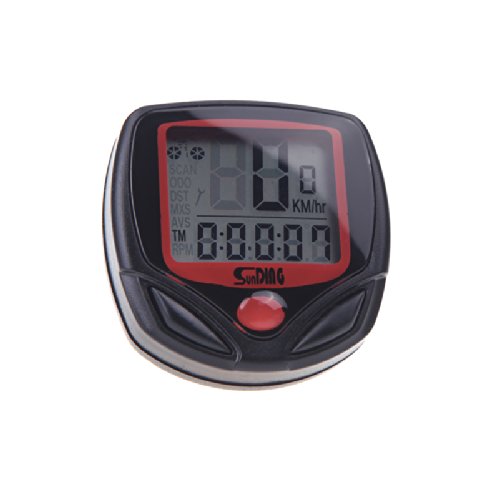
Image: The Sunding SD-548B Cycle Computer mounted on a bicycle handlebar, displaying speed and time.
2. Product Features
- Speed Display: Current, average, and maximum speed.
- Distance Tracking: Trip distance and total odometer.
- Time Functions: Riding time and 12/24 hour clock.
- Scan Mode: Automatically cycles through various data displays.
- Water Resistant: Designed to withstand splashes and light rain.
- Automatic ON/OFF: Powers on and off with bicycle movement.
- Wheel Circumference Setting: Customizable for accurate readings.
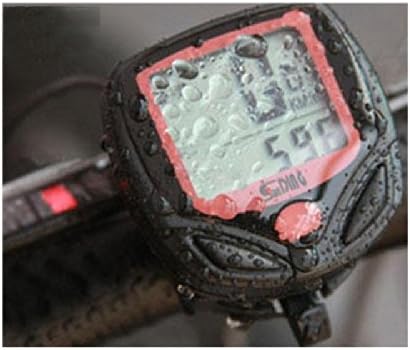
Image: The Sunding SD-548B Cycle Computer covered in water droplets, demonstrating its water-resistant design.
3. Package Contents
Please verify that all items listed below are included in your package:
- Sunding SD-548B Cycle Computer Unit
- Mounting Base with Wired Sensor
- Wheel Magnet
- Cable Ties (for installation)
- User Manual
- CR2032 Battery (may be pre-installed or separate)

Image: All components included in the Sunding SD-548B package: the cycle computer, mounting base with wired sensor, wheel magnet, cable ties, and user manual.
4. Setup and Installation
Follow these steps to properly install your cycle computer:
- Install Battery: Open the battery compartment on the back of the computer unit. Insert a CR2032 battery with the positive (+) side facing up. Close the compartment securely.
- Mount the Sensor: Attach the wired sensor to the front fork of your bicycle using cable ties. Position it so that the sensor head is aligned with the spokes.
- Attach the Magnet: Secure the magnet to a spoke on the front wheel. Ensure the magnet passes within 5mm of the sensor head with each wheel rotation. Adjust the magnet's position on the spoke as needed.
- Mount the Computer Base: Attach the mounting base to your handlebar or stem using the provided bracket and cable ties. Ensure it is securely fastened and the wire from the sensor can reach it without tension.
- Insert the Computer Unit: Slide the cycle computer unit onto the mounting base until it clicks into place.

Image: The rear of the Sunding SD-548B Cycle Computer, highlighting the battery compartment for CR2032 battery installation.

Image: A six-panel image illustrating the step-by-step installation process for the cycle computer, including sensor, magnet, and main unit mounting.
5. Operating Instructions
5.1 Button Functions
- MODE Button: Press to cycle through different display modes (functions). Press and hold for 3 seconds to enter setting mode.
- SET Button: Used to confirm settings or reset values in setting mode.
5.2 Initial Setup (Wheel Circumference)
Accurate speed and distance readings depend on correct wheel circumference settings.
- With the computer on, press and hold the MODE button for 3 seconds until the display shows '2060' (default circumference).
- The first digit will flash. Use the SET button to adjust the value.
- Press MODE to move to the next digit. Repeat until all four digits are set to your wheel's circumference in millimeters (e.g., 2100 for a 700x23C tire).
- Press MODE again to confirm and exit the setting mode.
5.3 Switching Modes
Press the MODE button repeatedly to cycle through the various functions such as SPD (Speed), ODO (Odometer), DST (Trip Distance), MXS (Maximum Speed), AVS (Average Speed), TM (Riding Time), SCAN, etc.
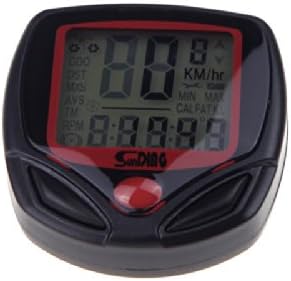
Image: The Sunding SD-548B Cycle Computer's display, illustrating various functions like SPD, ODO, DST, MXS, AVS, TM, and RPM with their corresponding values.
6. Functions Overview
- SPD (Current Speed): Displays your real-time riding speed.
- ODO (Odometer): Records the total distance traveled since the computer was first set up. This value cannot be reset.
- DST (Trip Distance): Records the distance of the current trip. Can be reset.
- MXS (Maximum Speed): Shows the highest speed achieved during the current trip.
- AVS (Average Speed): Calculates the average speed of the current trip.
- TM (Riding Time): Displays the duration of the current trip.
- CLK (Clock): Shows the current time in 12H or 24H format.
- SCAN: Automatically cycles through DST, MXS, AVS, and TM displays every 4 seconds.
- '+' '-' Comparator: An indicator that shows if your current speed is higher or lower than your average speed.
- Setting Speed Scale (km/h, m/h): Allows selection of preferred speed unit.
- Setting Tire Circumference: Customizable for accurate readings.
- Setting The Last Value of Odometer: For initial setup or data recovery.
- Freeze Frame Memory: Allows viewing of trip data after a ride.
- Auto ON/OFF: The unit automatically powers on when motion is detected and off after a period of inactivity.
7. Maintenance
- Cleaning: Wipe the unit with a soft, damp cloth. Do not use abrasive cleaners or solvents.
- Battery Replacement: When the display becomes dim or erratic, replace the CR2032 battery. Ensure the battery is inserted correctly.
- Storage: If not in use for an extended period, remove the battery to prevent leakage. Store in a cool, dry place.
- Water Resistance: The unit is water-resistant, but not waterproof. Avoid submerging it in water or exposing it to heavy rain for prolonged periods.
8. Troubleshooting
| Problem | Possible Cause | Solution |
|---|---|---|
| No speed display or incorrect readings | Magnet and sensor misaligned or too far apart. Sensor wire damaged. Incorrect wheel circumference setting. | Adjust magnet and sensor to be within 5mm. Check sensor wire for damage. Verify and correct wheel circumference setting. |
| Display is blank or dim | Low battery. Poor battery contact. | Replace CR2032 battery. Ensure battery is correctly seated. |
| Unit does not turn on/off automatically | No motion detected. Battery low. | Ensure magnet and sensor are working correctly. Replace battery. |
| All data resets unexpectedly | Battery removed or loose. System reset. | Ensure battery is secure. Re-enter settings if necessary. |
9. Specifications
- Brand: Sunding
- Model: SD-548B
- Weight: Approximately 24 grams (computer unit only)
- Power Source: 1 x CR2032 battery
- Display: LCD
- Functions: 14 functions (as listed in Section 6)
- Water Resistance: Yes (splash-proof)
10. Warranty and Support
This product comes with a standard manufacturer's warranty against defects in materials and workmanship. Please refer to the packaging or contact your retailer for specific warranty terms and duration. For technical support or further assistance, please contact the vendor or refer to the official Sunding website if available.