
1. Introduction
Thank you for purchasing the RL LIVE YOUR LIGHT Reality E27 Ceiling Light, Model R60121002. This manual provides important information regarding the safe installation, operation, and maintenance of your new ceiling light. Please read these instructions carefully before installation and retain them for future reference.

Image 1.1: The RL LIVE YOUR LIGHT Reality E27 Ceiling Light, black exterior with a gold interior, providing warm illumination.
2. Safety Instructions
- Electrical Safety: Installation must be performed by a qualified electrician or a person with appropriate electrical knowledge to prevent electric shock.
- Power Disconnection: Always disconnect the power supply at the main fuse box or circuit breaker before installation, maintenance, or bulb replacement.
- Voltage: Ensure the voltage supply matches the requirements specified on the product label.
- Indoor Use Only: This product is designed for indoor use only. Do not expose to moisture or outdoor elements.
- Bulb Type: Use only E27 base bulbs. Do not exceed the maximum wattage specified on the product. This fixture is suitable for LED lamps.
- Handling: Handle the light fixture with care to avoid damage. Do not bend or pull wires excessively.
- Cleaning: Clean only with a dry, soft cloth. Do not use abrasive cleaners or solvents.
3. Package Contents
Verify that all components are present and undamaged before proceeding with installation.
- Ceiling Light Fixture (1 unit)
- Mounting Bracket (1 unit)
- Mounting Hardware (screws, wall plugs)
- Instruction Manual (this document)
Note: Light bulb is not included and must be purchased separately.
4. Setup and Installation
Follow these steps carefully for proper installation. If you are unsure about any step, consult a qualified electrician.
- Prepare for Installation:
- Turn off the main power supply to the installation area at the circuit breaker.
- Ensure the power is off by testing the existing wiring with a voltage tester.
- Unpack the new light fixture and all components.
- Attach Mounting Bracket:
- Position the mounting bracket against the ceiling at the desired location.
- Mark the drilling points through the holes in the bracket.
- Drill holes in the ceiling and insert appropriate wall plugs (if necessary).
- Secure the mounting bracket to the ceiling using the provided screws.
- Electrical Connection:
- Connect the household electrical wires to the corresponding wires of the light fixture. Typically:
- Live (L) wire (usually brown or black) to the fixture's Live wire.
- Neutral (N) wire (usually blue or white) to the fixture's Neutral wire.
- Earth/Ground (E) wire (usually green/yellow) to the fixture's Earth wire.
- Ensure all connections are secure and properly insulated.
- Connect the household electrical wires to the corresponding wires of the light fixture. Typically:
- Mount the Fixture:
- Carefully align the light fixture with the mounting bracket.
- Secure the fixture to the bracket using the provided screws or locking mechanism.
- Install Light Bulb:
- Screw an E27 base light bulb (not included) into the socket. Ensure the bulb's wattage does not exceed the maximum rating of the fixture.
- Restore Power:
- Once installation is complete, restore power at the main circuit breaker.
- Test the light fixture to ensure it functions correctly.
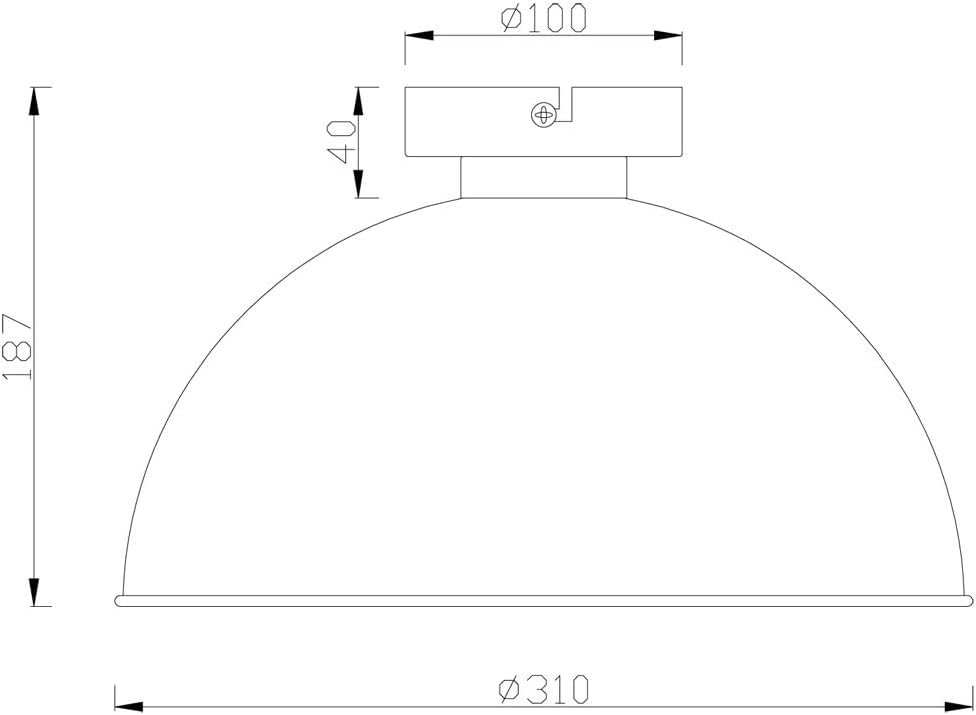
Image 4.1: Technical drawing illustrating the dimensions of the ceiling light fixture.
5. Operating Instructions
The RL LIVE YOUR LIGHT Reality E27 Ceiling Light operates via a standard wall switch connected to your household electrical circuit. Simply toggle the wall switch to turn the light ON or OFF.

Image 5.1: The ceiling light providing ambient lighting in a living space.
6. Maintenance
Regular maintenance ensures the longevity and optimal performance of your ceiling light.
- Cleaning:
- Before cleaning, ensure the power supply to the fixture is turned off.
- Allow the light to cool down completely if it has been in use.
- Wipe the exterior surfaces with a soft, dry, lint-free cloth.
- Do not use liquid or abrasive cleaners, as they may damage the finish.
- Bulb Replacement:
- Turn off the power supply to the fixture.
- Allow the old bulb to cool before touching it.
- Carefully unscrew the old E27 bulb.
- Screw in a new E27 bulb, ensuring it is of the correct type and wattage.
- Restore power and test the new bulb.
7. Troubleshooting
If you encounter issues with your ceiling light, refer to the following common problems and solutions:
| Problem | Possible Cause | Solution |
|---|---|---|
| Light does not turn on. |
|
|
| Light flickers. |
|
|
If the problem persists after trying these solutions, please contact customer support or a qualified electrician.
8. Specifications
| Feature | Detail |
|---|---|
| Brand | RL LIVE YOUR LIGHT |
| Manufacturer | Reality Leuchten |
| Model Number | R60121002 |
| Product Dimensions | 31 x 31 x 19 cm (Length x Width x Height) |
| Item Weight | 765 grams |
| Color | Black |
| Material | Metal |
| Style | Ceiling light |
| Light Fixture Form | Close to ceiling |
| Room Type | Living Room (suitable for various indoor spaces) |
| Specific Uses | Indoor use only |
| Power Source | Corded Electric |
| Bulb Base | E27 (bulb not included) |
| LED Compatible | Yes |
9. Warranty and Support
Specific warranty information for the RL LIVE YOUR LIGHT Reality E27 Ceiling Light, Model R60121002, is not provided in this document. For warranty details, please refer to the purchase documentation or contact the retailer where the product was purchased.
For technical support or further assistance, please contact the manufacturer, Reality Leuchten, or your local distributor. Contact information can typically be found on the product packaging or the manufacturer's official website.