
Introduction
This instruction manual provides essential guidance for the assembly, maintenance, and care of your Fujimi 1/350 Imperial Japanese Navy Battleship Kongo Premium model kit. This highly detailed kit allows enthusiasts to recreate a historically significant vessel with precision. Please read through all instructions carefully before beginning assembly.
The kit includes:
- Plastic model parts
- Metal parts for enhanced detail
- Detailed instruction booklet

Figure 1: The product packaging for the Fujimi 1/350 Imperial Japanese Navy Battleship Kongo Premium model kit, showcasing the detailed artwork of the battleship.
Setup and Preparation
Proper preparation is crucial for a successful model building experience. Ensure you have a clean, well-lit workspace and the necessary tools before starting.
1. Unboxing and Part Inspection
- Carefully open the packaging and remove all sprues and components.
- Verify that all parts listed in the kit's internal parts diagram are present.
- Inspect all plastic and metal parts for any damage, such as bending, breakage, or molding imperfections. If any parts are damaged, refer to the Troubleshooting section.
- Familiarize yourself with the layout of the parts on the sprues and the corresponding numbers in the instruction manual.
2. Recommended Tools (Not Included)
- Plastic nippers or sprue cutters
- Hobby knife or craft blade
- Plastic cement (liquid or tube type)
- Tweezers (fine-tipped recommended for small parts)
- Sanding sticks or fine-grit sandpaper
- Small files
- Paints and brushes (optional, for detailing)
Assembly Instructions
Follow the detailed step-by-step instructions provided in the kit's included manual. The following are general guidelines to assist you during the assembly process.
- Read Ahead: Before gluing any parts, read through the entire instruction manual to understand the assembly sequence and identify any complex steps.
- Part Removal: Use nippers to carefully remove parts from the sprues. Avoid pulling or twisting, which can damage delicate pieces. Trim any excess plastic (flash) with a hobby knife or sandpaper.
- Test Fit: Always test fit parts together before applying cement. This helps identify any fit issues and ensures proper alignment.
- Adhesion: Apply plastic cement sparingly. For liquid cement, touch the brush to the joint after fitting the parts together. For tube cement, apply a small amount to one surface before joining.
- Delicate Parts: The kit includes numerous small and intricate parts, especially the metal components. Handle these with care, using tweezers when necessary.
- Painting (Optional): Consider painting sub-assemblies before joining them to make detailed painting easier. Refer to the kit's painting guide for color recommendations.

Figure 2: Various detailed views of the assembled Fujimi 1/350 Battleship Kongo model, highlighting intricate deck structures and weaponry.

Figure 3: Further close-up images of the Fujimi 1/350 Battleship Kongo model, showing the precision of the parts and the overall scale.
Maintenance and Care
Once assembled, proper care will preserve the appearance and integrity of your model for years to come.
- Dusting: Regularly dust your model using a soft brush or a can of compressed air. Avoid abrasive cloths that could scratch painted surfaces or dislodge small parts.
- Display Environment: Display the model in a stable location away from direct sunlight, extreme temperatures, and high humidity. These conditions can cause plastic to warp, paint to fade, or decals to peel.
- Handling: Handle the model by its base or main hull whenever possible. Avoid touching delicate superstructures, masts, or antennae.
- Cleaning: For stubborn dirt, lightly dampen a soft cloth with water (and a tiny amount of mild soap if necessary) and gently wipe the affected area. Avoid harsh chemicals or solvents.
Troubleshooting
Encountering issues during model assembly is not uncommon. Here are some solutions to frequently encountered problems:
- Ill-fitting Parts: If parts do not fit together smoothly, gently sand or file the mating surfaces. Do not force parts, as this can cause breakage. Test fit frequently.
- Broken or Missing Parts: In the event of a broken or missing part, first check the entire packaging and sprues thoroughly. If a part is confirmed broken or missing, contact the retailer or Fujimi customer support for assistance. Small broken plastic parts can sometimes be repaired with plastic cement.
- Excess Flash or Seam Lines: Use a hobby knife or fine-grit sandpaper to carefully remove excess plastic (flash) or mold seam lines from parts before assembly.
- Decal Application Issues: If decals do not adhere properly or silver, ensure the surface is clean and glossy. Use decal setting solutions to help decals conform to irregular surfaces and eliminate silvering.
Specifications
Key specifications for the Fujimi 1/350 Imperial Japanese Navy Battleship Kongo Premium model kit:
| Feature | Detail |
|---|---|
| Brand | Fujimi |
| Model Name | Imperial Japanese Navy Battleship Kongo Premium |
| Scale | 1/350 |
| Item Model Number | SPOT |
| Material | Plastic, Metal |
| Theme | Military (Imperial Japanese Navy) |
| Color | Navy (as depicted) |
| Item Dimensions (L x W x H) | 3.94 x 27.56 x 10.63 inches |
| Item Weight | 3.44 Pounds |
| Number of Pieces | 1 (refers to the kit as a single item, not individual parts) |
| UPC | 787799942918 |
| Date First Available | June 22, 2015 |
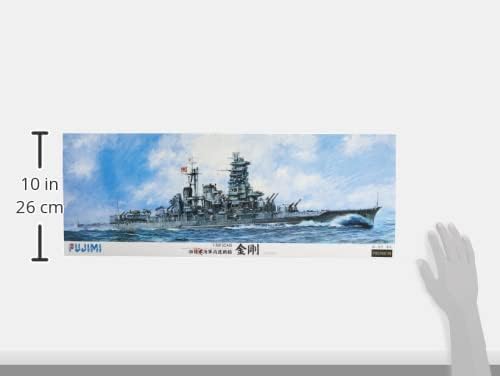
Figure 4: A visual representation of the product dimensions, indicating the scale and size of the model kit packaging.
Warranty and Support
Specific warranty details for the Fujimi 1/350 Imperial Japanese Navy Battleship Kongo Premium model kit are not provided in the product information. For inquiries regarding warranty, missing parts, or technical support, please refer to the following general guidelines:
- Retailer Support: For issues related to purchase, shipping, or initial product defects, please contact the retailer from whom you purchased the kit.
- Manufacturer Support: For technical questions about assembly, part identification, or potential manufacturing defects, it is recommended to contact Fujimi Corporation directly. Their official website or contact information can typically be found on the product packaging or through an online search.
- Proof of Purchase: Always retain your proof of purchase (receipt or order confirmation) as it may be required for any warranty claims or support requests.


