
Introduction
This manual provides detailed instructions for the operation and maintenance of your Timex Men's Expedition Shock Digital Watch, model TW4B029009J. Please read this manual thoroughly to ensure proper use and to maximize the lifespan of your timepiece.
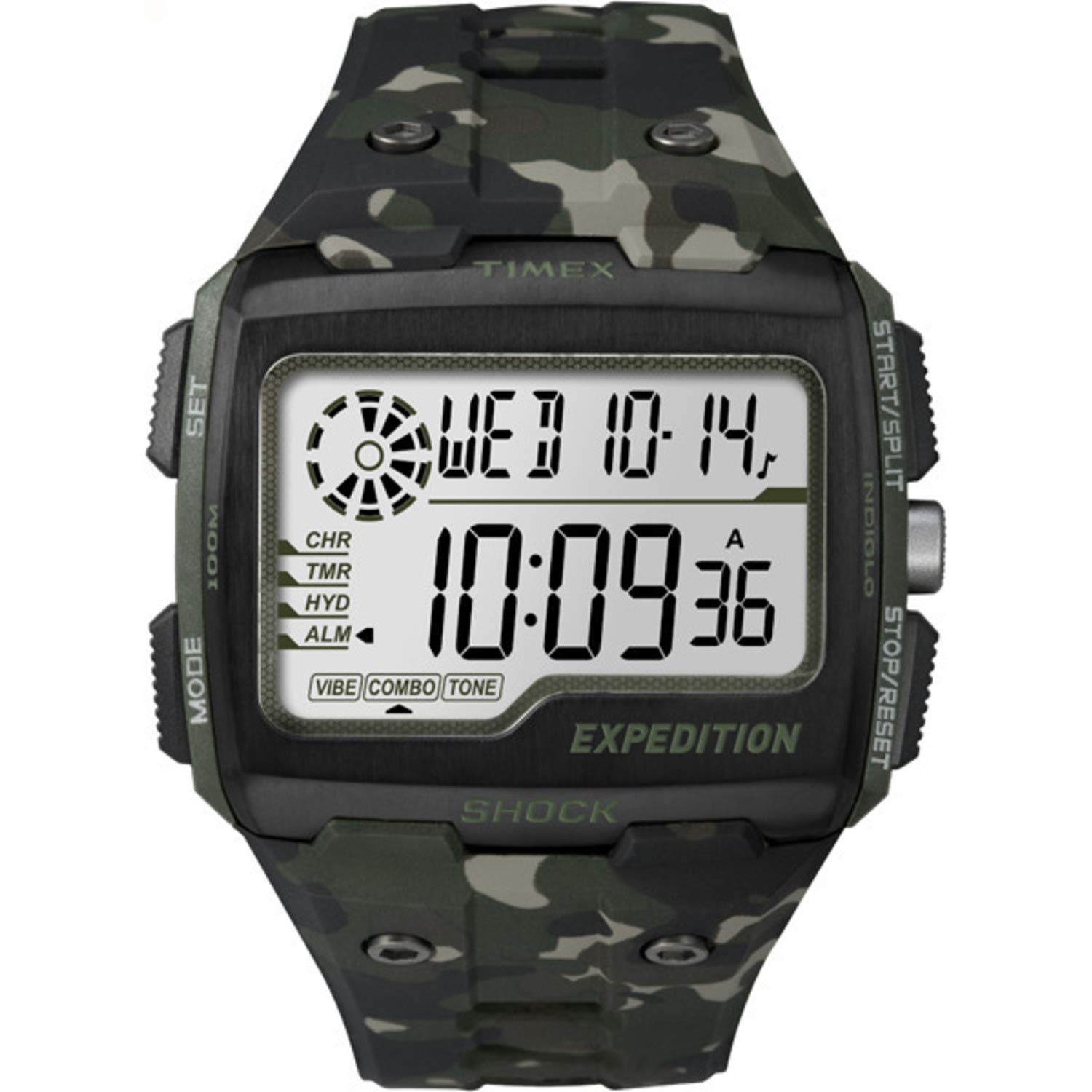
Front view of the Timex Men's Expedition Shock Digital Watch, displaying the time and date on its digital screen, with a camouflage patterned resin band.
Key Features
- Shock Resistant to I.S.O. Standards: Engineered for durability in demanding environments.
- Digital Display: Clear and easy-to-read digital time and information.
- Multiple Functions: Includes Stopwatch, Countdown Timer, Vibration Alarm, and Hydration Alerts.
- Water Resistance: Water resistant to 100 meters (330 feet), suitable for swimming and snorkeling.
- INDIGLO Night-Light: Provides illumination for visibility in low-light conditions.
- Durable Construction: Features a hardened resin case with a stainless steel top ring and a comfortable resin band.
Watch Overview
Familiarize yourself with the watch's buttons and display elements.

Side view of the Timex Expedition Shock watch, highlighting the 'SET', 'MODE', 'START/SPLIT', and 'STOP/RESET' buttons.
- SET Button: Used to enter and exit setting modes.
- MODE Button: Cycles through different watch functions (Time, Chronograph, Timer, Alarm, Hydration).
- START/SPLIT Button: Initiates or splits functions like stopwatch and timer.
- STOP/RESET Button: Stops or resets functions.
- INDIGLO Button: Activates the night-light (often integrated with another button, typically the 'SET' button or a dedicated button).
Setup and Basic Operation
Setting Time and Date
- In Time mode, press and hold the SET button until the display flashes.
- Press the MODE button to cycle through the settings (seconds, hour, minute, year, month, day).
- Use the START/SPLIT and STOP/RESET buttons to adjust the flashing value.
- Once all settings are correct, press the SET button again to exit.
Activating INDIGLO Night-Light
Press the INDIGLO button (often the SET button or a dedicated button on the top left) to illuminate the watch face for a few seconds. This feature is useful in low-light conditions.
Operating Modes
Press the MODE button to cycle through the following functions:
Chronograph (Stopwatch)
- Navigate to Chronograph mode using the MODE button.
- Press START/SPLIT to begin timing.
- Press START/SPLIT again to record a split time without stopping the timer.
- Press STOP/RESET to pause the timer.
- Press STOP/RESET again (while paused) to reset the timer to zero.
Countdown Timer
- Navigate to Timer mode using the MODE button.
- Press and hold SET to enter timer setting mode.
- Use MODE to select hours, minutes, or seconds, and START/SPLIT or STOP/RESET to adjust values.
- Press SET to confirm and exit setting mode.
- Press START/SPLIT to start the countdown.
- An alert will sound/vibrate when the timer reaches zero.
Vibration Alarm
- Navigate to Alarm mode using the MODE button.
- Press and hold SET to enter alarm setting mode.
- Use MODE to select hours or minutes, and START/SPLIT or STOP/RESET to adjust values.
- Toggle the alarm ON/OFF using the START/SPLIT button.
- Press SET to confirm and exit setting mode.
- When the alarm activates, it will vibrate. Press any button to silence it.
Hydration Alerts
- Navigate to Hydration mode using the MODE button.
- Press and hold SET to enter hydration alert setting mode.
- Set the desired interval for hydration reminders using START/SPLIT or STOP/RESET.
- Toggle the hydration alert ON/OFF using the START/SPLIT button.
- Press SET to confirm and exit setting mode.
- The watch will provide a vibration alert at the set intervals to remind you to hydrate.
Maintenance and Care
Water Resistance
Your Timex Expedition Shock watch is water resistant to 100 meters (330 feet). This means it is suitable for recreational swimming, showering, and snorkeling. Do not press any buttons while the watch is submerged, as this can compromise the water resistance seal. Avoid exposure to hot water or steam, which can damage the seals.
Shock Resistance
The watch is designed to be shock resistant to I.S.O. standards. While durable, avoid unnecessary impacts to prolong its life.
Cleaning
Clean your watch regularly with a soft, damp cloth. For the resin band, mild soap and water can be used. Ensure the watch is completely dry before storing or wearing.
Battery Replacement
The watch uses 1 Lithium Metal battery (included). When the display dims or functions become erratic, it may be time for a battery replacement. It is recommended to have the battery replaced by a qualified watch technician to ensure the water resistance seal is properly maintained.
Troubleshooting
| Problem | Possible Cause | Solution |
|---|---|---|
| Display is blank or dim. | Low battery. | Replace the battery. |
| Watch not keeping accurate time. | Low battery; incorrect time setting. | Replace the battery; reset time and date. |
| Buttons are unresponsive. | Watch may be in a locked mode; internal malfunction. | Try pressing and holding the MODE button for a few seconds to unlock. If issue persists, contact customer support. |
| Water inside the watch. | Water resistance compromised (e.g., buttons pressed underwater, damaged seal). | Immediately take the watch to a qualified service center. Do not attempt to open it yourself. |
Specifications
| Feature | Detail |
|---|---|
| Model Number | TW4B029009J |
| Display Type | Digital |
| Movement | Quartz |
| Case Material | Resin |
| Band Material | Resin |
| Case Diameter | 50 mm |
| Water Resistance Depth | 100 Meters (330 Feet) |
| Special Features | Alarm, Chronograph, Shock Resistant, Timer, Water-Resistant, Hydration Alerts, INDIGLO Night-Light |
| Battery Type | 1 Lithium Metal (included) |
| Item Weight | 75.78 Grams |
Official Product Videos
Expedition SHOCK - All Activities
Official video showcasing the Timex Expedition Shock watch in various outdoor activities, highlighting its durability and features.
Timex Men's Grid Shock
Short official video demonstrating the Timex Men's Grid Shock watch, focusing on its design and key functionalities.
Warranty and Support
This product is covered by a warranty provided by amazon.com. For specific warranty details and to initiate a support request, please refer to your purchase documentation or visit the Amazon product page for model TW4B029009J. For further assistance, you may also visit the official Timex website or contact Timex customer service.
Online Resources: