
Cruiser NF-388
Cruiser NF-388 Multipurpose Network Cable Tester User Manual
Model: NF-388
1. Introduction
The Cruiser NF-388 is a versatile network cable tester designed for comprehensive testing of various cable types, including Ethernet (5E, 6E), telephone wire, coaxial cable, and USB cables. It provides essential functions such as cable hunting, wiring error detection (open circuit, short circuit, jumper wire, reverse connection), cable length measurement, and polarity testing. This manual provides detailed instructions for the safe and effective use of your NF-388 device.

Figure 1: Cruiser NF-388 Multipurpose Network Cable Tester Kit (Red Version). This image displays the main tester unit, the receiver, and eight remote identifiers, all in a red casing.
Please note that the NF-388 is available in different color patterns (e.g., red or blue), but the functionality remains identical. The specific color shipped may vary.
2. Safety Information
To ensure safe operation and prevent damage to the device or injury, please observe the following precautions:
- High Voltage Warning: Do not connect the device to high-voltage lines or circuits. Doing so can cause severe damage to the tester and pose a risk of electric shock.
- Proper Placement: Store and operate the device in a safe location, away from children and pets. Be mindful of any sharp parts on the device or its accessories.
- Correct Port Usage: Always connect cables to the correct ports on the tester and remote units as indicated in this manual. Incorrect connections may lead to inaccurate readings or damage.
- Read Manual: Thoroughly read and understand this user manual before operating the NF-388.
3. Package Contents
Upon opening the package, verify that all components are present:
- NF-388 Transmitter (Main Unit)
- NF-388 Receiver (Probe)
- Remote Units (8 pieces)
- User Manual (this document)
- Connecting cables (e.g., RJ45, RJ11, BNC, USB - may vary by package)
4. Product Overview
The NF-388 system consists of three primary components:
4.1. NF-388 Transmitter (Main Unit)
This is the central unit for initiating tests and displaying results. It features an LCD screen, control buttons, and various ports for connecting different cable types.
- LCD Display: Shows wiremap, tone status, short circuits, open circuits, and low battery warnings.
- Control Buttons: For selecting test modes, adjusting tone, and navigating functions.
- Ports: RJ11, RJ45, BNC, USB for direct cable connection.
4.2. NF-388 Receiver
The receiver is used to trace and locate cables, especially when hunting for specific wires within a bundle. It features an earjack for audio feedback and an LED for illumination.
- Probe Tip: For detecting signals from the transmitter.
- Volume Control: Adjusts the audio output level.
- Earjack: For connecting headphones for clearer audio detection in noisy environments.
- LED Illumination: Provides light for working in dark areas.
4.3. Remote Units (8 pieces)
These units are used for testing cable continuity and mapping over longer distances. Each unit is numbered for easy identification.
- Connectors: RJ45, BNC.
- Identifiers: Numbered 1 through 8 for distinguishing multiple test points.
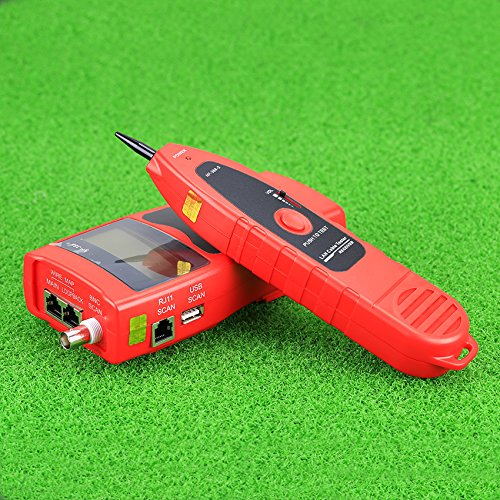
Figure 2: Cruiser NF-388 Main Unit (Transmitter) and Receiver. This image shows the primary testing unit with its LCD screen and control buttons, alongside the handheld receiver probe.
5. Setup
5.1. Battery Installation
The NF-388 Transmitter and Receiver each require a 9.0V (NEDA 1604/6F22) battery. To install:
- Locate the battery compartment cover on the back of the Transmitter and Receiver units.
- Open the cover by sliding or unscrewing it.
- Insert a new 9.0V battery, ensuring correct polarity (+/-).
- Close the battery compartment cover securely.
A low battery alarm function is integrated to alert you when battery replacement is needed.
5.2. Initial Power On
Press the power button on the Transmitter to turn it on. The LCD display will illuminate, indicating the device is ready for use.
6. Operating Instructions
The NF-388 offers several testing modes for various applications.
6.1. Cable Hunting (Tracing)
This function allows you to locate specific cables within a bundle or wall.
- Connect the cable to be traced to the appropriate port (RJ11, RJ45, BNC, or USB) on the NF-388 Transmitter.
- Select the "Tone" mode on the Transmitter. You can adjust the tone frequency (225kHz) if needed.
- Turn on the NF-388 Receiver.
- Use the Receiver's probe to scan along the suspected path of the cable. The Receiver will emit an audible tone when it detects the signal from the Transmitter.
- Adjust the Receiver's volume for optimal detection. The LED illumination can assist in dark environments.
6.2. Network Port Locating (Hub Blink)
This feature helps identify the corresponding network port on a hub or switch by making its indicator light flash.
- Connect one end of the network cable to the RJ45 port on the NF-388 Transmitter.
- Connect the other end of the network cable to a port on the network hub or switch.
- Activate the "Hub Blink" function on the Transmitter (refer to the device's specific button for this function).
- Observe the indicator lights on the hub/switch. The port connected to the NF-388 will flash, allowing for easy identification.
6.3. Wiring Error Check (Wiremap)
This function checks for common wiring errors in 5E, 6E, and coaxial cables, such as open circuits, short circuits, jumper wires, and reverse connections.
- Connect one end of the cable to the appropriate port on the NF-388 Transmitter (e.g., RJ45 for Ethernet, BNC for coaxial).
- Connect the other end of the cable to one of the 8 Remote Units. Ensure the Remote Unit number matches the one you intend to use for identification.
- Select the "Wiremap" mode on the Transmitter.
- The LCD display will show the wiring configuration and any detected errors (e.g., open, short, cross). The shielded indication will also be displayed if applicable.
6.4. Cable Length Measurement
The NF-388 can measure cable length up to 1000 meters and locate the breakage point.
- Ensure the cable is disconnected from any network devices or power sources.
- Connect one end of the cable to the appropriate port on the NF-388 Transmitter. The other end of the cable should be open (not connected to anything).
- Select the "Length" or "Measure" mode on the Transmitter (refer to specific button labels).
- The LCD will display the measured cable length. If a breakage is detected, it will indicate the approximate distance to the fault.
- The device includes memory and storage for calibration data to improve accuracy.
6.5. Polarity Test
This function allows for measuring DC voltage and testing polarity.
- The NF-388 can measure DC voltage within a range of 0.5V to 60V.
- Connect the test leads (if provided, or use appropriate adapters) to the voltage source and the designated polarity test input on the Transmitter.
- The LCD will display the measured voltage and its polarity.
7. Maintenance
7.1. Cleaning
Wipe the device with a soft, dry cloth. Do not use abrasive cleaners or solvents, as these can damage the casing or display.
7.2. Battery Replacement
When the low battery alarm activates, replace the 9.0V batteries in both the Transmitter and Receiver units as described in the "Battery Installation" section (5.1). Remove batteries if the device will not be used for an extended period to prevent leakage.
7.3. Storage
Store the NF-388 in a cool, dry place, away from direct sunlight and extreme temperatures. Keep it in its original packaging or a protective case to prevent damage.
8. Troubleshooting
If you encounter issues with your NF-388, refer to the following common problems and solutions:
- Device does not power on:
- Check if batteries are correctly installed with proper polarity.
- Replace batteries with new 9.0V batteries.
- No signal detected during cable hunting:
- Ensure the cable is securely connected to the Transmitter.
- Verify the Transmitter is in "Tone" mode.
- Check the Receiver's battery level and volume setting.
- Ensure the cable is not shielded excessively, which can reduce signal strength.
- Inaccurate cable length measurement:
- Ensure the cable is completely disconnected from all other devices and open at the far end.
- Check for any damage to the cable being tested.
- Recalibrate the device if necessary (refer to advanced settings in the full manual if available).
- Wiremap shows errors (open, short, reverse):
- Verify that both ends of the cable are securely connected to the Transmitter and the Remote Unit.
- Inspect the cable for visible damage or improperly crimped connectors.
- Test with a known good cable to confirm the device is functioning correctly.
9. Specifications
Technical specifications for the Cruiser NF-388 Multipurpose Network Cable Tester:
9.1. NF-388 Transmitter Specifications
| Feature | Specification |
|---|---|
| Indicator | LCD 53x25 mm, with backlight |
| Tone Frequency | 225kHz |
| Max. Transmission Distance | 2 km |
| Max. Cable Map Distance | 1 km |
| Max. Working Current | Less than 70mA |
| Tone Mode | 2 Tones adjustable |
| Compatible Connectors | RJ11, RJ45, BNC, USB |
| Functions & Faults LCD Display | Wiremap, Tone, Short, Open, No adapter, Low battery |
| Cable Map Indication | LCD (#1-#8) |
| Shielded Indication | LCD (#9) |
| Voltage Protection | AC 60V / DC 42V |
| Battery Type | DC9.0V (NEDA 1604/6F22 DC9V) x 1pcs |
| Dimensions (LxWxD) | 185 x 80 x 32 mm |
9.2. NF-388 Receiver Specifications
| Feature | Specification |
|---|---|
| Frequency | 225kHz |
| Max. Working Current | Less than 70mA |
| Earjack | 1 |
| LED Illumination | 2 |
| Battery Type | DC9.0V (NEDA 1604/6F22 DC9V) x 1pc |
| Dimensions (LxWxD) | 218 x 46 x 29 mm |
9.3. NF-388 Remote Unit Specifications
| Feature | Specification |
|---|---|
| Compatible Connectors | RJ45, BNC |
| Remote Units | 8 |
| Dimensions (LxWxD) | 107 x 30 x 24 mm |
Ask a question about this manual
Ask about setup, troubleshooting, compatibility, parts, safety, or missing instructions. Manuals+ will review the question and use this page’s manual context to help answer it.