
Respironics System One
Respironics System One Data Card User Manual
Model: System One
1. Product Overview
The Respironics System One Data Card is a replacement data storage component designed specifically for use with Philips Respironics System One CPAP machines. This card facilitates the recording and storage of therapy data generated by the CPAP device, enabling users and healthcare providers to monitor treatment effectiveness.
Key features include:
- Designed for Respironics System One CPAP machines.
- Enables data collection for therapy monitoring.

Image 1: Front and back view of the Respironics System One Data Card. The front shows the Philips Respironics logo and "Reorder: 1054462 ATP". The back shows "CE AF1GSD TASD0-09110003 174322M81S E0946BB MADE IN TAIWAN".
2. Setup and Installation
Installing the Respironics System One Data Card is a straightforward process. The card is designed for plug-and-play functionality within compatible CPAP devices.
2.1. Installation Steps
- Locate the SD card slot on your Philips Respironics System One CPAP machine. This slot is typically found on the side or front of the device.
- Orient the data card correctly, ensuring the metal contacts face the insertion point and the card is aligned with the slot.
- Gently insert the data card into the slot until it clicks into place or is fully seated. Do not force the card.
- Once inserted, the CPAP machine should recognize the card automatically.
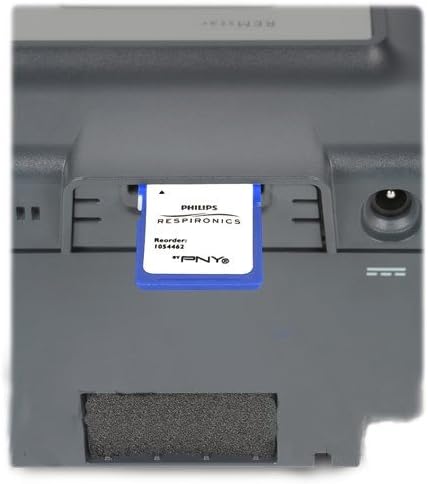
Image 2: The Respironics System One Data Card partially inserted into the dedicated slot of a Philips Respironics CPAP machine, demonstrating the correct orientation for installation.
3. Operating the Data Card
The data card operates automatically once installed in a compatible Philips Respironics System One CPAP machine. It records various therapy parameters during use, such as compliance data, AHI (Apnea-Hypopnea Index), leak rates, and pressure settings.
3.1. Data Recording
Data recording begins automatically when the CPAP therapy session starts. The card continuously stores information throughout the night. No manual intervention is required for data logging.
3.2. Data Retrieval
To retrieve data, remove the card from the CPAP machine and insert it into a compatible SD card reader connected to a computer. Specialized software, typically provided by your healthcare provider or Respironics, is required to read and interpret the data.
4. Maintenance
The Respironics System One Data Card requires minimal maintenance to ensure its longevity and proper function.
4.1. Cleaning
If necessary, gently wipe the plastic casing of the data card with a soft, dry, lint-free cloth. Avoid using liquid cleaners, solvents, or abrasive materials, as these can damage the card or its contacts.
4.2. Storage and Handling
- Store the data card in a cool, dry place, away from direct sunlight and extreme temperatures.
- Avoid bending, dropping, or subjecting the card to physical shock.
- Do not touch the metal contacts on the card, as oils and dirt can interfere with data transfer.
- Keep the card away from strong magnetic fields.
5. Troubleshooting
If you encounter issues with your Respironics System One Data Card, consider the following common solutions:
5.1. Card Not Recognized
- Ensure the card is fully and correctly inserted into the CPAP machine's SD card slot.
- Remove and reinsert the card to ensure proper seating.
- Verify that the CPAP machine is powered on.
- If using an older CPAP system, ensure compatibility. While the card is designed for System One, very old models might have limitations.
5.2. Data Not Transferring or Corrupted
- Ensure your SD card reader is functioning correctly and is compatible with standard SD cards.
- Try using a different SD card reader or computer.
- Verify that the software used for data interpretation is up-to-date and correctly installed.
- If the card is severely damaged or corrupted, it may need replacement. Note that generic SD cards (e.g., 2GB or larger) can often be formatted by the CPAP machine and used as alternatives, as suggested by some users.
5.3. Limited Information from Card
Some users of older systems may find that the data card provides limited information. This can be due to the CPAP machine's firmware or the specific data logging capabilities of the older model. Consult your healthcare provider or Respironics support for details on data interpretation for your specific device.
6. Specifications
| Feature | Detail |
|---|---|
| Brand | Respironics |
| Model Name | System One |
| Flash Memory Type | SD |
| Memory Storage Capacity | 2 GB |
| Compatible Devices | CPAP machines (Philips Respironics System One) |
| Hardware Interface | SDHC |
| Secure Digital Association Speed Class | Class 4 |
| Item Weight | 0.176 ounces (0.01 Kilograms) |
| Color | Blue |
| Special Feature | Water Proof |
7. Warranty and Support
7.1. Warranty Information
The Respironics System One Data Card comes with a Limited Warranty. For specific terms and conditions of the warranty, please refer to the documentation provided with your original CPAP machine or contact Respironics customer service directly.
7.2. Customer Support
For technical assistance, product inquiries, or warranty claims, please contact Philips Respironics customer support. Contact information can typically be found on the official Philips Respironics website or in the user manual of your CPAP machine.
Related documentsSystem One


Ask a question about this manual
Ask about setup, troubleshooting, compatibility, parts, safety, or missing instructions. Manuals+ will review the question and use this page’s manual context to help answer it.