
Introduction
This manual provides comprehensive instructions for the iLive iSB135RW Portable Wooden Bluetooth Speaker. Please read this manual thoroughly before operating the device to ensure proper use and to maximize its performance. Keep this manual for future reference.
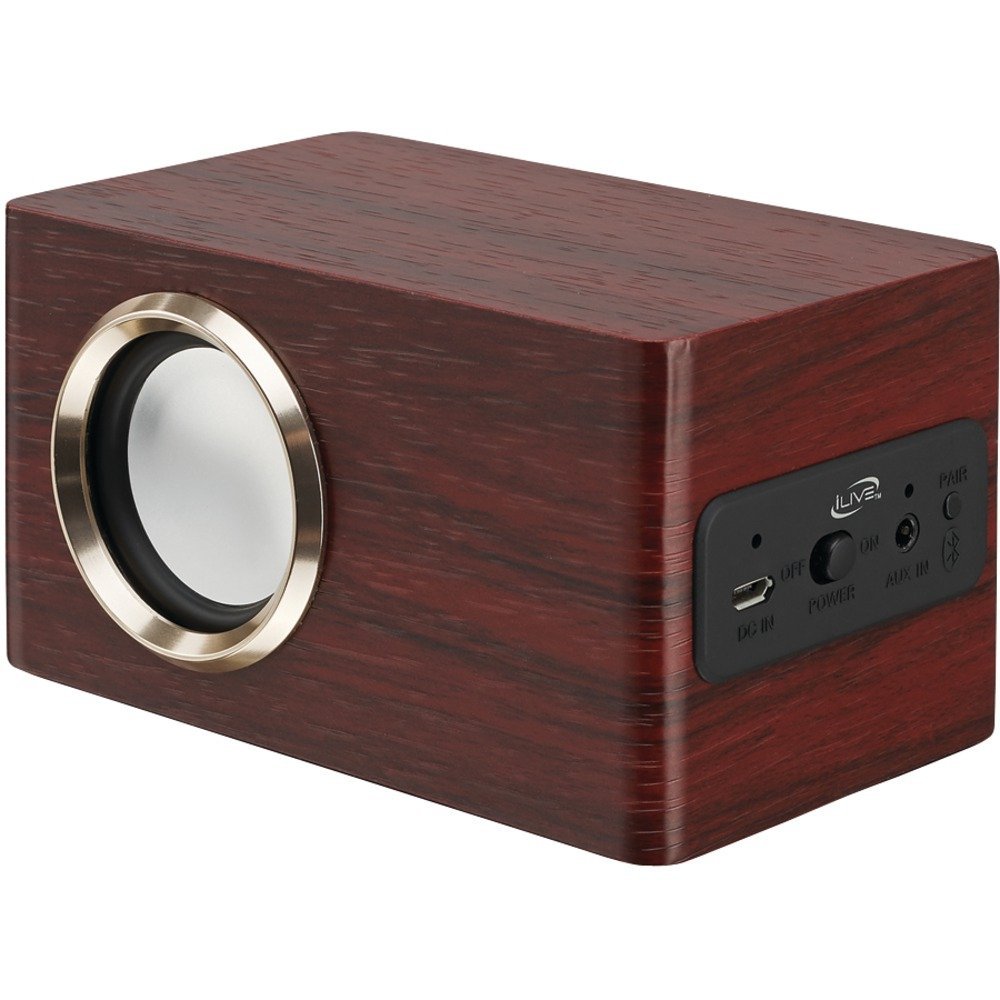
Image: The iLive iSB135RW Portable Wooden Bluetooth Speaker, featuring a rosewood finish and a compact design. This image displays the front and side profile of the speaker.
Package Contents
Verify that all items listed below are included in your package:
- iLive iSB135RW Portable Wooden Bluetooth Speaker
- Micro-USB to USB Charging Cable
- User Manual (this document)
Controls and Features
Familiarize yourself with the main components of your speaker:
- Power Button: Used to turn the speaker on or off.
- Bluetooth Indicator LED: Displays the Bluetooth connection status (pairing, connected).
- Micro-USB Charging Port: Connects the charging cable to power the device.
- Speaker Grille: Protects the internal speaker components.
Charging the Speaker
Before initial use, fully charge the speaker's internal battery.
- Locate the Micro-USB charging port on the speaker.
- Connect the small end of the Micro-USB to USB charging cable to the speaker's charging port.
- Connect the larger USB end of the cable to a powered USB source, such as a computer's USB port or a USB wall adapter (not included).
- The charging indicator LED will illuminate, typically red, to show that the speaker is charging.
- Allow approximately 3 hours for a full charge. The indicator LED will change color or turn off once charging is complete.
A fully charged battery provides up to 3 hours of playback time.
Bluetooth Pairing
Follow these steps to connect your speaker to a Bluetooth-enabled device:
- Ensure the speaker is fully charged. Press and hold the Power Button to turn the speaker on.
- The Bluetooth Indicator LED will begin to flash, indicating the speaker is in pairing mode and ready to connect.
- On your Bluetooth-enabled device (e.g., smartphone, tablet, laptop), navigate to the Bluetooth settings menu.
- Enable Bluetooth and search for available devices.
- Select "iLive iSB135RW" from the list of found devices.
- Once successfully paired, the Bluetooth Indicator LED on the speaker will become solid, and your device may confirm the connection.
The speaker supports automatic device pairing, meaning it will attempt to reconnect to the last paired device when powered on.
Basic Operation
Once paired, you can control audio playback from your connected device.
- Power On/Off: Press and hold the Power Button for approximately 3 seconds to turn the speaker on or off.
- Volume Control: Adjust the playback volume directly from your connected Bluetooth device.
- Audio Playback: Use your connected device to play, pause, skip tracks, or select audio sources.
Maintenance
Proper care will ensure the longevity of your speaker:
- Clean the speaker with a soft, dry cloth. Do not use liquid cleaners or abrasive materials.
- Avoid exposing the speaker to extreme temperatures, direct sunlight, or high humidity.
- Do not immerse the speaker in water.
- Store the speaker in a cool, dry place when not in use for extended periods.
Troubleshooting
If you encounter issues, refer to the following common problems and solutions:
- No Power:
- Ensure the speaker is fully charged. Connect the Micro-USB charging cable and allow it to charge for at least 30 minutes.
- Verify that the charging cable is securely connected to both the speaker and the power source.
- Cannot Pair with Bluetooth Device:
- Confirm the speaker is in pairing mode (Bluetooth Indicator LED flashing).
- Ensure Bluetooth is enabled on your device and it is within the 60-foot operating range of the speaker.
- Try turning both the speaker and your device off and then on again.
- If previously paired, try 'forgetting' or 'unpairing' the speaker from your device's Bluetooth settings and then re-pairing.
- No Sound or Low Volume:
- Check the volume level on both the speaker (if applicable, though typically controlled by source device) and your connected Bluetooth device.
- Ensure the speaker is successfully paired and connected to your device.
- Verify that the audio source on your device is playing.
- Poor Sound Quality or Audio Skipping:
- Move your Bluetooth device closer to the speaker to ensure it is within the optimal operating range (up to 60 feet).
- Remove any obstructions between the speaker and your device that might interfere with the Bluetooth signal.
- Disconnect and re-pair the speaker with your device.
Specifications
| Brand | iLive Electronics |
| Model Name | iSB135RW |
| Bluetooth Version | v2.1 |
| Wireless Range | Up to 60 feet |
| Battery Type | Built-in Rechargeable Lithium-Ion |
| Battery Life | Up to 3 hours |
| Charging Time | Approximately 3 hours |
| Connectivity | Bluetooth, Micro-USB (for charging) |
| Product Dimensions | 6 x 4.5 x 4.5 inches |
| Item Weight | 8 ounces |
| Color | Rosewood |
Warranty and Support
This iLive iSB135RW speaker comes with a Limited Warranty. For detailed warranty information, terms, and conditions, please refer to the documentation provided with your purchase or visit the official iLive Electronics website.
For technical support or customer service inquiries, please contact iLive Electronics directly through their official support channels.
Safety Information
Please observe the following safety guidelines:
- Do not expose the speaker to water, rain, or moisture.
- Avoid placing the speaker near heat sources such as radiators, heat registers, stoves, or other apparatus (including amplifiers) that produce heat.
- Do not attempt to disassemble, repair, or modify the speaker yourself. Refer all servicing to qualified service personnel.
- Dispose of batteries according to local regulations. Do not dispose of batteries in a fire as they may explode.
- Use only attachments/accessories specified by the manufacturer.
