
PFERD 12504094
Pferd - Bird Tongue Needle File 2403 C1 180 mm User Manual
Model: 12504094
Introduction
This manual provides essential information for the safe and effective use of your Pferd Bird Tongue Needle File 2403 C1 180 mm. Designed for precision work, this durable tool is ideal for fine filing tasks, deburring, and shaping in various materials. Please read these instructions carefully before use to ensure optimal performance and longevity of the tool.

Image: The Pferd Bird Tongue Needle File 2403 C1 180 mm, a precision tool for fine filing.
Safety Information
- Always wear appropriate personal protective equipment (PPE), including safety glasses, when using files.
- Ensure the workpiece is securely clamped to prevent movement during filing.
- Do not use files with damaged or loose handles.
- Avoid applying excessive pressure, which can damage the file or the workpiece.
- Keep hands clear of the filing surface.
Setup
The Pferd Bird Tongue Needle File is a hand tool that requires minimal setup.
- Inspect the File: Before each use, check the file for any signs of damage, such as broken teeth or a loose handle. Do not use a damaged file.
- Prepare Workpiece: Secure the material you intend to file in a vise or with clamps. Ensure it is stable and will not shift during the filing process.
- Clear Workspace: Ensure your work area is clean, well-lit, and free of obstructions.
Operating Instructions
The Bird Tongue Needle File is designed for precision work on small or intricate parts.
- Grip: Hold the file firmly with one hand on the handle and the other hand guiding the tip, if necessary, for control.
- Filing Stroke: Apply pressure only on the forward stroke. Lift the file slightly or relieve pressure on the return stroke to prevent dulling the teeth.
- Angle: Maintain a consistent angle relative to the workpiece to achieve a uniform finish. The bird tongue shape is excellent for concave surfaces or tight radii.
- Cleaning: Periodically clean the file teeth with a file card or wire brush to remove accumulated material (pinning), which can reduce cutting efficiency.
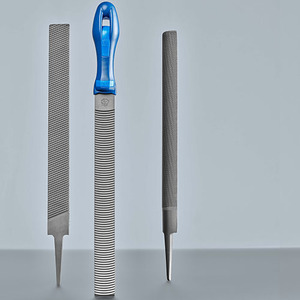
Image: An assortment of hand files, demonstrating the variety of shapes available for different filing tasks.
Maintenance
- Cleaning: After each use, clean the file thoroughly with a file card or stiff brush to remove all metal particles and debris. This prevents clogging and maintains cutting efficiency.
- Storage: Store files separately to prevent their teeth from rubbing against each other, which can dull them. Use a file rack, protective sleeves, or wrap them individually.
- Rust Prevention: Apply a light coat of oil to the file if it will be stored for an extended period or in a humid environment to prevent rust.
- Handle Check: Periodically check the handle for tightness. If it becomes loose, replace or re-secure it to ensure safe operation.
Troubleshooting
| Problem | Possible Cause | Solution |
|---|---|---|
| File not cutting effectively | Teeth are clogged with material (pinning) or are dull. | Clean the file with a file card. If dull, the file may need replacement. |
| File slips on workpiece | Insufficient pressure, incorrect angle, or workpiece not secure. | Increase pressure on the forward stroke, adjust angle, or re-secure workpiece. |
| File rusts easily | Improper storage or exposure to moisture. | Store in a dry place, apply light oil for long-term storage. |
Specifications
| Attribute | Detail |
|---|---|
| Brand | PFERD |
| Model Number | 12504094 |
| Part Number | 237410 |
| Item Weight | 10 g |
| Length | 180 mm (as per product title) |
| ASIN | B00Y0X9UR2 |
| Date First Available | 2 Jun. 2015 |
Warranty and Support
For information regarding warranty, returns, or technical support for your Pferd product, please refer to the official PFERD website or contact your retailer. Keep your purchase receipt as proof of purchase.
Manufacturer: Pferd
Brand: PFERD
Related documents12504094


Ask a question about this manual
Ask about setup, troubleshooting, compatibility, parts, safety, or missing instructions. Manuals+ will review the question and use this page’s manual context to help answer it.