
Introduction
This instruction manual provides guidance for the proper installation and use of the TRIPP LITE Cat6/Cat5e 110 Style Punch Down Keystone Jack (Model N238-010-BK). These keystone jacks are designed for reliable network connections in both Cat5e and Cat6 cabling environments, offering flexibility and performance for various UTP Ethernet applications.
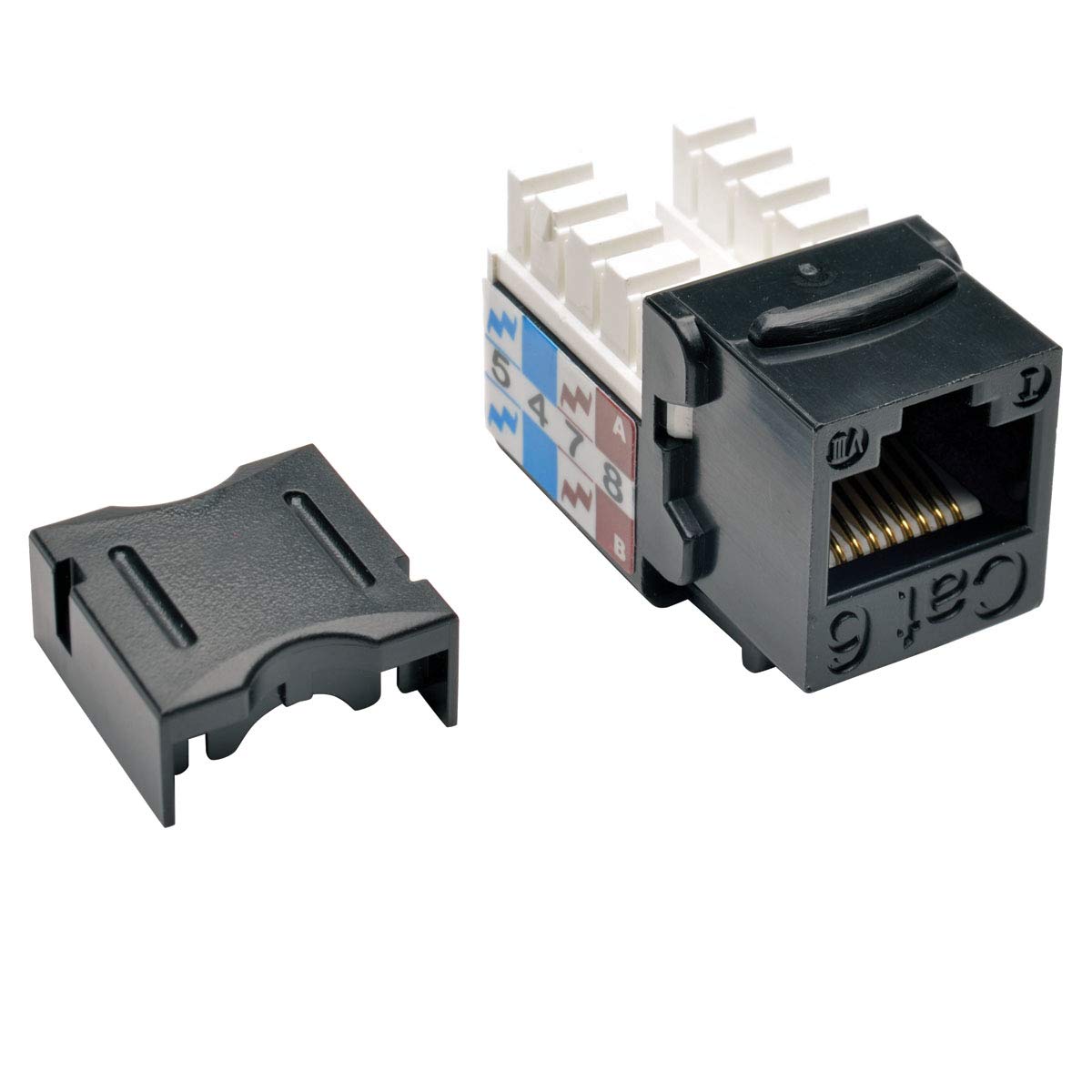
Figure 1: Front view of the TRIPP LITE Cat6/Cat5e 110 Style Punch Down Keystone Jack.
Safety Information
Always follow basic safety precautions when working with network cabling and electrical components. Ensure power is disconnected from any active equipment before making connections. Use appropriate tools and wear protective eyewear if necessary. Do not attempt to modify the product in any way not described in this manual.
Package Contents
Verify that all components are present before beginning installation:
- 10 x TRIPP LITE Cat6/Cat5e 110 Style Punch Down Keystone Jacks (Black)
- 10 x Termination Caps
Setup and Installation
This section details the steps for properly terminating network cables to the keystone jack.
Tools Required (Not Included):
- 110 Punch Down Tool
- Wire Strippers
- Cable Tester (recommended for verification)
Wiring Schemes (T568A and T568B):
The keystone jack features dual-color coded labeling for both T568A and T568B wiring schemes. Ensure consistency in your wiring choice throughout your network installation.
- T568A: Green/White, Green, Orange/White, Blue, Blue/White, Orange, Brown/White, Brown
- T568B: Orange/White, Orange, Green/White, Blue, Blue/White, Green, Brown/White, Brown

Figure 2: Back view of the keystone jack illustrating T568A and T568B wiring schemes.
Termination Steps:
- Prepare the Cable: Carefully strip approximately 1 inch (2.5 cm) of the outer jacket from the Ethernet cable, exposing the twisted pairs. Be careful not to nick the inner wire insulation.
- Untwist and Arrange Wires: Untwist the wire pairs and arrange them according to your chosen wiring scheme (T568A or T568B) as indicated on the keystone jack's color-coded label.
- Place Wires: Place each individual wire into its corresponding slot on the 110-style IDC (Insulation Displacement Connector) block. Ensure the wire extends slightly beyond the slot.
- Punch Down Wires: Using a 110 punch down tool, firmly press each wire into its slot. The punch down tool will seat the wire and trim any excess. Ensure a secure connection for each wire.
- Attach Termination Cap: Once all wires are punched down, secure the included termination cap over the IDC block. This protects the connections and provides strain relief.
- Install Jack: Insert the terminated keystone jack into a compatible face plate, outlet box, or patch panel until it clicks securely into place.
Operating
Once installed, the TRIPP LITE Cat6/Cat5e Keystone Jack functions as a standard network port. Simply plug a compatible RJ45 Ethernet cable into the front of the keystone jack to establish a network connection. Ensure the connected devices (e.g., computer, switch, router) are powered on and configured correctly for network communication.
Maintenance
The TRIPP LITE Keystone Jack requires minimal maintenance. Periodically inspect the connections for any signs of damage or loose wires. Keep the jack free from dust and debris. If cleaning is necessary, use a soft, dry cloth. Avoid using liquid cleaners directly on the jack.
Troubleshooting
If you experience issues with your network connection, consider the following troubleshooting steps:
- No Network Connection:
- Verify that both ends of the Ethernet cable are securely plugged into the keystone jack and the network device.
- Check the wiring on the keystone jack to ensure all wires are properly punched down and follow the correct T568A or T568B scheme.
- Test the cable run with a cable tester to identify any breaks or miswires.
- Ensure network devices (router, switch, computer) are powered on and functioning correctly.
- Slow Network Speed:
- Confirm that all components in the network path (cables, switches, network cards) are rated for the desired speed (e.g., Cat6 for Gigabit Ethernet).
- Inspect the cable for any damage or excessive bends that could degrade performance.
- Ensure proper termination; loose or poorly punched wires can cause signal degradation.
Specifications
| Model Number | N238-010-BK |
| Compatibility | Cat6, Cat5e |
| Style | 110 Punch Down Keystone Jack |
| Wiring Schemes | T568A, T568B (Dual-color coded labeling) |
| Color | Black |
| Compliance | EIA/TIA Cat6 connecting hardware specifications, UL-certified ANSI/TIA/EIA-568-B.2-1 Permanent Link/Channel Identification Test |
| Included Components | Keystone Jack, Termination Caps |
| Weight | 0.09 Pounds (per jack) |
Warranty and Support
Warranty: This TRIPP LITE product is covered by a Lifetime Limited Warranty. For specific terms and conditions, please refer to the official TRIPP LITE warranty documentation or visit the TRIPP LITE website.
Technical Support: For technical assistance or further inquiries, please contact TRIPP LITE customer support. Contact information can typically be found on the official TRIPP LITE website or product packaging.


