1. Introduction
This manual provides detailed instructions for the safe and effective operation of the HOLDPEAK HP-856A HVAC Anemometer. This device is designed for measuring wind speed, airflow (CFM/CMM), and temperature, making it suitable for various applications including HVAC system balancing, environmental monitoring, and industrial testing.
2. Product Features
- Measures wind speed, airflow (CFM/CMM), and temperature.
- USB connectivity for data transfer to PC (Windows 7, XP, 10).
- Large wind flow range: CFM 0-999900, resolution 0.001-100.
- Wide wind speed measurement range: 0.001~100 mph (0.3-45 m/s).
- Temperature range: 32~113°F (0~45°C).
- Multiple wind speed units: m/s, km/h, ft/min, knots, mph.
- Real-time MAX/MIN/AVG display.
- Backlight LCD display for clear readings.
- Data hold function.
- Low battery indicator.
- Auto power-off function.
- 600 data storage capacity.
- Separated extendable wind sensor vane for flexible measurements.
3. Package Contents
Verify that all items are present in the package:
- HOLDPEAK HP-856A Anemometer Main Unit
- Extendable Wind Sensor Vane
- USB Cable
- Software CD (for PC connectivity)
- 9V Battery (pre-installed or included)
- Hard Carry Case
- Instruction Manual
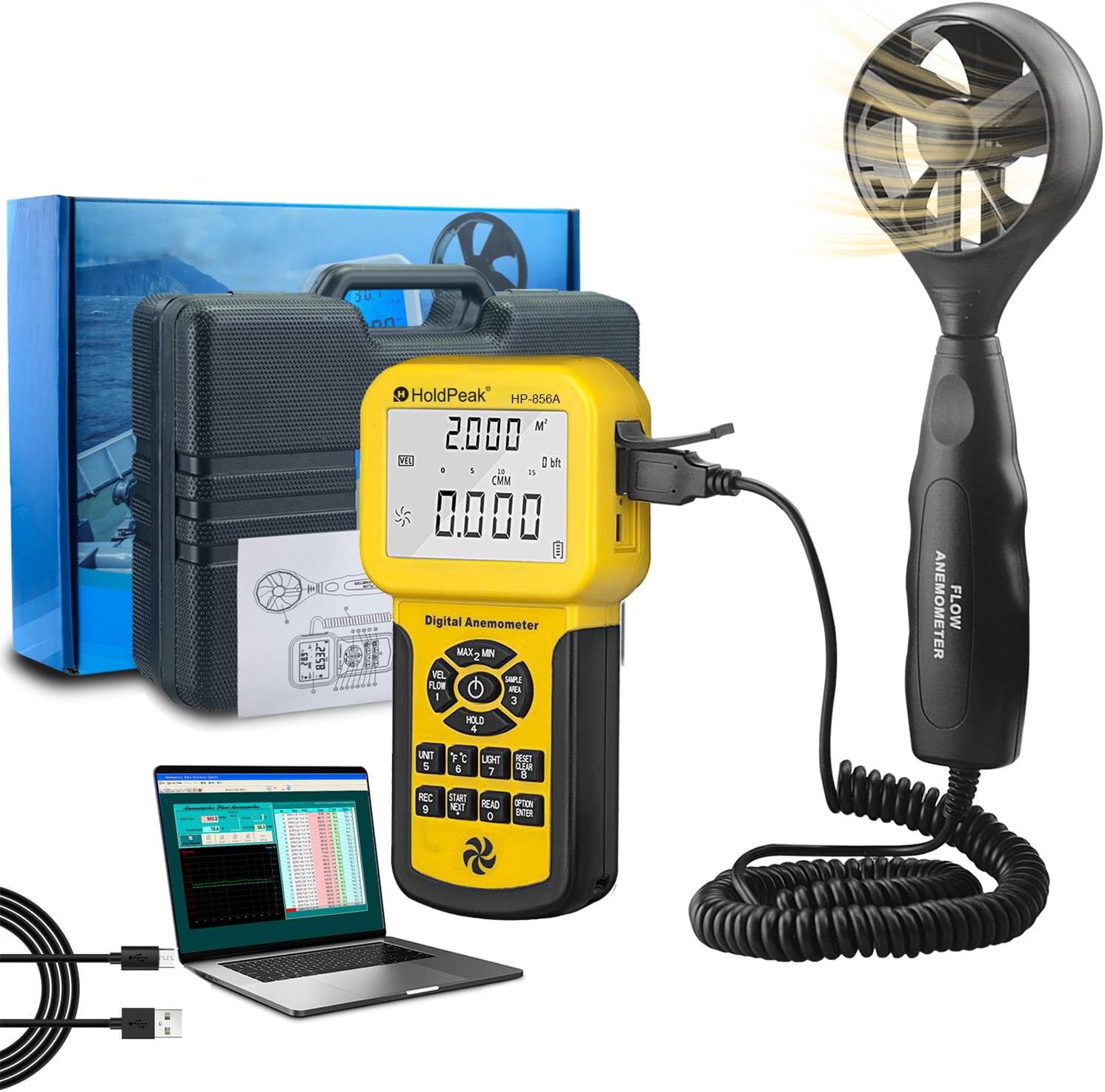
Image: The HOLDPEAK HP-856A Anemometer main unit, extendable wind sensor, USB cable, and hard carry case.
4. Safety Information
- Read this manual thoroughly before use.
- Do not attempt to repair or modify the device. Refer to qualified personnel for service.
- Keep the device away from water and high humidity.
- Avoid exposing the device to extreme temperatures or direct sunlight for prolonged periods.
- Ensure the battery is correctly installed according to polarity markings.
- Remove the battery if the device will not be used for an extended period to prevent leakage.
- Dispose of batteries and the device according to local regulations.
5. Setup
5.1. Battery Installation
The HP-856A typically uses one 9V battery.
- Locate the battery compartment on the back of the main unit.
- Open the compartment cover.
- Connect the 9V battery to the battery clip, observing correct polarity.
- Place the battery into the compartment and close the cover securely.
5.2. Connecting the Wind Sensor
The wind sensor vane connects to the main unit via a coiled cable.
- Plug the USB-A connector from the coiled cable into the corresponding USB port on the main unit.
- Ensure the connection is firm.
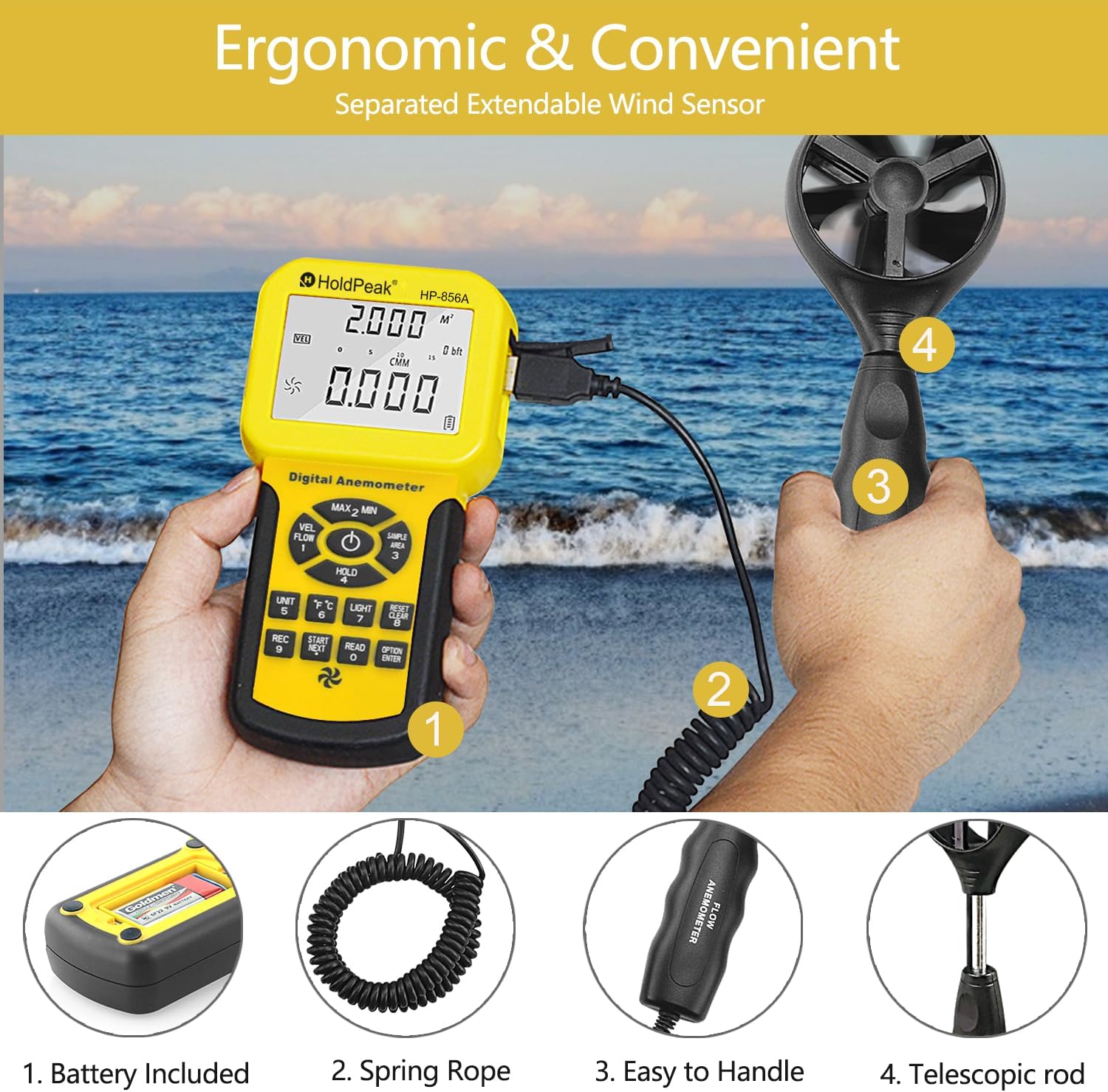
Image: Illustration of connecting the extendable wind sensor to the main unit.
6. Operating Instructions
6.1. Power On/Off
Press the POWER button to turn the device on or off.
6.2. Display Overview
The large LCD displays various parameters:
- TEMP: Temperature reading.
- VEL: Wind velocity reading.
- FLOW: Airflow (CFM/CMM) reading.
- Unit indicators (m/s, km/h, ft/min, knots, mph, °C, °F).
- MAX/MIN/AVG indicators.
- Battery level indicator.

Image: The anemometer's display showing wind velocity and airflow readings.
6.3. Changing Measurement Units
Press the UNIT button to cycle through wind speed units (m/s, km/h, ft/min, knots, mph).
Press the °C/°F button to switch between Celsius and Fahrenheit for temperature.
6.4. MAX/MIN/AVG Measurement
Press the MAX/MIN button to view maximum, minimum, and average readings for wind speed and airflow. Press again to cycle through modes.
6.5. Data Hold
Press the HOLD button to freeze the current reading on the display. Press again to release.
6.6. Backlight
Press the LIGHT button to turn the display backlight on or off.
6.7. Airflow Area Setting
To measure airflow (CFM/CMM), you must first set the area of the duct or vent.
- Press the AREA button.
- Use the arrow buttons to adjust the area value.
- Press ENTER to confirm.
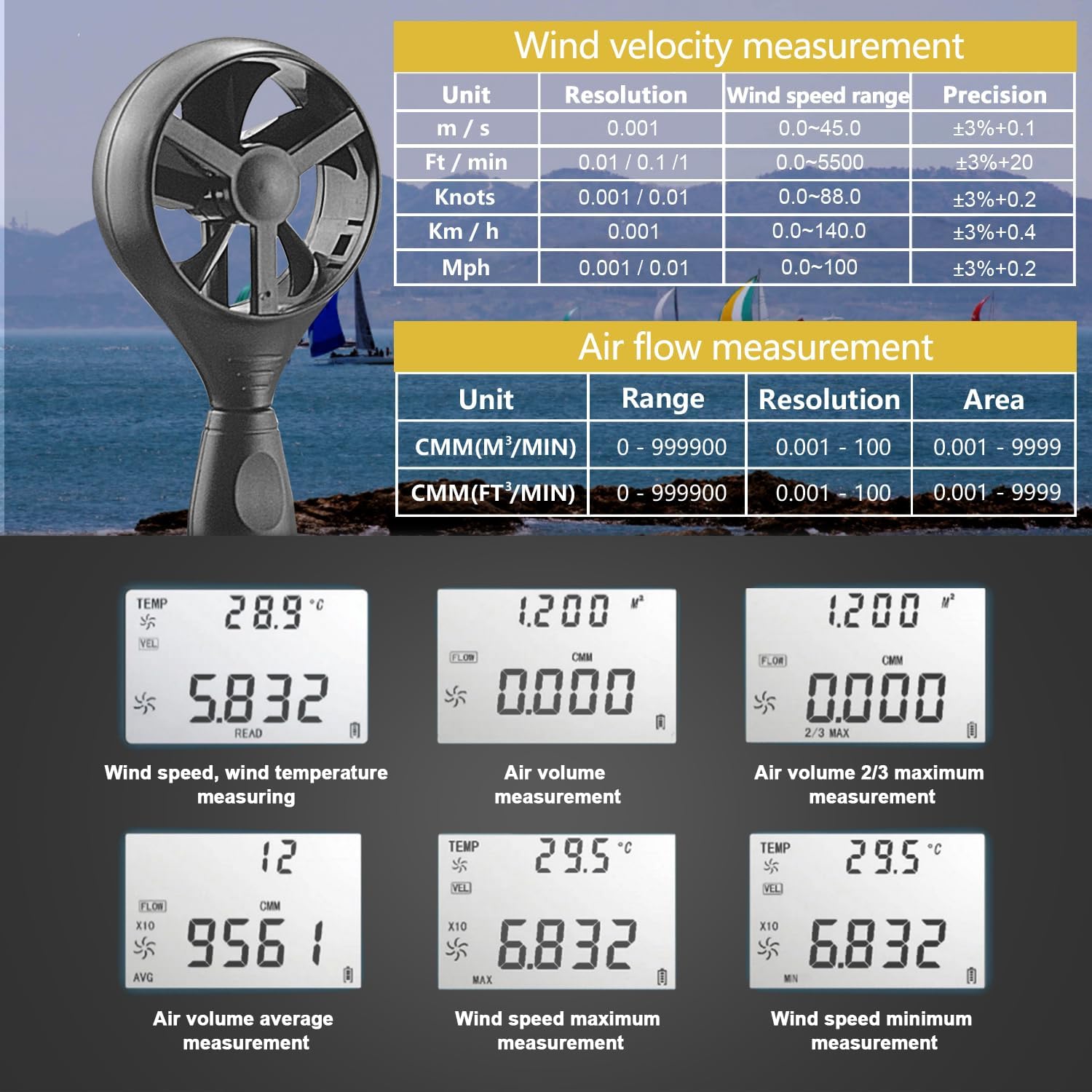
Image: The anemometer display illustrating different measurement readouts like wind speed, air volume, and temperature.
7. Data Management and PC Connectivity
7.1. Data Storage
The device can store up to 600 sets of data.
- To save a reading, press the REC button.
- To recall stored data, press the READ button. Use arrow keys to navigate.
- To clear stored data, refer to the detailed instructions in the full manual.
7.2. PC Connection
The HP-856A can connect to a PC for real-time monitoring and data logging.
- Install the provided software from the CD onto your Windows PC (compatible with Win 7, XP, 10).
- Connect the main unit to your PC using the supplied USB cable.
- Launch the software. You should be able to view real-time data, record measurements, and generate graphs for analysis.

Image: The anemometer connected to a computer via USB, showing data being displayed and recorded on the PC software.
Video: Real-time online test of the HOLDPEAK HP-856A Anemometer
This video demonstrates connecting the anemometer to a PC via USB and observing real-time data logging and graphical representation of wind speed and temperature.
8. Maintenance
- Keep the device clean and dry. Use a soft, damp cloth for cleaning. Do not use abrasive cleaners or solvents.
- Regularly check the wind sensor vane for any obstructions or damage. Ensure it spins freely.
- Store the device in its hard carry case when not in use to protect it from dust and impact.
- Replace the battery when the low battery indicator appears on the display.

Image: The anemometer and its components neatly stored in the provided hard carry case.
9. Troubleshooting
9.1. No Display/Device Not Turning On
- Check battery installation and ensure correct polarity.
- Replace with a fresh 9V battery.
9.2. Inaccurate Readings
- Ensure the wind sensor vane is free from obstructions and spins smoothly.
- Verify the correct measurement units are selected.
- For airflow measurements, confirm the correct area setting.
- Allow the device to stabilize in the measurement environment for temperature readings.
9.3. PC Connection Issues
- Ensure the USB cable is securely connected to both the anemometer and the PC.
- Verify that the software drivers are correctly installed.
- Check PC compatibility (Windows 7, XP, 10).
- Try a different USB port on your computer.
10. Specifications
| Parameter | Value |
|---|---|
| Brand | H HOLDPEAK |
| Model Number | HP-856A |
| Wind Speed Range | 0.001~100 mph (0.3-45 m/s) |
| Wind Speed Accuracy | ±3% |
| Air Flow (CFM) Range | 0-999900 CFM |
| Air Flow Resolution | 0.001-100 |
| Air Flow Area | 0.001-9999 ft² |
| Temperature Range | 32~113°F (0~45°C) |
| Data Storage | 600 records |
| PC Connectivity | USB (Windows 7, XP, 10) |
| Power Source | 1 x 9V Battery |
| Material | Polycarbonate (PC) |
| Dimensions (L x W x H) | 64.17 x 13.58 x 33.46 inches |
| Item Weight | 11.3 ounces (320 Grams) |
11. Warranty and Support
H HOLDPEAK provides a 2-year after-sale service and lifetime technical support for this product. For any concerns or assistance, please contact H HOLDPEAK customer service.
You can visit the official H HOLDPEAK Store on Amazon for more information and support resources.