
Product Overview
The Blackburn EX-1 Disc Rear Rack is designed for mounting on the rear of bicycles, providing a sturdy platform for carrying cargo. It features an aluminum construction, making it lightweight yet strong, and is specifically designed to accommodate bicycles with disc brakes. This rack is compatible with both 700c and 26-inch wheels and can support a load capacity of up to 40 pounds.
This manual provides instructions for the proper installation, operation, and maintenance of your Blackburn EX-1 Disc Rear Rack to ensure safe and efficient use.
Safety Information
- Always ensure all bolts are securely tightened before each ride.
- Do not exceed the maximum load capacity of 40 pounds (18 kg).
- Distribute weight evenly on the rack to maintain bicycle balance.
- Regularly inspect the rack for any signs of damage or wear. Replace damaged parts immediately.
- Be aware that adding weight to the rear of your bicycle can affect handling and braking. Practice riding with a loaded rack in a safe environment before extended use.
Setup and Installation
Proper installation is crucial for the safety and performance of your rear rack. Follow these steps carefully.
Tools Required:
- Hex key set (typically 4mm, 5mm, 6mm)
- Adjustable wrench or open-end wrench set
- Measuring tape (optional, for strut adjustment)
Installation Steps:
- Attach Lower Mounts: Secure the lower legs of the rack to the eyelets near the rear axle of your bicycle frame. Use the provided bolts and washers. Ensure the rack is centered over the wheel. For disc brake clearance, the rack is designed to clear the caliper.
- Position Rack: Hold the rack in its desired position, ensuring it is level and provides adequate clearance for the rear wheel and tire.
- Attach Upper Struts: Connect the adjustable upper struts from the rack to the seat stay eyelets on your bicycle frame. If your frame lacks seat stay eyelets, P-clamps (not included, may be required) can be used to attach the struts to the seat stays. Adjust the length of the struts to achieve a level rack platform.
- Tighten All Fasteners: Once the rack is properly aligned and level, securely tighten all bolts. Do not overtighten, but ensure they are firm.
- Final Check: Gently shake the rack to ensure it is stable and does not wobble. Re-check all connections.


Operating Instructions
Once installed, the Blackburn EX-1 Disc Rear Rack is ready for use. Follow these guidelines for optimal performance and safety.
- Loading Cargo: Place items on the rack platform or attach panniers to the side rails. Ensure cargo is securely fastened using bungee cords, straps, or pannier hooks to prevent shifting during transit.
- Weight Distribution: Distribute the weight as evenly as possible, with heavier items placed lower and closer to the center of the rack. This helps maintain bicycle stability.
- Visibility: Ensure that loaded cargo does not obstruct your bicycle's rear light or reflectors. If necessary, attach additional lights or reflectors to the rack or cargo.
- Clearance: Verify that cargo does not interfere with the rear wheel, brakes, or your pedaling motion.
Maintenance
Regular maintenance will extend the life of your Blackburn EX-1 Disc Rear Rack and ensure continued safe operation.
- Inspect Fasteners: Periodically check all bolts and screws for tightness. Vibrations from riding can cause fasteners to loosen over time.
- Clean Rack: Clean the rack with a damp cloth and mild soap as needed. Avoid harsh chemicals that could damage the finish.
- Check for Damage: Inspect the aluminum frame for cracks, bends, or other signs of structural damage, especially after impacts or heavy use.
- Corrosion Prevention: If riding in wet or corrosive conditions, wipe down the rack after use to prevent corrosion, particularly around fasteners.
Troubleshooting
| Problem | Possible Cause | Solution |
|---|---|---|
| Rack is wobbly or loose. | Loose mounting bolts. | Tighten all mounting bolts securely. |
| Rack is not level. | Upper struts are unevenly adjusted. | Adjust the length of the upper struts until the rack platform is level. |
| Cargo interferes with wheel or brakes. | Improper cargo placement or oversized cargo. | Reposition cargo, ensure proper clearance, or use smaller bags/items. |
| Rack does not fit bicycle frame. | Incompatible frame design or missing eyelets. | Verify frame compatibility. P-clamps may be required for frames without seat stay eyelets (not included). Consult a bike mechanic if unsure. |
Specifications
- Model: EX-1 Disc Rear Rack
- Material: T6061 Aluminum
- Color: Black
- Mounting Type: Rear Seat Mount
- Load Capacity: 40 pounds (18 kg)
- Item Weight: 1.6 pounds (0.73 kg)
- Wheel Size Compatibility: 26 inches, 700c (also fits 29er)
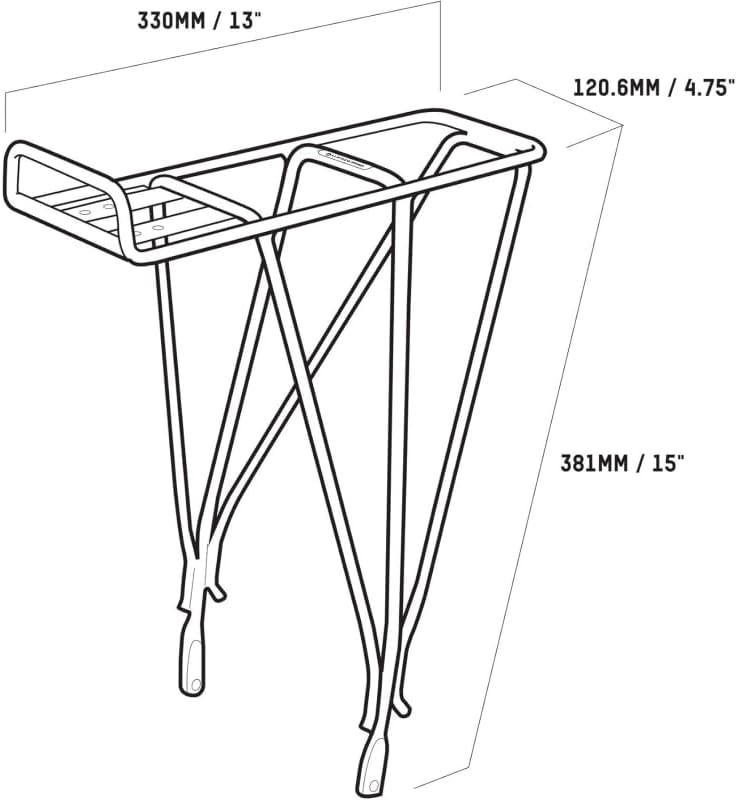
- Dimensions: Approximately 330mm (13") Length x 120.6mm (4.75") Width x 381mm (15") Height (refer to Figure 3 for detailed dimensions)
- Included Components: Rear Rack (mounting hardware included)
- Manufacturer Part Number: 2027629
- UPC: 768686827433
Warranty Information
The Blackburn EX-1 Disc Rear Rack is subject to a limited lifetime warranty for the lifetime of the original purchaser. This warranty covers manufacturing defects in materials and workmanship.
Exclusions: This warranty does not apply to damage due to heat, physical damage resulting from abuse, neglect, improper repair, improper fit, improper installation, improper care, accidents, failure to follow directions, alterations, misuse, or use unintended by the manufacturer. It also does not cover minor cosmetic damages due to normal "wear and tear" of the product.
For warranty claims or further details, please contact Blackburn customer support.
Customer Support
If you have any questions, require assistance with installation, or need to report a problem, please contact Blackburn customer support through their official website or the retailer where the product was purchased.
For more information, visit the official Blackburn website: www.blackburndesign.com
