
Introduction
This manual provides comprehensive instructions for the Neewer NW-700 Condenser Microphone and NW-35 Adjustable Recording Microphone Suspension Scissor Arm Stand Kit. This kit is designed for professional studio broadcasting, recording, and vocal applications, offering high-quality audio capture with its cardioid pick-up pattern.
Package Contents
The Neewer NW-700 and NW-35 kit includes the following components:
- (1) NW-700 Condenser Microphone
- (1) NW-35 Adjustable Suspension Scissor Arm Stand
- (1) Table Mounting Clamp
- (1) Metal Shock Mount
- (1) Pop Filter
- (1) Ball-type Anti-wind Foam Cap
- (1) 3.5mm Male to XLR Female Cable
Note: A Sound Card, 48V Phantom Power, 1/4" to XLR Cable, and XLR to XLR Cable are not included and may need to be purchased separately for optimal performance. A 48V phantom power adapter is required for the microphone to function.
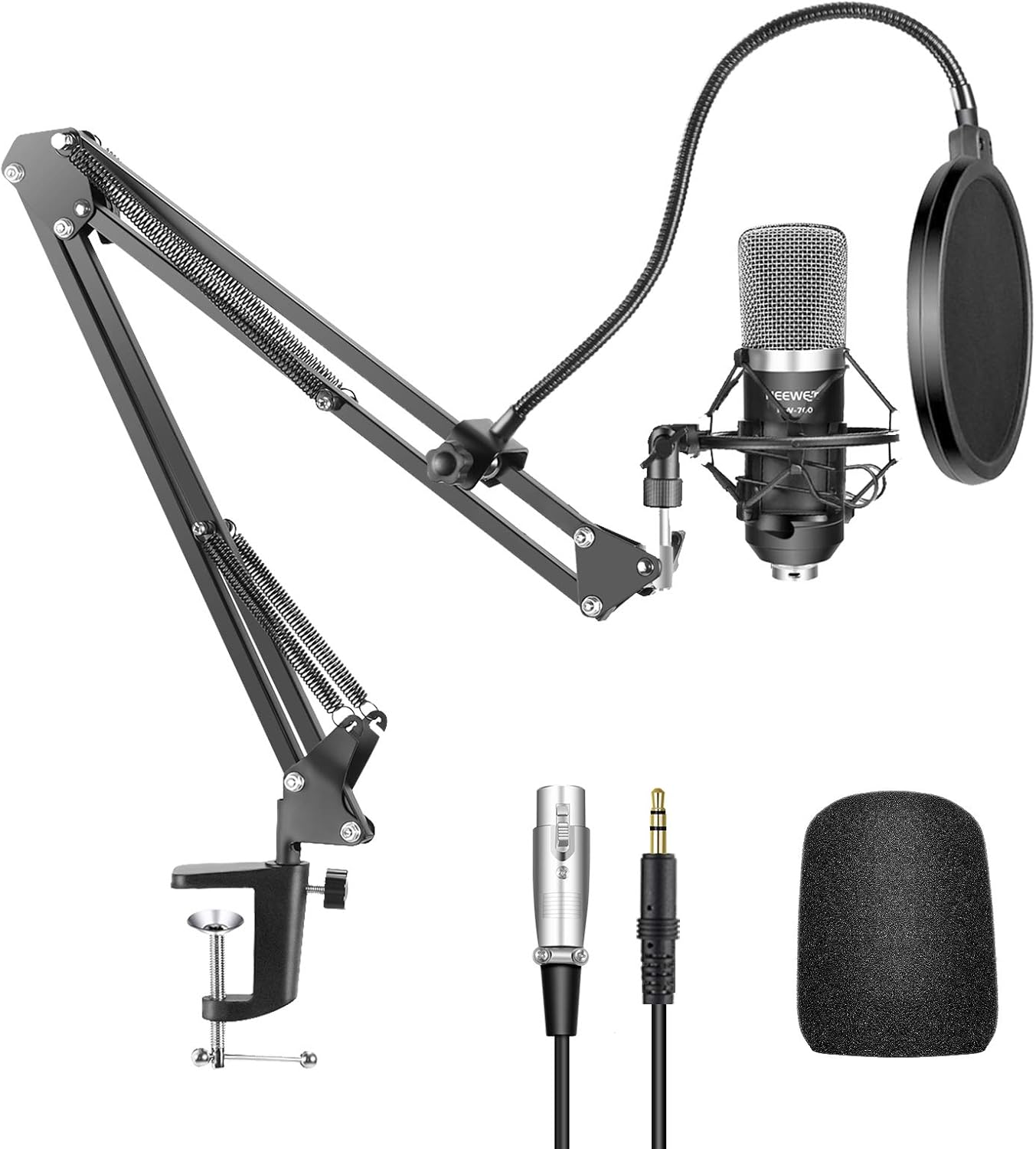
Image: Overview of the Neewer NW-700 microphone kit, showing all included components.
Setup Instructions
1. Assemble the Scissor Arm Stand
Attach the table mounting clamp to a sturdy surface, such as a desk or table. Insert the base of the scissor arm stand into the clamp and secure it by tightening the knob. Ensure the stand is stable before proceeding.
2. Install the Shock Mount and Microphone
Screw the metal shock mount onto the end of the scissor arm stand. Gently press the clips of the shock mount to expand it, then insert the NW-700 condenser microphone into the shock mount. Release the clips to secure the microphone. The shock mount features an angle adjustment with a locking knob for precise positioning.

Image: Details of the microphone shock mount and pop filter assembly.
3. Attach the Pop Filter and Foam Cap
Attach the pop filter to the scissor arm stand using its clamp. Position the pop filter approximately 2-6 inches in front of the microphone. Place the ball-type anti-wind foam cap over the microphone head to reduce wind interference and plosive sounds.
4. Connect the Microphone to Your Device
The NW-700 condenser microphone requires 5V of power to operate. For optimal sound quality, a 48V phantom power supply (not included) is recommended, especially when connecting to a laptop or if the sound is unclear.
Desktop Computer Connection: Connect the 3.5mm male end of the included cable to your desktop computer's microphone input jack. Connect the XLR female end to the microphone.
Laptop Connection: For laptops, it is recommended to use an external 48V phantom power supply. Connect the microphone to the phantom power supply via an XLR to XLR cable (not included), then connect the phantom power supply to your laptop using an appropriate cable (e.g., XLR to 3.5mm or XLR to USB, not included).

Image: Connection diagram illustrating how to connect the microphone to a desktop or laptop, emphasizing the role of a 48V phantom power unit.

Image: Visual examples of connecting the microphone to a desktop and a laptop.
Incompatible Devices: This microphone cannot be used with mobile phones, tablet computers, or Mac computers.
Operating Instructions
Microphone Positioning
The NW-700 features a cardioid pick-up pattern, meaning it primarily captures sound from the front of the microphone, minimizing background noise from the sides and rear. Position the side of the microphone labeled "NEEWER" directly towards the sound source (e.g., your mouth) for optimal audio capture.

Image: A visual representation of the microphone's cardioid polar pattern and frequency response.
Adjusting the Scissor Arm Stand
The scissor arm stand is adjustable for various working positions. Rotate the support stand up to 270 degrees to position the microphone as needed. The double-braced arms provide strength and stability. To rotate the entire base, ensure the locking system is released, allowing for 360-degree rotation.

Image: Visual guide on how to adjust the microphone arm for different angles and positions.
Maintenance
- Cleaning: Use a soft, dry cloth to wipe down the microphone and stand. Avoid using liquid cleaners or solvents.
- Storage: When not in use, store the microphone and components in a dry, dust-free environment.
- Cable Care: Avoid sharp bends or kinks in the cables to prevent damage.
Troubleshooting
| Problem | Possible Cause | Solution |
|---|---|---|
| No sound or low volume | Insufficient power supply; incorrect connection; software settings. | Ensure 5V power is supplied. For laptops or better sound, use a 48V phantom power supply. Check all cable connections. Verify microphone input settings on your computer. |
| Background noise or hiss | Lack of phantom power; poor quality cable; environmental noise. | Use a 48V phantom power supply. Consider using a higher quality XLR to XLR cable. Ensure recording environment is quiet. |
| Microphone not recognized by Mac | Incompatibility with Mac operating systems. | The NW-700 microphone is not compatible with Mac computers. |
| Pop filter or stand feels loose | Clamps or knobs not tightened sufficiently. | Tighten all adjustment knobs and clamps firmly. Avoid over-tightening to prevent damage. |
Specifications
- Model Name: NW-700
- Brand: NEEWER
- Microphone Form Factor: Microphone Only
- Material: Metal
- Polar Pattern: Unidirectional (Cardioid)
- Frequency Response: 40Hz - 20KHz
- Audio Sensitivity: -36.8mV (0dB-1V/Pa at 1KHz)
- Signal-to-Noise Ratio: 65 dB
- Power Source: Corded Electric (requires 5V, 48V phantom power recommended)
- Item Weight: 1.21 Kilograms (2.66 pounds)
- Product Dimensions (L x W x H): 6 x 19 x 9 inches
- Cable Length: 78.7 inches (250cm)
- Max Load (Scissor Arm Stand): Approx 35oz / 1KG
- Compatible Devices: Laptop, PC (Windows)
- Incompatible Devices: Mobile Phones, Tablet Computers, Mac

Image: Detailed product dimensions for the microphone and stand components.
Warranty and Support
For warranty information or technical support, please refer to the official NEEWER website or contact their customer service directly. Keep your purchase receipt for warranty claims.