
1. Product Overview
The Air Vent Rabl Heavy-duty Automatic Foundation Vent is designed to regulate airflow in your foundation space, helping to manage moisture and protect your home from potential damage. This vent operates automatically based on temperature changes, eliminating the need for manual adjustments.
Key features include:
- Automatic Operation: A bi-metal coil mechanism opens and closes the vent without requiring electricity.
- Temperature Responsive: The vent fully opens at approximately 70°F (21°C) to allow fresh air intake and fully closes at approximately 40°F (4°C) to conserve energy and protect pipes from cold.
- Durable Construction: Heavy-duty design with a honeycomb grill for enhanced protection.
- Moisture Control: Helps remove excess moisture, which can prevent damp rot and deter pests like termites.
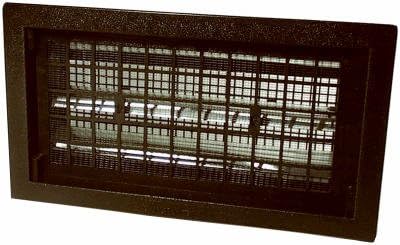
Figure 1: Front view of the Air Vent Rabl Heavy-duty Automatic Foundation Vent. This image shows the black frame and the internal honeycomb grill structure.
2. Safety Information
Please read and understand all instructions before installation and operation. Failure to follow these guidelines may result in property damage or injury.
- Ensure proper ventilation during installation.
- Wear appropriate personal protective equipment (PPE) such as gloves and eye protection during installation.
- If you are unsure about any part of the installation process, consult a qualified professional.
- Keep the vent area clear of obstructions to ensure proper airflow and operation.
- This product is designed for foundation ventilation. Do not use it for purposes other than its intended use.
- Proposition 65 Warning: This product may expose you to chemicals known to the State of California to cause cancer and birth defects or other reproductive harm. For more information go to www.P65Warnings.ca.gov.
3. Installation Instructions
The Air Vent Rabl Automatic Foundation Vent is designed for straightforward installation without the need for mortar. It can be installed using screws, screw anchors, or retaining clips, all of which are included.
3.1 Tools Required (Not Included)
- Drill
- Appropriate drill bits for masonry or wood
- Measuring tape
- Level
- Pencil or marker
3.2 Installation Steps
- Prepare the Opening: Ensure the foundation opening is clean and appropriately sized for the vent (refer to specifications for dimensions).
- Position the Vent: Place the vent into the opening. Use a level to ensure it is straight.
- Mark Mounting Points: Using the vent's frame as a guide, mark the locations for screws or retaining clips on the foundation.
- Drill Pilot Holes: Drill pilot holes at the marked locations. For masonry, use a masonry drill bit and insert screw anchors if necessary.
- Secure the Vent:
- Using Screws/Anchors: Align the vent with the pilot holes and secure it firmly using the provided screws or screw anchors.
- Using Retaining Clips: Attach the retaining clips to the vent and secure them to the foundation opening as per the clip manufacturer's instructions.
- Verify Operation: After installation, ensure the vent's louvers can open and close freely without obstruction.
4. Operating Instructions
The Air Vent Rabl Automatic Foundation Vent operates autonomously based on ambient temperature, requiring no manual intervention after installation.
- Opening Mechanism: As the temperature rises and reaches approximately 70°F (21°C), the internal bi-metal coil expands, causing the vent's louvers to open fully. This allows for maximum fresh air intake into the foundation area.
- Closing Mechanism: As the temperature drops and reaches approximately 40°F (4°C), the bi-metal coil contracts, causing the vent's louvers to close fully. This action helps to conserve energy by preventing cold air from entering the foundation and protects pipes from freezing temperatures.
The vent is designed to provide continuous, passive ventilation management, adapting to seasonal temperature changes to maintain optimal conditions in your foundation.
5. Maintenance
Regular, simple maintenance will ensure the longevity and efficient operation of your automatic foundation vent.
- Annual Inspection: At least once a year, inspect the vent for any debris (leaves, dirt, insect nests) that might obstruct the louvers or the honeycomb grill.
- Cleaning: Gently clean the vent and grill with a soft brush or cloth to remove any accumulated dirt. Avoid using harsh chemicals that could damage the finish or internal components.
- Check Louver Movement: Periodically observe the vent during temperature changes (e.g., a warm day turning cold) to ensure the louvers open and close smoothly. If they appear stuck, gently clear any visible obstructions.
- Structural Integrity: Check the vent frame and mounting points for any signs of damage or loosening. Re-secure if necessary.
6. Troubleshooting
If you encounter issues with your Air Vent Rabl Automatic Foundation Vent, refer to the following common problems and solutions:
| Problem | Possible Cause | Solution |
|---|---|---|
| Vent louvers are stuck or not moving freely. |
|
|
| Vent does not open/close at specified temperatures. |
|
|
If the problem persists after attempting these solutions, please contact Air Vent customer support for further assistance.
7. Specifications
| Feature | Detail |
|---|---|
| Brand | Air Vent |
| Model Number | CECOMINOD079813 |
| Color | Black |
| Nominal Free Area (NFA) | 50 sq. in. |
| Item Weight | 2.1 pounds (0.95 kg) |
| Product Dimensions | 17 x 10 x 5 inches (43.18 x 25.4 x 12.7 cm) |
| Power Source | Corded Electric (Note: Automatic operation is mechanical, not electrical) |
| Voltage | 100 Volts (This specification seems inconsistent with the "no electricity" feature for automatic operation. It might refer to a different variant or a general product line spec. The automatic function relies on the bi-metal coil.) |
| Special Features | Automatic Temperature-Responsive Ventilation |
| Installation Method | Screws, screw anchors, or retaining clips (no mortar required) |
Note: The "Corded Electric" and "100 Volts" specifications appear in the product data but contradict the "Bi-metal coil to open and close automatically without electricity" description. The automatic function of this specific model relies on the bi-metal coil. Please disregard electrical specifications for the automatic temperature function.
8. Warranty Information
The Air Vent Rabl Heavy-duty Automatic Foundation Vent comes with a Limited Warranty.
For detailed information regarding the terms, conditions, and duration of your warranty, please refer to the official warranty document included with your product packaging or visit the Air Vent official website. Keep your proof of purchase for warranty claims.
9. Customer Support
If you have any questions, require technical assistance, or need to report an issue that cannot be resolved using the troubleshooting guide, please contact Air Vent customer support.
Please have your product model number (CECOMINOD079813) and date of purchase ready when contacting support.
For contact information, please refer to the product packaging or the official Air Vent website.