
Introduction
This manual provides essential information for the safe and efficient operation of your Seismic Audio SALA-210-PKG1 Passive Line Array Speaker System. Please read this manual thoroughly before installation and use to ensure proper setup and to maximize the performance and longevity of your equipment. This system includes four premium passive 2x10 line array speakers with dual compression drivers, designed for professional PA, DJ, and live sound reinforcement applications.
What's in the Box
Upon unpacking, please verify that all components listed below are present and in good condition. If any items are missing or damaged, contact your dealer immediately.
- Four (4) Seismic Audio SALA-210 Passive 2x10 Line Array Speakers
Safety Information
Always observe the following safety precautions to prevent electric shock, injury, or damage to the equipment:
- Electrical Safety: Ensure all connections are made correctly and securely. Use appropriate gauge speaker cables with Speakon connectors. Never operate the speakers with damaged cables.
- Placement: Position speakers on stable surfaces or use approved rigging hardware for suspended installations. Ensure proper weight distribution and secure mounting. Avoid placing speakers in direct sunlight, near heat sources, or in excessively humid environments.
- Hearing Protection: Prolonged exposure to high sound pressure levels can cause permanent hearing damage. Use hearing protection when operating the system at high volumes.
- Ventilation: Ensure adequate airflow around the speakers, especially if used in enclosed spaces, to prevent overheating of associated amplifiers.
- Servicing: Do not attempt to service these speakers yourself. Refer all servicing to qualified service personnel.
Setup
Proper setup is crucial for optimal performance and safety. Follow these steps for connecting your SALA-210-PKG1 speakers.
1. Physical Placement and Rigging
The SALA-210 speakers are designed for line array configurations. They feature integrated rigging points for secure suspension or stacking. When stacking, ensure the speakers are interlocked correctly and stable. For suspended applications, use only certified rigging hardware and consult with a qualified rigger.

Image: Side view of the SALA-210 speaker, highlighting the integrated rigging points for secure installation.
2. Electrical Connections
Each SALA-210 speaker features a rear input panel with Speakon connectors and a switch for Passive or Bi-Amp operation.

Image: The rear input panel of the SALA-210 speaker, showing the Speakon input/thru connections and the Passive/Bi-Amp selector switch.
- Passive Mode: For standard operation, set the switch to 'Passive'. Connect your amplifier's output to the 'IN' Speakon connector. The 'THRU' connector can be used to daisy-chain to another speaker. In passive mode, the internal crossover manages frequency distribution to the woofers and compression drivers.
- Bi-Amp Mode: For advanced setups requiring external crossovers and separate amplification for low and high frequencies, set the switch to 'Bi-Amp'. In this mode, the 'IN' connector will typically handle the low-frequency input, and the 'THRU' connector will handle the high-frequency input (refer to specific wiring diagrams if provided with your amplifier or external crossover). This mode requires two amplifier channels per speaker.
- Cable Requirements: Use high-quality Speakon cables of appropriate gauge for the length of your runs to minimize signal loss.
3. System Overview and Connection Example
This video provides a visual overview of the Seismic Audio SALA-210-PKG1 system and demonstrates its components, which can assist in understanding the setup process.
Video: An overview of the Seismic Audio SALA-210-PKG1 Line Array Speaker System, showcasing its features and potential applications.
Operating Instructions
Once your SALA-210 speakers are properly set up and connected to an appropriate amplifier, follow these guidelines for operation:
- Power On Sequence: Always power on your audio source (mixer, player) first, then your signal processors (EQ, crossover), and finally your power amplifier. When powering off, reverse this sequence: amplifier off first, then processors, then source. This prevents damaging 'pops' or 'thumps'.
- Gain Staging: Set the gain levels on your mixer and amplifier carefully to avoid clipping (distortion). Start with low volume and gradually increase to the desired level.
- Monitoring: Continuously monitor the sound quality. If you hear distortion, immediately reduce the volume.
- Equalization: Use equalization (EQ) on your mixer or processor to fine-tune the sound to the acoustic environment. Avoid excessive boosting of frequencies, which can lead to feedback or speaker damage.
Maintenance
Regular maintenance will help preserve the performance and appearance of your speakers.
- Cleaning: Use a soft, dry cloth to wipe down the speaker cabinets. For stubborn dirt, a slightly damp cloth can be used, but ensure no moisture enters the speaker grilles or connectors. Do not use abrasive cleaners or solvents.
- Inspection: Periodically check all cables and connectors for signs of wear or damage. Ensure all rigging hardware is secure and free from corrosion.
- Storage: When not in use, store speakers in a dry, temperature-controlled environment, away from direct sunlight and extreme temperatures. Consider using protective covers to prevent dust accumulation and physical damage.
Troubleshooting
If you encounter issues with your SALA-210-PKG1 system, refer to the following common problems and solutions:
| Problem | Possible Cause | Solution |
|---|---|---|
| No sound from speaker | Incorrect cable connection; Amplifier off or faulty; Speaker switch in wrong mode; Source device issue. | Check all Speakon cable connections. Ensure amplifier is powered on and functioning. Verify the Passive/Bi-Amp switch is set correctly. Check audio source. |
| Distorted sound | Overdriven amplifier; Incorrect gain staging; Damaged speaker component. | Reduce amplifier volume or mixer gain. Check for clipping indicators on amplifier. If distortion persists at low volumes, contact service. |
| Intermittent sound | Loose cable connection; Faulty cable; Amplifier issue. | Secure all cable connections. Try a different Speakon cable. Test with another amplifier if possible. |
Specifications
Detailed technical specifications for the Seismic Audio SALA-210 Line Array Speaker.
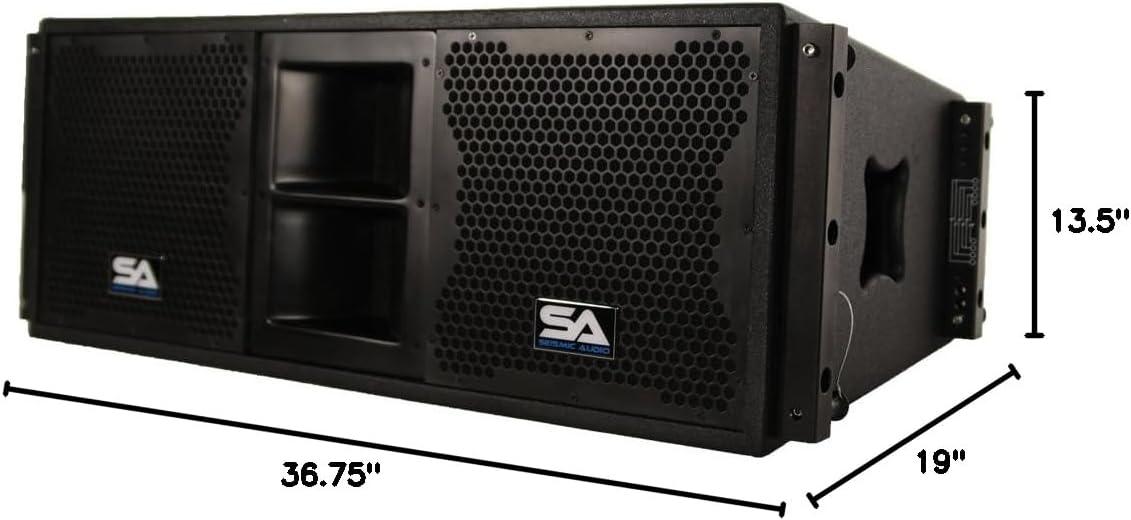
Image: Dimensions of the SALA-210 speaker, illustrating its depth, width, and height.
- Model: SALA-210-PKG1 (System) / SALA-210 (Individual Speaker)
- Type: Passive 2x10 Line Array Speaker with Dual Compression Drivers
- Active/Passive: Passive
- Speaker Maximum Output Power (System): 1120 Watts
- Audio Output Mode: Stereo (when used in pairs/system)
- Mounting Type: Pole Mount / Rigging Points
- Speaker Type: Woofer (main drivers)
- Additional Features: Bi-amplification capable
- Woofer Diameter: 10 Inches (per woofer)
- Audio Driver Type: Dynamic Driver
- Connectivity Protocol: Speakon
- Item Dimensions (D x W x H): 19" x 36.75" x 13.5" (per speaker)
- Item Weight (System): 316 Pounds (for four speakers)
- Number of Items: 4 (in package)
- Manufacturer: Seismic Audio
- UPC: 847861035235
Warranty
The Seismic Audio SALA-210-PKG1 Line Array Speaker System is covered by a One Year Warranty from the date of purchase. This warranty covers defects in materials and workmanship under normal use. It does not cover damage caused by misuse, abuse, accident, unauthorized modifications, or improper installation. Please retain your proof of purchase for warranty claims.
Support
For technical assistance, troubleshooting beyond this manual, or warranty inquiries, please contact Seismic Audio customer support. Refer to the contact information provided with your purchase or visit the official Seismic Audio website for current support details.