
1. Product Overview
The Strider 12 Sport Balance Bike is designed to help young children learn balance and steering, making the transition to a pedal bike easier. This ultra-light bike features a durable design and adjustable components to grow with your child.
- 12-inch Pro Bike: Features mini grips, a padded seat, safety pad, performance footrest, and an 11-inch starting seat height, allowing toddlers to easily straddle the bike.
- Easy to Adjust: Seat and handlebar heights are adjustable without tools, accommodating inseam lengths from 12-18 inches.
- Balance Bike Concept: Introduces children to the feeling of being on a bike, building confidence by encouraging striding and practicing bike-handling skills.
- Efficient Learning: Balance bikes are proven to teach kids to ride faster than traditional methods, focusing on balance and steering first.
- Durable Tires: Foam rubber tires are designed to never go flat, ensuring continuous play.

Image: A young child confidently riding a Strider balance bike, highlighting the development of confidence and coordination.
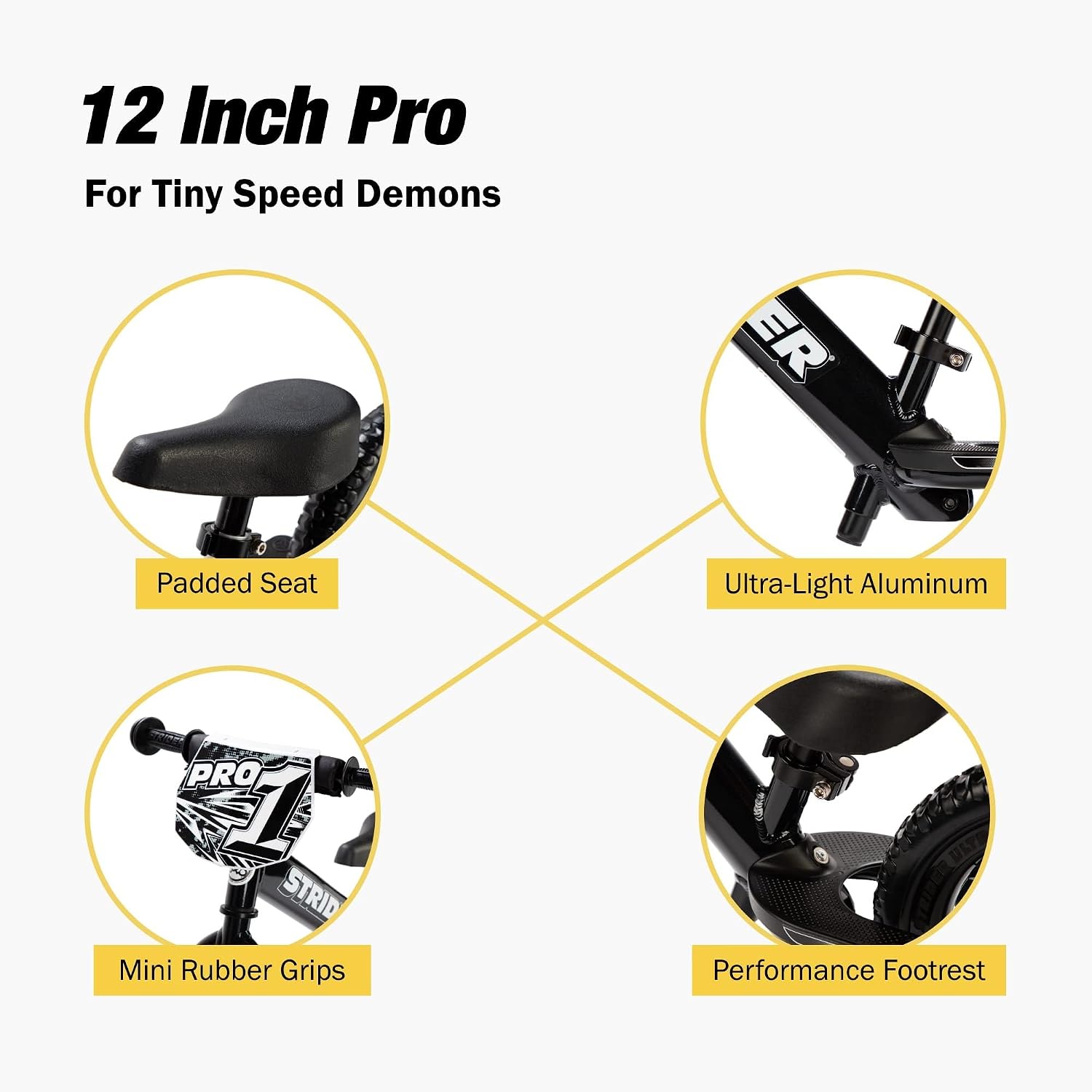
Image: A diagram illustrating the key features of the Strider 12 Inch Pro model, including the padded seat, ultra-light aluminum frame, mini rubber grips, and performance footrest.

Image: A visual representation of the Strider bike's design, emphasizing its lightweight nature, tool-free adjustable seat and handlebars, and durable flat-free tires.
2. Setup and Assembly
Assembly is required for the Strider 12 Sport Balance Bike. Please follow the instructions provided in the packaging for detailed assembly steps. Ensure all components are securely fastened before use.
2.1. Adjusting Seat and Handlebar Height
Proper adjustment is crucial for your child's comfort and learning. The seat and handlebar heights can be adjusted without tools to match your child's growth.
- Seat Height: Adjust the seat so your child can place both feet flat on the ground with a slight bend in their knees. The ideal inseam range is 12-18 inches.
- Handlebar Height: Adjust the handlebars to be approximately level with your child's waist when they are seated.

Image: A guide on how to accurately measure a child's inseam to ensure the correct bike fit, featuring a child's silhouette and a measurement scale.
3. Operating Instructions
The Strider 12 Sport Balance Bike is designed for intuitive learning. Children learn to balance by using their feet to stride and glide, gradually lifting their feet as they gain confidence.
- Starting: Encourage your child to walk or stride with the bike between their legs, pushing off the ground with their feet.
- Gliding: As they gain speed, encourage them to lift their feet and glide, focusing on balancing.
- Steering: Teach them to steer by looking where they want to go and gently turning the handlebars.
- Stopping: Children can stop by placing their feet firmly on the ground. The bike also features a footrest for advanced riders.

Image: A child actively riding a Strider balance bike on a natural dirt trail, showcasing the bike's versatility for outdoor adventures.

Image: A child performing a small jump off their Strider balance bike in a park, demonstrating the potential for advanced riding skills.

Image: A child in a helmet riding a Strider balance bike on a paved path, looking directly at the camera, highlighting the joy of riding.
3.1. Official Strider Balance Bike Video
This video provides a general overview of the Strider balance bike philosophy and shows various children and adults enjoying Strider bikes, including related accessories like the rocking base. While not specific to the 12 Sport model's assembly, it illustrates the benefits and fun of Strider products.
Video: An official Strider video showcasing the excitement and benefits of Strider balance bikes for children and families, including various models and activities.
4. Maintenance
Regular maintenance ensures the longevity and safety of your Strider 12 Sport Balance Bike.
- Check Bolts: Periodically inspect all bolts and fasteners to ensure they are tight.
- Clean Bike: Wipe down the frame and components with a damp cloth after use, especially after riding in dirt or mud.
- Tire Inspection: Although foam rubber tires are flat-free, check them for any damage or excessive wear.
- Storage: Store the bike in a dry place away from direct sunlight to prevent material degradation.
5. Troubleshooting
Here are some common issues and their solutions:
- Child struggling to balance: Ensure the seat height is correctly adjusted so both feet are flat on the ground. Encourage walking and striding before gliding.
- Loose components: Refer to the assembly instructions and tighten any loose bolts or quick-release levers.
- Squeaking noises: Check for any friction points or loose parts. A small amount of lubricant can be applied to moving parts if necessary, avoiding brake surfaces.
6. Specifications
| Feature | Detail |
|---|---|
| Bike Type | Balance Bike |
| Age Range Description | Toddler |
| Brand | Strider |
| Number of Speeds | 1 |
| Color | Black Pearl |
| Wheel Size | 12 Inches |
| Frame Material | Alloy Steel |
| Suspension Type | Rigid |
| Special Feature | Durable |
| Included Components | Balance Bike |
| Brake Type | Coaster Brake (implied by 'Contrapedal') |
| Specific Product Use | All Terrain |
| Power Source | Pedal Power (though it's a balance bike, this refers to the eventual transition) |
| Assembly Required | Yes |
| Supported Weight | 60 Pounds |
| Minimum User Height | 28 Centimeters |
| Item Weight | 5.6 Pounds |
| Model Number | ST-P4 |
| UPC | 848953002098 |
7. Warranty and Support
Warranty Type: No warranty information is explicitly provided for this product.
For additional support, product information, or to explore other Strider products, please visit the official Strider brand store: Strider Brand Store.


