
Introduction
This instruction manual provides detailed information on the setup, operation, and maintenance of your KPH URC-8 Universal Remote Control. Designed for compatibility with LG televisions and equipped with USB functionality, this remote offers a convenient way to manage your entertainment system. Please read this manual thoroughly before use to ensure optimal performance and longevity of your device.
Product Overview
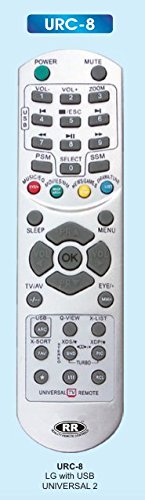
This image displays the KPH URC-8 universal remote control. It is white with grey buttons, featuring a standard layout including number keys, volume and channel controls, navigation buttons, and specific function keys like USB, Q-VIEW, and X-LIST. The top of the remote shows 'URC-8' and the bottom has the 'RR' logo with 'QUALITY REMOTE CONTROL' text.
The KPH URC-8 remote control is engineered to provide seamless control over your LG television and other compatible devices. Its ergonomic design ensures comfortable handling, while clearly labeled buttons facilitate intuitive operation. Key features include:
- Universal compatibility with various LG TV models.
- Dedicated USB function button for media playback.
- Standard TV control buttons: Power, Mute, Volume, Channel, Menu, Sleep.
- Numeric keypad for direct channel access.
- Navigation and OK buttons for menu interaction.
Setup
1. Battery Installation
- Locate the battery compartment cover on the back of the remote control.
- Slide the cover downwards or press the latch to open it.
- Insert two AAA batteries (not included), ensuring the positive (+) and negative (-) terminals align with the indicators inside the compartment.
- Replace the battery compartment cover by sliding it back into place until it clicks securely.
2. Initial Setup / Pairing
The KPH URC-8 remote is pre-programmed for many LG TV models. In most cases, it will work directly after battery installation. If your remote does not respond to your TV, follow these general programming steps:
- Ensure your TV is powered on.
- Point the remote at the TV.
- Press and hold the 'Power' button and the '0' button simultaneously for approximately 5 seconds until the indicator light on the remote blinks.
- Release the buttons. The remote is now in search mode.
- Test the remote by pressing the 'Power' button. If the TV turns off, the remote is successfully programmed.
- If the TV does not respond, repeat the process. Some universal remotes may require trying different codes or auto-search methods. Refer to the TV's manual for specific remote control pairing instructions if issues persist.
Operating Instructions
Familiarize yourself with the buttons on your KPH URC-8 remote control:
- Power: Turns the TV on or off.
- Mute: Mutes or unmutes the TV sound.
- VOL+/-: Adjusts the volume level.
- CH+/- (or P+/-): Changes TV channels.
- Numeric Keypad (0-9): Directly enters channel numbers.
- OK: Confirms selections in menus.
- Directional Arrows (Up/Down/Left/Right): Navigates through menus and options.
- MENU: Opens the TV's main menu.
- SLEEP: Sets the TV's sleep timer.
- TV/AV: Switches between TV and external input sources (e.g., HDMI, AV).
- USB: Activates the USB media player function on compatible LG TVs.
- Q-VIEW: Quickly switches between the current and previously viewed channel.
- X-LIST: Accesses a list of channels or programs.
- PSM, SELECT, SSM: These buttons may correspond to Picture Sound Mode, Select, and Sound Setting Mode depending on your TV model.
- Colored Buttons (Red, Green, Yellow, Blue): Functionality varies by TV model and content (e.g., teletext, smart TV features).
Maintenance
- Cleaning: Wipe the remote control with a soft, dry cloth. Do not use abrasive cleaners, waxes, or solvents.
- Battery Replacement: Replace batteries when the remote's response becomes sluggish or stops working. Always replace both batteries at the same time with new ones of the same type.
- Storage: If the remote will not be used for an extended period, remove the batteries to prevent leakage and corrosion. Store in a cool, dry place away from direct sunlight.
- Avoid Damage: Do not drop the remote, expose it to water or excessive humidity, or place it near heat sources.
Troubleshooting
- Remote not working:
- Check if the batteries are inserted correctly with the correct polarity.
- Replace old batteries with new ones.
- Ensure there are no obstructions between the remote and the TV's infrared sensor.
- Confirm the remote is pointed directly at the TV.
- Re-attempt the programming/pairing steps if the remote was previously working but stopped.
- Specific buttons not responding:
- This could indicate a dirty contact under the button. Try pressing the button firmly several times.
- If only a few buttons are affected, the remote might be damaged.
- Limited functionality with TV:
- While universal, some advanced or smart TV functions may not be supported by all universal remotes.
- Ensure your TV model is within the compatible range for this remote.
Specifications
| Attribute | Detail |
|---|---|
| Brand | KPH |
| Model Number | BPT814 (URC-8) |
| Connectivity Technology | Infrared (IR) |
| Controller Type | Button Control |
| Power Source | 2 x AAA Batteries (not included) |
| Compatibility | LG TVs (Universal 2) |
Warranty and Support
For warranty information and customer support, please refer to the documentation provided with your purchase or contact the retailer. KPH products are designed for reliability, and any specific warranty terms will be outlined by the manufacturer or seller at the time of purchase. Keep your proof of purchase for any warranty claims.
For further assistance or technical queries, please reach out to the KPH customer service or the point of purchase.