
1. Product Overview
The iLive ITB105B is a 20-inch compact sound bar designed to enhance your audio experience for computers, televisions, or other compatible devices. It features Bluetooth 2.0 technology for wireless audio streaming and multiple wired input options for versatile connectivity.
Key Features
- Supports A2DP (Advanced Audio Distribution Profile) for high-quality Bluetooth audio.
- Built-in stereo speakers for clear sound output.
- Digital volume control for precise audio adjustment.
- Multiple audio inputs: 3.5mm line-in, RCA stereo auxiliary, and Optical.
2. Package Contents
Verify that all items are present in the package:
- iLive ITB105B 20-Inch Compact Bluetooth Sound Bar
- Remote Control
- AC Power Adapter
- 3.5mm Audio Cable
- RCA Stereo Audio Cable
- Wall Mount Kit (screws and anchors)
- User Manual
3. Controls and Connections
Familiarize yourself with the sound bar's controls and connection ports before setup.
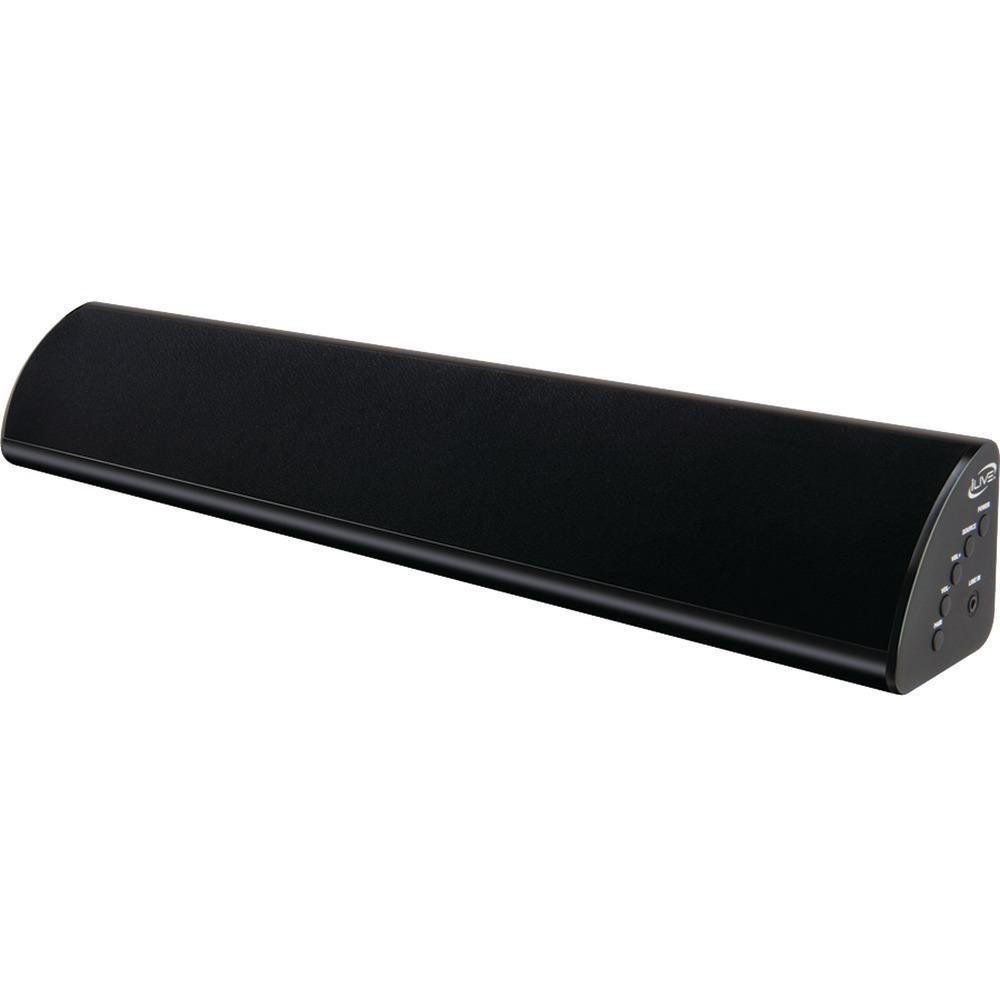
Front view of the iLive ITB105B 20-Inch Compact Sound Bar, showcasing its sleek design and speaker grille.
Front/Top Panel Controls
- Power Button: Turns the sound bar on or off.
- Input/Source Button: Cycles through available audio inputs (Bluetooth, AUX, RCA, Optical).
- Volume Up/Down Buttons: Adjusts the master volume level.
- Bluetooth Pairing Button: Initiates Bluetooth pairing mode.
Rear Panel Connections
- DC Power Input: Connect the AC power adapter here.
- AUX In (3.5mm): Connect devices with a 3.5mm audio output.
- RCA Audio In (L/R): Connect devices with RCA stereo audio outputs.
- Optical In: Connect devices with an optical digital audio output.
4. Setup
4.1 Power Connection
- Connect the AC power adapter to the DC Power Input port on the rear of the sound bar.
- Plug the other end of the AC power adapter into a standard wall outlet.
4.2 Audio Connections
Choose one of the following methods to connect your audio source:
Bluetooth Pairing
- Power on the sound bar.
- Press the Input/Source button until the Bluetooth indicator light is active (usually a flashing blue light).
- On your Bluetooth-enabled device (smartphone, tablet, computer), enable Bluetooth and search for new devices.
- Select "ITB105B" from the list of available devices.
- Once paired, the Bluetooth indicator light will become solid blue, and you can play audio wirelessly.
3.5mm AUX Input
- Connect one end of the 3.5mm audio cable to the AUX In port on the sound bar.
- Connect the other end of the 3.5mm audio cable to the headphone jack or audio output of your device.
- Press the Input/Source button on the sound bar until the AUX indicator light is active.
RCA Input
- Connect the red and white plugs of the RCA stereo audio cable to the corresponding RCA Audio In ports on the sound bar.
- Connect the other end of the RCA cable to the audio output ports of your device (e.g., TV, DVD player).
- Press the Input/Source button on the sound bar until the RCA indicator light is active.
Optical Input
- Connect an optical audio cable (not included) to the Optical In port on the sound bar.
- Connect the other end of the optical cable to the optical digital audio output of your device.
- Press the Input/Source button on the sound bar until the Optical indicator light is active.
5. Operation
5.1 Power On/Off
Press the Power button on the sound bar or the remote control to turn the unit on or off.
5.2 Input Selection
Press the Input/Source button on the sound bar or the remote control repeatedly to cycle through the available audio inputs: Bluetooth, AUX, RCA, and Optical. The corresponding indicator light will illuminate to show the active input.
5.3 Volume Control
Use the Volume Up (+) and Volume Down (-) buttons on the sound bar or the remote control to adjust the audio output level. Ensure the volume on your connected audio source is also at an appropriate level.
6. Maintenance
Proper care ensures the longevity of your sound bar:
- Cleaning: Use a soft, dry cloth to clean the exterior of the sound bar. Do not use liquid cleaners or abrasive materials.
- Placement: Place the sound bar on a stable, flat surface or mount it securely using the provided kit. Avoid placing it near heat sources, direct sunlight, or in areas with high humidity.
- Ventilation: Ensure adequate airflow around the unit to prevent overheating. Do not block ventilation openings.
- Power: Disconnect the power adapter from the wall outlet if the unit will not be used for an extended period.
7. Troubleshooting
If you encounter issues with your sound bar, refer to the following common problems and solutions:
| Problem | Possible Solution |
|---|---|
| No power | Ensure the AC power adapter is securely connected to both the sound bar and a working wall outlet. Try a different outlet. |
| No sound |
|
| Bluetooth pairing fails |
|
| Remote control not working |
|
| Interference from TV remote | Some TV remote controls may use similar infrared frequencies. If your TV remote causes unintended actions on the sound bar, try repositioning the sound bar or using the sound bar's manual controls. |
8. Specifications
| Feature | Detail |
|---|---|
| Model Name | ITB105B |
| Speaker Type | Soundbar |
| Connectivity Technology | Bluetooth |
| Wireless Communication Technology | Bluetooth |
| Surround Sound Channel Configuration | 2.0 |
| Audio Output Mode | Stereo |
| Control Method | Touch, Remote |
| Power Source | AC |
| Speaker Size | 20 Inches |
| Item Weight | 1.6 Pounds |
| Product Dimensions | 17 x 4.5 x 4.5 inches |
| Impedance | 100 Ohms |
| Color | Blue |
| Mounting Type | Bar Mount |
| Manufacturer | iLive |
| UPC | 047323151057 |
9. Warranty and Support
For warranty information or technical support, please refer to the documentation included with your purchase or visit the official iLive Electronics website. Keep your proof of purchase for warranty claims.
Contact Information: Please refer to the manufacturer's official website or product packaging for the most current support contact details.


