
Product Overview
The LG LT800P replacement water filter is designed to provide cleaner, fresher, and better-tasting water and ice for your household. This filter effectively reduces various contaminants found in drinking water, ensuring high-quality filtration for your refrigerator.
- Provides cleaner, fresher, and better tasting water and ice.
- NSF-certified to reduce contaminants including pesticides, chemicals, detergents, cysts, asbestos, mercury, lead, and benzene.
- Filters out some herbicides, pesticides, and pharmaceuticals.
- Utilizes advanced technology for effective water filtration.

Image: The LG LT800P water filter shown alongside its retail packaging, highlighting the product's appearance and branding.
Specifications
| Feature | Detail |
|---|---|
| Model Number | LT800P (ADQ73613401, ADQ73613408, ADQ75795104) |
| Product Dimensions | 1.9"D x 1.9"W x 7"H |
| Item Weight | 0.36 Pounds |
| External Testing Certification | NSF (NSF42, NSF53, NSF401) |
| Product Benefits | Water Filtration |
| Capacity | 200 Gallons |
| Recommended Replacement Interval | Every 6 months or 200 gallons |
Compatible Refrigerator Models
The LG LT800P / LT800PC replacement water filter is compatible with the following LG refrigerator models:
- LMXS30776S
- LMXS30746S
- LMXC24746S
- LSC22991ST
- LSXS26466S
- LSXS26366S
- LSXS26326S
- LSXS26326W
- LSXS26326B
- LSXS22423S
- LSXS22423W
- LSXS22423B
Installation
Follow these general steps for installing your LG LT800P water filter. Specific instructions may vary slightly by refrigerator model; refer to your refrigerator's manual for precise details.
- Locate the water filter compartment in your refrigerator. This is typically found in the upper right corner of the fresh food compartment or in the door.
- Twist the old filter counter-clockwise to unlock it. Pull the filter straight out to remove it.
- Remove the protective cap from the new filter.
- Align the new filter with the filter housing. Push the filter in and twist it clockwise until it locks into place. Ensure a secure fit to prevent leaks.
- After installation, flush approximately 2 gallons of water through the dispenser to remove any air from the system and clear carbon fines. This is a normal process for new carbon-based filters.
- Reset the 'Filter Status' light on your refrigerator's control panel, if applicable. Refer to your refrigerator's manual for instructions on resetting the filter indicator.

Image: A detailed view of the filter's connection end, showing the seals that ensure a leak-free fit.

Image: The LG LT800P water filter standing upright, displaying its full form and labeling.
Maintenance
To ensure optimal performance and continued reduction of contaminants, it is crucial to replace your LG LT800P water filter regularly.
- Replace the filter every 6 months or after filtering 200 gallons of water, whichever comes first.
- Regular replacement maximizes contaminant reduction and maintains water quality.
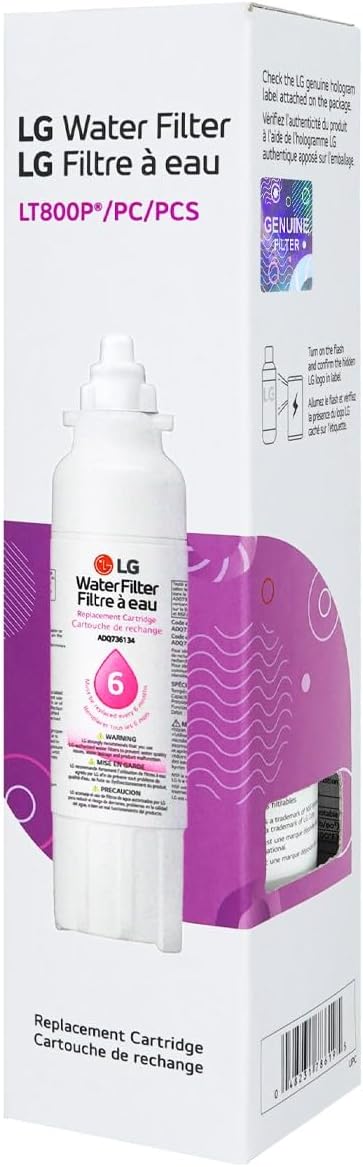
Image: The LG LT800P water filter and its packaging, emphasizing the recommended 6-month replacement interval.
Troubleshooting
If you experience issues such as leaks or reduced water flow after filter replacement, ensure the filter is correctly seated and twisted fully into place. Using non-genuine filters can lead to various problems.
- Leaks: Ensure the filter is properly installed and fully twisted into its housing. Check the O-rings for any damage or misalignment.
- Reduced Water Flow: This may indicate a clogged filter. If the filter is old or has reached its capacity, replace it. Ensure proper flushing after installation.
- Water Taste/Odor: If water quality declines, it's likely time for a filter replacement. Ensure you are using a genuine LG filter.
Warning: Using non-genuine filters can cause leaks or damage to your refrigerator. The limited warranty does not cover damages or product failure caused by the use of unauthorized third-party accessories and parts.
Warranty and Support
LG strongly recommends using only genuine LG water filters to prevent water quality issues, water leakage, and product malfunction. The use of unauthorized third-party accessories and parts may void your product's limited warranty.
For further support or inquiries, please visit the official LG website or contact LG customer service.

Image: NSF certification logo in a laboratory setting, signifying the filter's adherence to strict quality and safety standards.
Additional Features
LG ThinQ App
Control and monitor your LG appliances with ease using the LG ThinQ app. It allows you to check the status of your smart appliances and register your product for warranty purposes.

Image: A user interacting with the LG ThinQ app on a smartphone, with QR codes provided for easy download from app stores.
Smart Reorders with Amazon Alexa
Your LG ThinQ appliances can detect when supplies like water filters are running low and automatically place a smart reorder through Amazon. Connect your LG ThinQ account with Alexa to utilize this convenient feature.

Image: An Amazon Echo device and a smartphone screen demonstrating the smart reorder setup process via Amazon Alexa.