
Introduction
This manual provides comprehensive instructions for the proper use, installation, and maintenance of your CableWholesale Cat6 Ethernet Crossover Cable. Designed for reliable network connectivity, this cable facilitates direct device-to-device communication without the need for an intermediary network hub or switch, making it ideal for specific networking applications.

Figure 1: CableWholesale Cat6 Ethernet Crossover Cable. This image displays the two ends of the red Cat6 crossover cable, highlighting the RJ45 connectors with their clear plastic housings and gold-plated contacts.
Setup
The CableWholesale Cat6 Ethernet Crossover Cable is designed for direct connection between two network devices of the same type, such as two computers, or a computer and a DSL/cable modem, without requiring a network switch or router for the connection. Modern devices often feature Auto MDI/MDI-X, which automatically detects the cable type and adjusts accordingly, simplifying setup.
Connecting Your Cable
- Identify Ports: Locate the Ethernet (RJ45) ports on the two devices you wish to connect. These ports are typically found on the back of desktop computers, laptops, modems, and network cards.
- Insert Connector 1: Gently insert one end of the Cat6 Crossover Cable into the Ethernet port of the first device until it clicks into place. The snagless boot design helps prevent the connector clip from snagging during installation.
- Insert Connector 2: Insert the other end of the cable into the Ethernet port of the second device, ensuring it clicks securely.
- Verify Connection: Most Ethernet ports have indicator lights that illuminate or flash when a successful connection is established and data is being transmitted. Consult your device's manual for specific indicator light behavior.

Figure 2: Key Features of the Cat6 Crossover Cable. This diagram highlights the RJ45 8P8C connector, 24 AWG stranded copper, 350 MHz bandwidth, UL listing, RoHS compliance, and snagless mold boot, emphasizing the cable's robust construction and compliance with industry standards.
Operating
The CableWholesale Cat6 Ethernet Crossover Cable is designed for high-speed data transfer, supporting Gigabit Ethernet applications and performing at high-data transfer rates. It is suitable for Fast Ethernet, Gigabit Ethernet, and 10-Gigabit Ethernet, supporting up to 350 MHz.
Typical Applications
- Direct PC-to-PC Connection: For transferring files directly between two computers without a network device.
- DSL/Cable Modem to PC: Directly connecting a modem to a computer.
- Gaming Console System Link: Connecting two gaming consoles for direct multiplayer gaming.
- Network Device Configuration: Direct connection to network devices (routers, switches) for initial setup or troubleshooting.
Maintenance
Proper care and handling will extend the life and maintain the performance of your Cat6 Ethernet Crossover Cable.
- Avoid Sharp Bends: Do not bend the cable sharply, as this can damage the internal copper conductors and reduce performance. The minimum bend radius should be respected.
- Protect Connectors: The RJ45 connectors are delicate. Avoid pulling the cable by the cord; always grasp the connector housing when plugging or unplugging. The snagless boot provides additional protection for the connector clip.
- Keep Clean: Keep the connectors free from dust and debris. Use compressed air or a lint-free cloth to gently clean the contacts if necessary.
- Proper Storage: When not in use, coil the cable loosely and store it in a dry, cool place away from direct sunlight or extreme temperatures. Avoid tangling with other cables.

Figure 3: Internal Construction of the Cat6 Cable. This image illustrates the twisted pairs of stranded pure copper conductors, PVC jacket, and gold-plated contacts, demonstrating the quality materials used for optimal signal transmission and durability.
Troubleshooting
If you experience issues with your CableWholesale Cat6 Ethernet Crossover Cable, try the following troubleshooting steps:
- No Link Light: Ensure both ends of the cable are securely plugged into their respective ports. Try unplugging and re-plugging the cable. Check if the Ethernet ports on both devices are active and enabled.
- Slow Connection: Verify that both devices support the desired network speed (e.g., Gigabit Ethernet). Ensure there are no other network bottlenecks. Test the cable with another known-working device or cable to isolate the issue.
- Intermittent Connection: Check for any physical damage to the cable, such as kinks, cuts, or damaged connectors. Ensure the cable is not running near sources of strong electromagnetic interference (EMI), although this cable is unshielded, excessive EMI can still affect performance.
- Cable Not Recognized: Restart both connected devices. Update network drivers on your computer if applicable.
If issues persist after following these steps, the cable may be faulty, or there might be an issue with one of the connected devices. Consider testing with a different, known-working cable.
Specifications
The CableWholesale Cat6 Ethernet Crossover Cable is manufactured to meet stringent industry standards, ensuring reliable performance.
| Feature | Specification |
|---|---|
| Brand | CableWholesale |
| Model Number | 10X8-33703 |
| Cable Type | Cat6 Ethernet Crossover |
| Connector Type | RJ45 Gold Plate Connector |
| Wire Gauge | 24 AWG Stranded Copper |
| Pairs | 4 Pair Unshielded Twisted Pair (UTP) |
| Data Transfer Rate | Up to 10 Gigabytes Per Second (suitable for Gigabit Ethernet, 10-Gigabit Ethernet) |
| Frequency | Up to 350 MHz |
| Boot Type | Snagless Boot |
| Compliance | EIA/TIA-568-C standard, RoHS Compliant, ETL Verified, UL/CSA approved |
| Color | Red (for this specific variant) |
| Length | 3 Foot (for this specific variant) |
| Indoor/Outdoor Usage | Indoor |
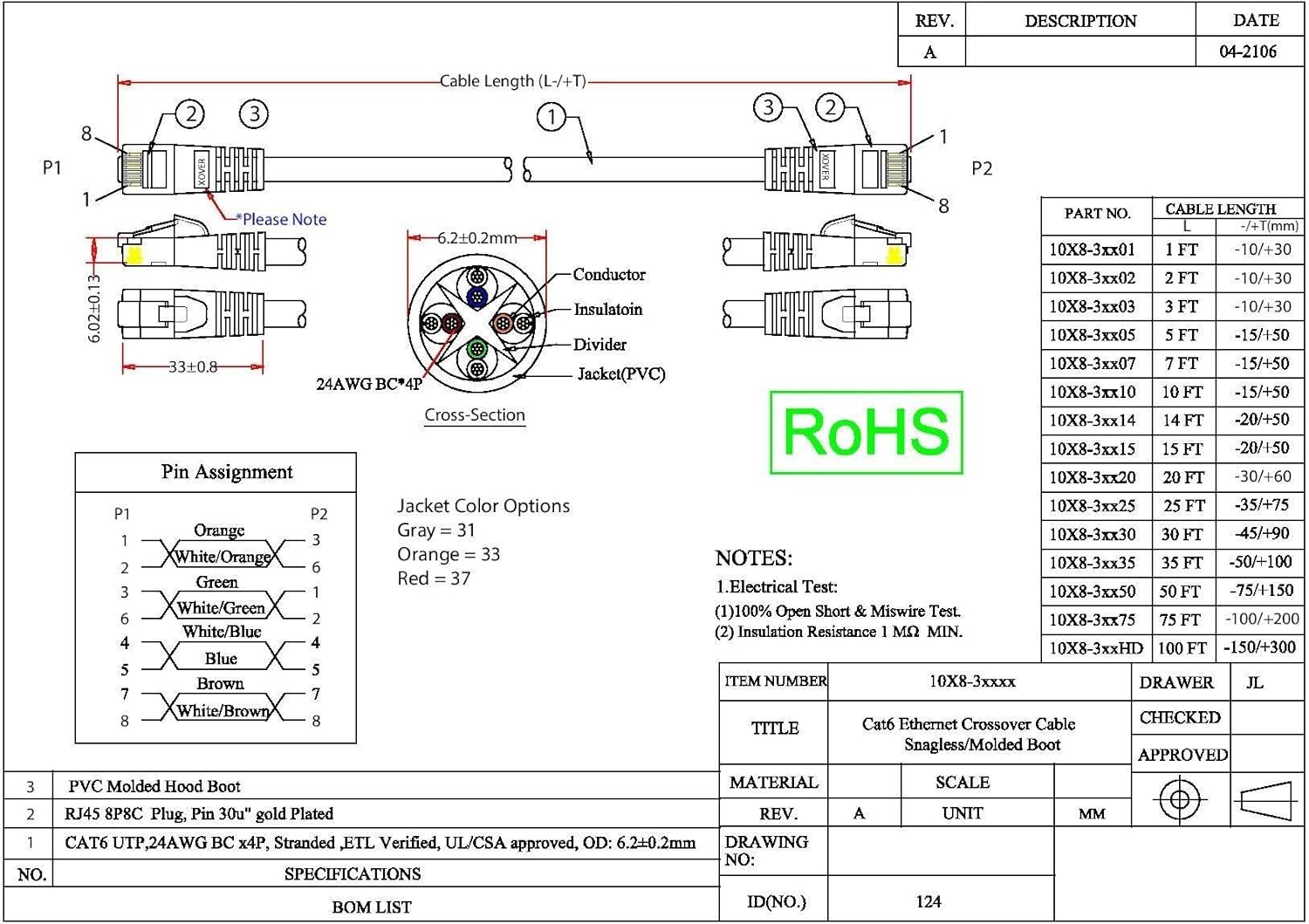
Figure 4: Technical Diagram and Pin Assignment. This detailed schematic provides the cable's dimensions, cross-section, and crucial pin assignment (T568B standard) for both P1 and P2 connectors, essential for understanding its crossover functionality. It also lists material specifications and compliance.
Warranty and Support
CableWholesale products are designed for reliability and performance. For specific warranty information and support, please refer to the official CableWholesale website or contact their customer service directly. Details regarding returns and replacements are typically available through your point of purchase.
Contact Information: Please visit the CableWholesale Store on Amazon for further assistance and product information.