
BLACK+DECKER KS501-QS
BLACK+DECKER KS501-QS 400W Jigsaw User Manual
Model: KS501-QS
1. Introduction
Thank you for choosing the BLACK+DECKER KS501-QS 400W Jigsaw. This manual provides essential information for the safe and effective operation, maintenance, and troubleshooting of your new tool. Please read this manual thoroughly before use and keep it for future reference.
2. Safety Information
Always follow basic safety precautions when using electrical tools to reduce the risk of fire, electric shock, and personal injury.
- Work Area Safety: Keep your work area clean and well-lit. Cluttered or dark areas invite accidents.
- Electrical Safety: Do not expose power tools to rain or wet conditions. Do not abuse the cord.
- Personal Safety: Always wear eye protection. Use hearing protection when operating for extended periods. Dress properly; avoid loose clothing or jewelry.
- Tool Use and Care: Do not force the power tool. Use the correct power tool for your application. Disconnect the plug from the power source before making any adjustments, changing accessories, or storing power tools.
3. Product Overview
Familiarize yourself with the components of your BLACK+DECKER KS501-QS Jigsaw.
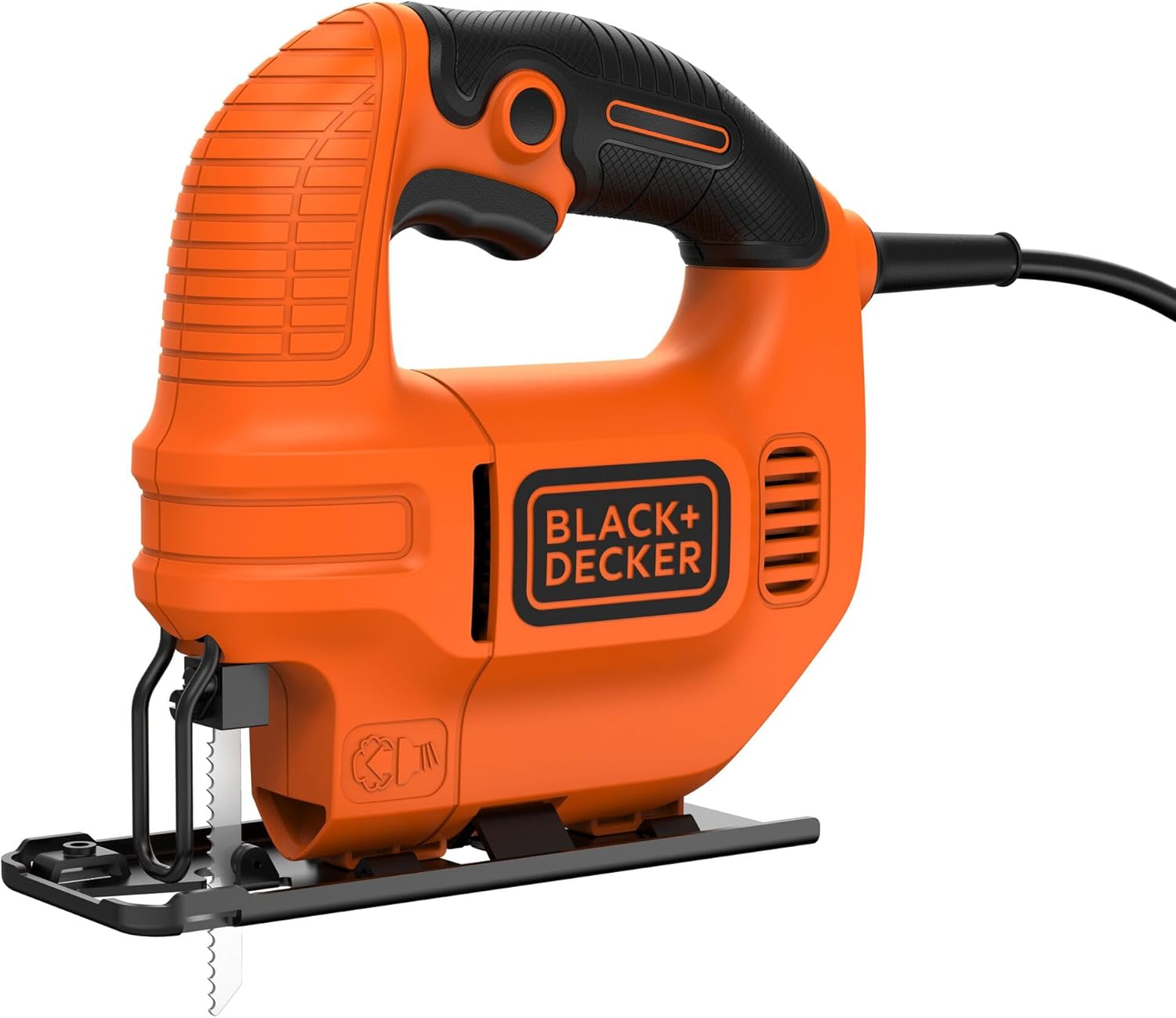


Key Components:
- Ergonomic Handle: Designed for comfortable operation and reduced fatigue.
- Blade Clamp: Secures the jigsaw blade in place.
- Base Plate (Shoe): Provides stability and guides the saw along the cutting line.
- On/Off Switch: Activates and deactivates the tool.
- Locking Switch: For continuous operation during long cuts.
- Chip Blowing Function: Directs air to clear sawdust from the cutting line for better visibility.
4. Setup
4.1 Blade Installation
- Ensure the jigsaw is unplugged from the power source.
- Locate the blade clamp mechanism.
- Insert the shank of the jigsaw blade into the blade clamp until it clicks securely into place. Ensure the teeth of the blade are facing forward.
- Gently pull on the blade to confirm it is firmly seated and will not come loose during operation.
4.2 Power Connection
Connect the power cord to a suitable 230V AC power outlet. Ensure the outlet is grounded and capable of supplying the required wattage (400W).
5. Operating Instructions
5.1 Basic Cutting
- Secure the workpiece firmly to prevent movement during cutting.
- Hold the jigsaw firmly with both hands, ensuring a stable grip on the ergonomic handle.
- Place the front of the base plate flat on the workpiece, ensuring the blade is clear of the material.
- Press the On/Off switch to start the saw. Allow the blade to reach full speed before beginning the cut.
- Guide the saw along the desired cutting line with steady, even pressure. Do not force the tool.
- Utilize the chip blowing function to maintain a clear view of the cutting line.
- Once the cut is complete, release the On/Off switch and wait for the blade to stop completely before lifting the saw from the workpiece.

5.2 Adjusting for Bevel Cuts
The base plate can be adjusted for bevel cuts at angles between 0 and 45 degrees.
- Unplug the tool.
- Loosen the screw or lever that secures the base plate.
- Tilt the base plate to the desired angle (0° to 45°).
- Tighten the screw or lever to secure the base plate in position.
5.3 Using the Locking Switch
For extended cutting tasks, the locking switch can be engaged to keep the tool running without continuously holding the trigger. To activate, press the On/Off switch, then press the locking switch. To disengage, press the On/Off switch again.
6. Maintenance
Regular maintenance ensures the longevity and optimal performance of your jigsaw.
- Cleaning: After each use, unplug the tool and use a soft brush or cloth to remove sawdust and debris from the ventilation slots and blade area. Do not use water or chemical cleaners.
- Blade Replacement: Replace dull or damaged blades promptly to ensure clean cuts and prevent strain on the motor.
- Cord Inspection: Regularly inspect the power cord for any signs of damage. If damaged, have it repaired by a qualified service technician.
- Storage: Store the jigsaw in a dry, secure place out of reach of children.
7. Troubleshooting
If you encounter issues with your jigsaw, refer to the following common problems and solutions:
| Problem | Possible Cause | Solution |
|---|---|---|
| Tool does not start. | No power supply; faulty switch; damaged cord. | Check power connection and outlet. Inspect cord for damage. If issues persist, contact service. |
| Blade not cutting efficiently or binding. | Dull or incorrect blade; forcing the tool; improper material support. | Replace blade. Reduce feed pressure. Ensure workpiece is securely clamped. |
| Excessive vibration. | Loose blade; damaged blade; worn internal components. | Ensure blade is securely installed. Replace blade if damaged. If vibration continues, seek professional service. |
8. Specifications
| Feature | Detail |
|---|---|
| Brand | BLACK+DECKER |
| Model Number | KS501-QS |
| Power Source | Corded Electric |
| Wattage | 400 watts |
| Voltage | 230 Volts |
| Speed | 3000 RPM |
| Blade Length | 65 Millimeters |
| Cutting Angle | 0 to 45 Degrees (Adjustable) |
| Item Weight | 1.4 Kilograms (3.08 pounds) |
| Product Dimensions | 7.48"L x 3.07"W x 11.5"H |
| Special Feature | Ergonomic, Chip Blowing Function |
| Surface Recommendation | Wood |
9. Warranty and Support
This BLACK+DECKER product is covered by a 2-year guarantee from the date of purchase. For warranty claims or technical support, please contact BLACK+DECKER customer service or visit their official website.
For information on product recycling and environmental responsibility, please visit: Stanley Black & Decker Packaging Recycling
For more information about BLACK+DECKER products, visit: www.blackanddecker.com
Ask a question about this manual
Ask about setup, troubleshooting, compatibility, parts, safety, or missing instructions. Manuals+ will review the question and use this page’s manual context to help answer it.