
1. Introduction
1.1 Product Overview
The MILANIX MX7U is a compact and portable 7-inch LCD television monitor designed for versatile use. It features a built-in digital tuner for receiving over-the-air broadcasts, a rechargeable lithium battery for cordless operation, and multiple input options including USB, SD card, and AV input. This device is suitable for various environments, from home use to travel and outdoor activities.

Image 1.1: The MILANIX MX7U Portable TV, showing the main unit, remote control, and external antenna.
1.2 Package Contents
Please verify that all items listed below are included in your package. If any items are missing or damaged, please contact customer support.
- 7-inch Digital LCD Display Unit (MX7U)
- Full Function Wireless Remote Control
- External High Power Antenna
- AC Wall Charger
- Car Charger (12V)
- AV Cable
- Removable Stand
- Instruction Manual (this document)

Image 1.2: All components included in the MILANIX MX7U package, laid out for inspection.
2. Setup
2.1 Attaching the Stand
The MILANIX MX7U comes with a removable stand for stable placement. Align the stand with the mounting slot on the bottom of the TV unit and secure it firmly. The stand allows for adjustable viewing angles.

Image 2.1: The MILANIX MX7U with its dimensions and an illustration of the 2-way stand option.
2.2 Powering the Device
The TV can be powered using the included AC wall charger, car charger, or its internal rechargeable lithium battery.
- AC Power: Connect the AC wall charger to the DC IN port on the side of the TV and plug it into a standard wall outlet.
- Car Power: Connect the car charger to the DC IN port and plug it into your vehicle's 12V power socket.
- Battery Power: The built-in lithium battery provides portable power. Ensure the battery is charged before use. The battery charges automatically when connected to AC or car power.
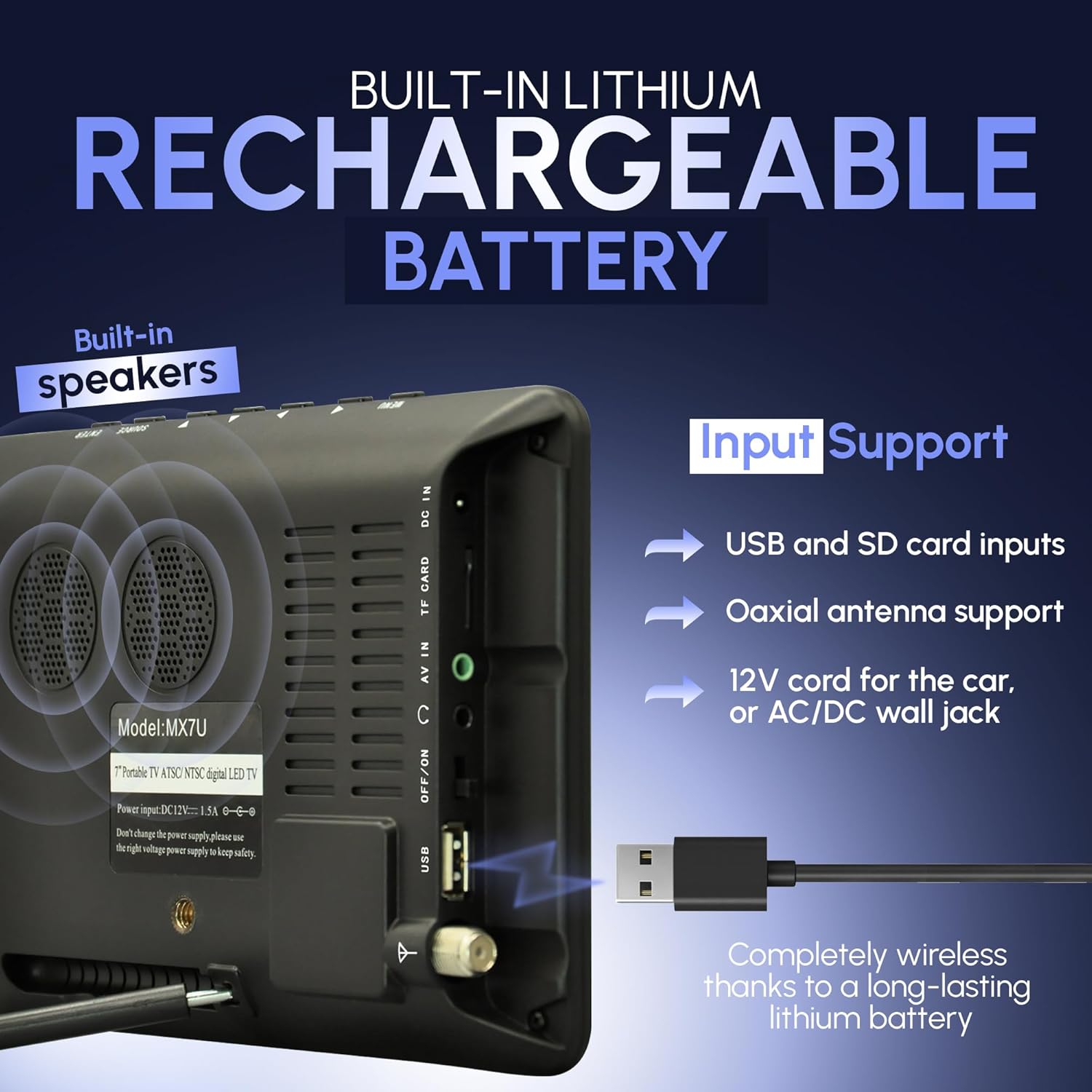
Image 2.2: Side panel of the MILANIX MX7U, highlighting the DC IN, AV IN, TF CARD, and USB ports, along with built-in speakers.
2.3 Antenna Connection
For receiving digital TV broadcasts, connect the included external high-power antenna to the coaxial antenna input port on the TV. Position the antenna for optimal reception. You may need to adjust its position to find the best signal.
3. Operating Instructions
3.1 Power On/Off
Press the POWER button on the remote control or the OFF/ON switch on the side of the TV to turn the unit on or off.
3.2 Initial Channel Scan
Upon first use or after moving to a new location, you will need to scan for available digital channels:
- Ensure the antenna is properly connected and positioned.
- Press the MENU button on the remote.
- Navigate to the "Channel" or "Setup" menu.
- Select "Auto Scan" or "Auto Tuning" and confirm.
- The TV will search for and store all available digital channels. This process may take several minutes.
3.3 Basic TV Operation
- Channel Selection: Use the CH+ / CH- buttons on the remote or TV to change channels. You can also directly enter channel numbers using the numeric keypad on the remote.
- Volume Adjustment: Use the VOL+ / VOL- buttons to adjust the volume.
- Mute: Press the MUTE button on the remote to temporarily silence the audio.
- Input Source: Press the INPUT button on the remote to switch between TV, AV, USB, and SD card input sources.
3.4 Media Playback (USB/SD Card)
The MILANIX MX7U supports playback of various media files from USB drives and SD/TF cards.
- Insert a USB drive into the USB port or an SD/TF card into the TF CARD slot.
- Press the INPUT button on the remote and select "USB" or "Card" as the source.
- Use the navigation buttons on the remote to browse your files and select the desired media for playback.
Supported Formats: MP3, JPG, MPEG2_HD, MPEG4, MPEG4_HD, H.264, FLV, MVC.

Image 3.1: Supported media formats for the MILANIX MX7U, including MP3, JPG, MPEG2_HD, MPEG4, MPEG4_HD, H.264, FLV, and MVC.
3.5 AV Input
Connect external devices such as DVD players or gaming consoles using the included AV cable to the AV IN port. Select "AV" as the input source using the INPUT button.
3.6 Remote Control Functions
The full-function remote control provides access to all TV features. Familiarize yourself with the buttons for power, volume, channel, menu navigation, input selection, and media playback controls.
4. Maintenance
4.1 Cleaning the TV
To clean the screen and casing, use a soft, dry cloth. For stubborn marks, lightly dampen the cloth with water or a mild, non-abrasive screen cleaner. Avoid using harsh chemicals or abrasive materials, as these can damage the surface.
4.2 Battery Care
The built-in lithium battery is designed for long-lasting performance. To maximize battery life:
- Avoid fully discharging the battery frequently.
- Store the TV in a cool, dry place when not in use for extended periods.
- Recharge the battery periodically if stored for a long time to prevent deep discharge.
5. Troubleshooting
If you encounter issues with your MILANIX MX7U, please refer to the following common problems and solutions:
| Problem | Possible Cause | Solution |
|---|---|---|
| No power | Battery discharged; power adapter not connected; power switch off. | Charge the battery; ensure power adapter is securely connected; turn the power switch to ON. |
| "No Signal" message | Antenna not connected; poor antenna position; no digital broadcasts in area; incorrect input source. | Connect antenna securely; adjust antenna position; perform a channel scan; ensure input source is set to TV. |
| No sound | Volume too low; muted; audio settings incorrect. | Increase volume; unmute the TV; check audio settings in the menu. |
| Remote control not working | Batteries depleted; obstruction between remote and TV; remote not pointed at sensor. | Replace remote batteries; remove obstructions; point remote directly at the TV's IR sensor. |
| Cannot play media from USB/SD | Incorrect input source; unsupported file format; corrupted media. | Select USB/Card input; ensure files are in supported formats (MP3, JPG, MPEG4, etc.); try different media. |
If the problem persists after trying these solutions, please contact MILANIX customer support.
6. Specifications
| Feature | Detail |
|---|---|
| Brand | MILANIX |
| Model Number | MX7U |
| Screen Size | 7 Inches |
| Display Technology | LCD |
| Resolution | 720p (HD Ready) |
| Refresh Rate | 60 Hz |
| Aspect Ratio | 16:9 |
| Tuner Type | Built-in Digital TV Tuner (ATSC/NTSC) |
| Connectivity | USB, AV Input, Coaxial Antenna Input, Earphone Jack |
| Media Card Slot | SD Card / TF Card |
| Power Source | AC/DC Adapter, Built-in Lithium Rechargeable Battery |
| Speakers | Built-in |
| Product Dimensions (L x W x H) | 12.45 x 22.86 x 20.32 cm (approx.) |
| Weight | 830 g (approx.) |
7. Warranty and Support
MILANIX products are manufactured to high-quality standards. This product is covered by a limited warranty. Please refer to the warranty card included in your package for specific terms and conditions.
For technical support, troubleshooting assistance, or warranty claims, please contact MILANIX customer service. Contact information can typically be found on the product packaging or the official MILANIX website.
No official product videos were provided in the product data for embedding in this manual.