
Sony CCD-TRV62
Sony CCD-TRV62 Hi8 NTSC Stereo Analog Camcorder User Manual
Model: CCD-TRV62
Introduction
This manual provides comprehensive instructions for the operation, maintenance, and troubleshooting of your Sony CCD-TRV62 Hi8 NTSC Stereo Analog Camcorder. This camcorder is designed for recording and playing back video on Hi8 tapes, and also supports playback of 8mm analog tapes through its A/V and S-video jacks. Please read this manual thoroughly to ensure proper use and to maximize the lifespan of your device.
What's in the Box
Upon unboxing your Sony CCD-TRV62 camcorder, please verify that all the following items are included:
- Sony CCD-TRV62 Hi8 NTSC Stereo Analog Camcorder
- AC Adapter
- A/V Cable (for audio/video output)
- S-video Cable (for higher quality video output)

Image: The Sony CCD-TRV62 camcorder displayed with its essential accessories, including the AC adapter, A/V cable, and S-video cable, laid out on a wooden surface.
Setup
Powering the Camcorder
- Connect the AC Adapter: Insert the small plug of the AC adapter into the DC IN jack on the camcorder.
- Plug into Power Outlet: Plug the AC adapter's power cord into a standard electrical outlet. The camcorder will now receive power.
Connecting to a TV/Monitor for Playback
To view your recorded footage on a television or monitor, use the provided A/V or S-video cables.
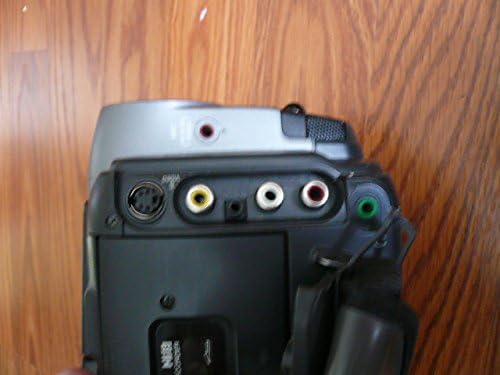
Image: A close-up view of the rear panel of the Sony CCD-TRV62 camcorder, highlighting the various input/output ports, including the S-video, A/V (RCA), and DC IN jacks.
- Using A/V Cable (RCA):
- Connect the yellow plug of the A/V cable to the video input (yellow) on your TV.
- Connect the white plug to the left audio input (white) on your TV.
- Connect the red plug to the right audio input (red) on your TV.
- Connect the other end of the A/V cable to the corresponding A/V OUT jack on the camcorder.
- Using S-video Cable (for improved video quality):
- Connect the S-video cable to the S-video OUT jack on the camcorder and the S-video IN jack on your TV.
- For audio, you will still need to use the white and red RCA plugs of the A/V cable, connecting them from the camcorder's A/V OUT to your TV's audio inputs.
- Select TV Input: Switch your TV's input source to the corresponding A/V or S-video input.
Operating the Camcorder
Inserting a Tape
- Open the Cassette Compartment: Locate the EJECT button or lever, usually on the top or side of the camcorder, and press/slide it to open the cassette compartment.
- Insert Tape: Gently insert a Hi8 or 8mm analog video cassette with the tape window facing outwards, ensuring it clicks into place.
- Close Compartment: Close the cassette compartment until it latches securely.

Image: A side view of the Sony CCD-TRV62 camcorder, illustrating the tape compartment area, the "Handycam Vision" branding, and various control buttons such as zoom and focus.
Recording Video
- Power On: Ensure the camcorder is powered on (connected to AC adapter).
- Open LCD Screen/Viewfinder: Open the LCD screen or pull out the viewfinder to activate the display.
- Select Recording Mode: Set the camcorder to camera/recording mode, typically via a switch or dial.
- Adjust Focus and Zoom: Use the focus ring/buttons and zoom lever to compose your shot. The camcorder features a 30x optical zoom and SteadyShot image stabilization.
- Start Recording: Press the REC START/STOP button to begin recording. The recording indicator will appear on the screen.
- Stop Recording: Press the REC START/STOP button again to stop recording.
Playing Back Tapes
- Insert Tape: Ensure a Hi8 or 8mm analog tape is inserted.
- Connect to TV (if desired): Connect the camcorder to a TV/monitor as described in the "Setup" section.
- Select Playback Mode: Switch the camcorder to VCR/Playback mode.
- Use Playback Controls: Use the PLAY, REW, FF, PAUSE, and STOP buttons to control tape playback.
Maintenance
Proper maintenance ensures the longevity and optimal performance of your camcorder.
- Cleaning the Lens: Use a soft, lint-free cloth specifically designed for optical lenses to gently wipe the lens surface. Avoid using abrasive materials or harsh chemicals.
- Cleaning the Camcorder Body: Wipe the exterior of the camcorder with a soft, dry cloth. For stubborn dirt, slightly dampen the cloth with water, then wipe dry. Do not use solvents.
- Tape Head Cleaning: If playback quality deteriorates (e.g., distorted video, static), the tape heads may need cleaning. Use a dry-type video head cleaning cassette sparingly, as overuse can cause wear.
- Storage: Store the camcorder in a cool, dry place away from direct sunlight, extreme temperatures, and high humidity. Remove any tape from the compartment before long-term storage.
Troubleshooting
This section addresses common issues you might encounter with your Sony CCD-TRV62 camcorder.
| Problem | Possible Cause | Solution |
|---|---|---|
| Camcorder does not power on. | AC adapter not connected properly or power outlet issue. | Ensure AC adapter is securely connected to both camcorder and a working power outlet. |
| No image on TV during playback. | Incorrect cable connection or TV input selection. | Verify A/V or S-video cables are correctly connected to both camcorder and TV. Ensure TV input is set to the correct source (e.g., Video 1, AV, S-Video). |
| Poor video quality during playback (static, distorted image). | Dirty video heads or damaged tape. | Use a dry-type video head cleaning cassette. Try playing a different tape to rule out tape damage. |
| Tape does not eject. | Mechanism jam or power issue. | Ensure camcorder is powered on. Gently try pressing the EJECT button again. Do not force the tape. If problem persists, seek professional service. |
Specifications
Key technical specifications for the Sony CCD-TRV62 Hi8 NTSC Stereo Analog Camcorder:
- Model: CCD-TRV62
- Video System: NTSC
- Recording Format: Hi8
- Playback Compatibility: Hi8, 8mm Analog
- Photo Sensor Technology: CCD
- Video Capture Resolution: 240p
- Screen Size: 3.5 Inches (LCD)
- Connectivity: RCA (A/V), S-Video
- Special Features: SteadyShot Image Stabilization, Lightweight design
- Power Source: AC Adapter (included)
Warranty and Support
This Sony CCD-TRV62 camcorder comes with a 30-day warranty from the date of purchase. Please note that there is no return policy for video equipment. For any technical assistance or warranty claims, please contact the seller directly.
For general product information or to explore other Sony products, you may visit the official Sony store on Amazon: Sony Store.
Related Documents - CCD-TRV62
 |
Sony CCD-TRV Series Camcorder Service Manual Comprehensive service manual for Sony CCD-TRV series camcorders, including models CCD-TRV15, TRV15E, TRV15EP, TRV15PK, TRV25, TRV25PK, TRV35, TRV35E, TRV65, TRV65PK, TRV85, TRV93, TRV215, TRV615, and TRV815. Covers specifications, disassembly, block diagrams, circuit board details, and detailed adjustment procedures for camera, mechanical, and video sections. |
 |
Sony CCD-TRV108 Analog Handycam Camcorder: Features and Specifications Detailed overview of the Sony CCD-TRV108 Analog Handycam Camcorder, including its key features like Video Hi8 recording, 20x optical zoom, NightShot infrared, and comprehensive technical specifications. |
 |
Sony Handycam Hi8 Video Camera Recorder CCD-TR2300/TR3300 Operating Instructions Comprehensive operating instructions and user manual for the Sony Handycam Hi8 Video Camera Recorder models CCD-TR2300 and CCD-TR3300. Covers setup, basic and advanced operations, features, maintenance, and troubleshooting. |
 |
Sony Handycam Vision Video Camera Recorder Operating Instructions Comprehensive operating instructions for Sony Handycam Vision video camera recorders, covering models CCD-TRV37, TRV47, TRV57, TRV67, and TRV87. Learn setup, recording, playback, and advanced features. |
 |
Sony Handycam Vision 비디오 카메라 레코더 사용 설명서 Sony Handycam Vision 비디오 카메라 레코더 (모델 CCD-TRV37, CCD-TRV47, CCD-TRV57, CCD-TRV67, CCD-TRV87) 사용 설명서. 제품 사용법, 촬영, 재생, 고급 기능 및 문제 해결에 대한 자세한 정보를 제공합니다. |
 |
دليل تشغيل كاميرات SONY HANDYCAM (CCD-TRV238E/TRV438E, DCR-TRV270E/TRV285E) دليل شامل لتشغيل كاميرات الفيديو SONY HANDYCAM، بما في ذلك موديلات CCD-TRV238E/TRV438E و DCR-TRV270E/TRV285E. تعلم كيفية التسجيل، العرض، والإعدادات الأساسية والمتقدمة. |
Ask a question about this manual
Ask about setup, troubleshooting, compatibility, parts, safety, or missing instructions. Manuals+ will review the question and use this page’s manual context to help answer it.