
Zazu Kids ZA-SAM-01
Zazu Kids Sam Sleep Trainer Alarm Clock and Night Light User Manual
Model: ZA-SAM-01
Introduction
Welcome to the user manual for your Zazu Kids Sam Sleep Trainer Alarm Clock and Night Light. Sam is designed to help children understand when it's time to sleep and when it's time to wake up, promoting healthy sleep routines and making bedtime easier for the whole family.
Product Overview
The Zazu Kids Sam Sleep Trainer is a unique alarm clock and night light shaped like a friendly sheep. Its primary function is to visually indicate sleep and wake times through the opening and closing of its eyes, and a color-changing LCD screen.
Key Components:
- Sam the Sheep Unit
- LCD Display Screen
- Control Buttons (located on the back/bottom of the unit)
- Power Adapter Port

Sam with eyes open, indicating it is time to wake up. The display shows the current time.

Sam with eyes closed, indicating it is time to sleep or stay in bed. The display shows the current time.
Setup
Unpacking
Carefully remove Sam from its packaging. Ensure all components, including the power adapter, are present.
Power Connection
Connect the provided power adapter to the port on Sam (usually on the back or bottom) and plug it into a standard wall outlet. Sam can also operate on 4x AA batteries (not included) for backup power, but a stable power connection is recommended for consistent operation and full functionality.
Initial Time Setting
Upon first power-up or after a power interruption, you will need to set the current time. Refer to the detailed operating instructions below for specific button functions.
Online Setup Tutorial
For a visual guide and detailed setup instructions, an official setup tutorial video is available online: www.bit.ly/samsetup
Operating Instructions
Sam's controls require careful attention during initial setup. Please follow these steps precisely for optimal performance.
Setting Current Time
- Locate the control buttons on the back or bottom of the unit.
- Press and hold the 'Time Set' button (or equivalent, refer to specific button labels on your unit) until the time display flashes.
- Use the '+' and '-' buttons to adjust the hours and minutes.
- Press 'Time Set' again to confirm and save the current time.
Setting Sleep Time (Eyes Closed)
This is the time Sam's eyes will close, indicating it's time for bed or to stay in bed.
- Press and hold the 'Sleep Time' button (or button with a moon/sleep icon).
- Adjust the desired sleep time using the '+' and '-' buttons.
- Confirm by pressing the 'Sleep Time' button again.
Setting Wake-Up Time (Eyes Open)
This is the time Sam's eyes will open, indicating it's okay to wake up.
- Press and hold the 'Wake Time' button (or button with a sun/wake icon).
- Adjust the desired wake-up time using the '+' and '-' buttons.
- Confirm by pressing the 'Wake Time' button again.
Nap Timer Function
Sam can be set for specific nap durations, with eyes closing for the nap period.
- Press the 'Nap' button (or button with a 'Z' or nap icon).
- Use '+' and '-' to select the desired nap duration (e.g., 30 minutes, 1 hour, etc.).
- Press 'Nap' again to start the nap timer. Sam's eyes will close for the duration, and open when the nap is over.
Alarm Sound and Volume
Sam offers 3 different alarm sounds and adjustable volume for the wake-up alarm.
- Access the alarm settings menu (typically by holding the 'Alarm' button or cycling through modes).
- Cycle through the available alarm sounds using '+' or '-'.
- Adjust the alarm volume using dedicated volume buttons or '+' and '-' when the volume setting is active.
Night Light and Display Brightness
The integrated night light and display brightness can be adjusted to suit your child's preference.
- Press the 'Light' button (or button with a light bulb icon) to cycle through brightness levels or turn the night light on/off.
- Some models may have an auto-shutoff feature for the night light after a set period (e.g., 5, 15, or 30 minutes). Consult your unit's specific instructions for this feature.
Features
- Visual Sleep/Wake Indicator: Sam's eyes open and close to clearly show children when it's time to sleep and when it's time to wake, providing a universal visual cue.
- Color-Changing LCD Display: The screen changes color (e.g., blue for sleep, green for wake) to further reinforce sleep and wake times, providing an intuitive visual cue.
- Adjustable Alarm: Features 3 distinct alarm sounds with adjustable volume, suitable for older children who prefer an audible wake-up.
- Nap Timer: Allows setting specific durations for naps, with Sam's eyes closing for the nap period and opening when it's over.
- Analog Clock Face: In addition to the digital display, Sam features an analog clock face, aiding in teaching children how to read traditional analog clocks.
- Adjustable Night Light: Integrated night light with adjustable brightness and optional auto-shutoff after a set period (e.g., 5, 15, or 30 minutes).
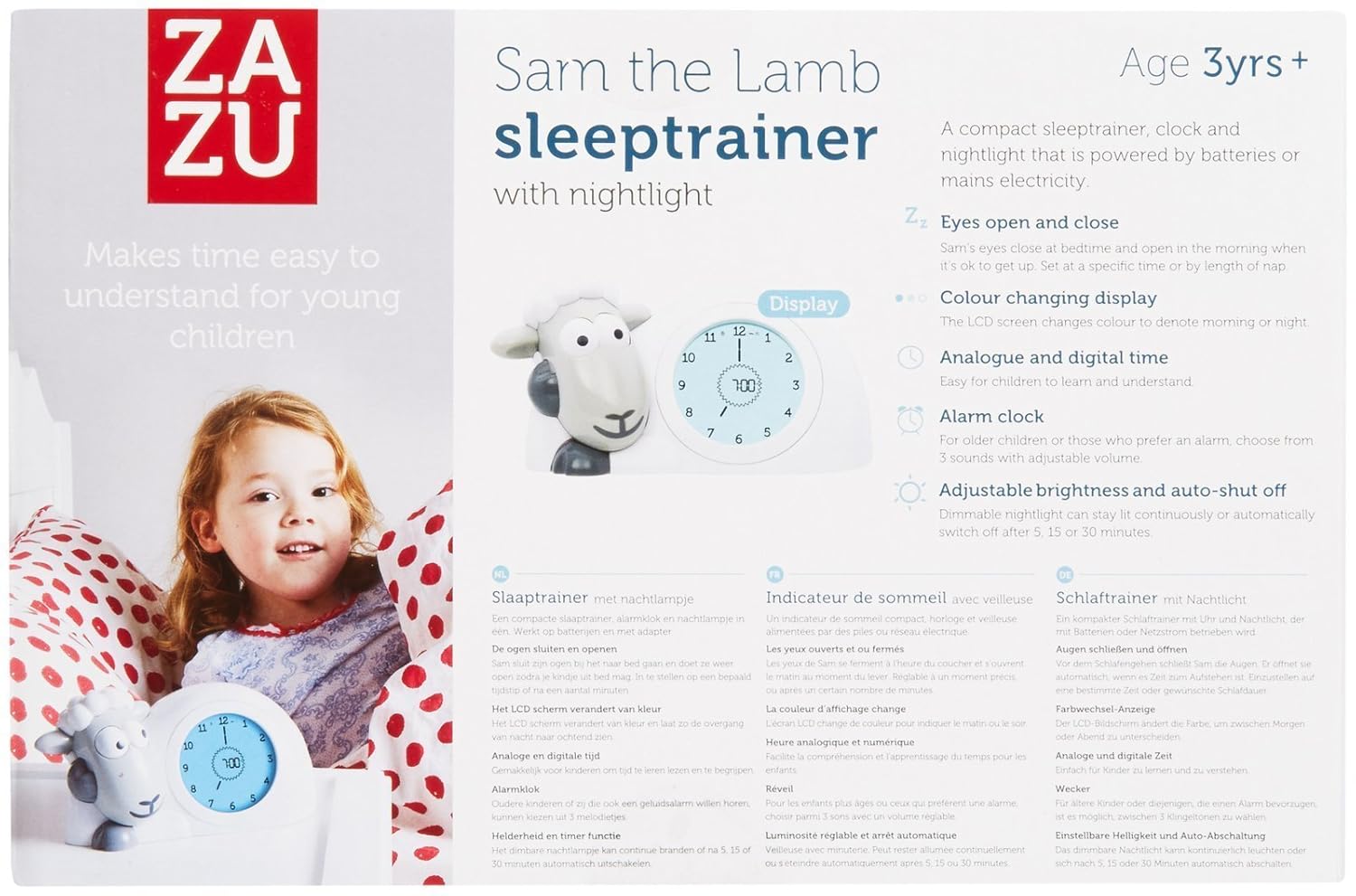
Product packaging illustrating key features of the Zazu Kids Sam Sleep Trainer, including its visual cues and adjustable settings.
Specifications
| Attribute | Detail |
|---|---|
| Brand | Zazu Kids |
| Model Number | ZA-SAM-01 |
| Dimensions | 7.9 x 4.8 x 5.5 inches |
| Item Weight | 1.05 pounds |
| Power Source | Corded Electric |
| Display Type | LCD |
| Material | Lead Free, Phthalate Free |
| Age Range | Kid |
| Color | Gray |
Maintenance
Cleaning
Wipe the unit with a soft, dry cloth. Do not use abrasive cleaners, solvents, or immerse the unit in water. Ensure the unit is unplugged before cleaning.
Battery Replacement
If you are using batteries for backup power, replace them when the display dims, flickers, or the unit behaves erratically. Ensure correct polarity when inserting new batteries (4x AA, not included).
Storage
When not in use for extended periods, store Sam in a cool, dry place away from direct sunlight and extreme temperatures.
Troubleshooting
| Problem | Possible Cause / Solution |
|---|---|
| Sam's eyes do not open/close as expected. | Verify that the sleep and wake-up times are set correctly in the operating instructions. Ensure the unit is receiving consistent power from the adapter. If using batteries, check battery level and replace if low. |
| Display is flickering or making strange noises. | This often indicates low battery or an unstable power connection. Ensure the power cord is fully inserted into both the unit and the wall outlet. Consider replacing batteries if running on them. |
| Alarm does not sound. | Check if the alarm is enabled in the settings and if the volume is set to an audible level. Verify the wake-up time is correctly configured. |
| Difficulty setting time/functions. | The controls can be complex initially. Refer to the "Operating Instructions" section carefully, paying attention to button presses and holds. Watching the online setup tutorial video (www.bit.ly/samsetup) is highly recommended for visual guidance. |
| Unit is unresponsive. | Try disconnecting and reconnecting the power adapter. If using batteries, remove and reinsert them. If the issue persists after a power cycle, contact customer support. |
Warranty and Support
Zazu Kids products are designed for durability and reliability. For specific warranty information regarding your Sam Sleep Trainer, please refer to the documentation included with your purchase or visit the official Zazu Kids website.
For further assistance, technical support, or to inquire about replacement parts, please contact Zazu Kids customer service. You can often find contact details and additional resources on the Zazu Kids official website or their store page on Amazon: Zazu Kids Store on Amazon