Introduction
The Movo VXR280 is a compact, lightweight, and durable stereo condenser microphone designed for high-quality audio recording with DSLR cameras, camcorders, and portable recorders. It features adjustable directional mic capsules to capture pristine stereo sound with realistic spatial imaging, making it ideal for videography, sound field recording, and broadcast applications.

Figure 1: The Movo VXR280 Stereo Microphone mounted on a DSLR camera, showcasing its compact design and integration with camera equipment.
Package Contents
Verify that all items are present in your package:
- Movo VXR280 Stereo Microphone
- Furry Windscreen
- 3.5mm TRS Output Cable
- Earphone
- Travel Bag
- Camera Shoe Mount (integrated)

Figure 2: All components included with the Movo VXR280 Stereo Microphone: the microphone unit, a furry windscreen for outdoor use, a 3.5mm TRS output cable for camera connection, an earphone for monitoring, and a travel bag for portability.
Setup
- Install Batteries: The VXR280 requires two (2) AAA batteries (not included). Open the battery compartment and insert the batteries, observing correct polarity.
- Mount the Microphone:
- Slide the integrated shoe mount onto your camera's hot shoe or cold shoe.
- Alternatively, use the 1/4" thread on the bottom of the shock mount to attach the microphone to a tripod or other mounting accessory.
- Connect to Device: Use the supplied 3.5mm TRS output cable to connect the microphone's "LINE OUT" port to your camera's microphone input jack.
- Attach Windscreen (Optional): For outdoor recording or in windy conditions, place the furry windscreen over the microphone capsules to reduce wind noise.

Figure 3: Key features of the Movo VXR280, including the adjustable cardioid condenser capsules (90°-120° pickup pattern), the headphone monitoring port for live audio verification, and the integrated shock mount with standard camera shoe and 1/4" tripod thread for versatile mounting.
Operating Instructions
Controls and Functions:
- Power Switch: Slide the switch to "ON" to power on the microphone.
- -10dB/0dB PAD Switch:
- Set to 0dB for normal recording levels.
- Set to -10dB when recording very loud sound sources to prevent distortion.
- High Pass Filter (HPF): Activate the HPF to reduce low-frequency noise such as air conditioning hum, traffic noise, or wind rumble.
- Adjustable Recording Level: Use the gain control knob to adjust the microphone's output level. Monitor your audio to set an appropriate level for your recording device.
- Headphone Monitoring Input: Plug the supplied earphone or your own headphones into the "HEADPHONE" jack to monitor audio in real-time during recording. This ensures accurate sound capture.
- Adjustable Directional Mic Capsules: The two cardioid condenser capsules can be adjusted from 90° to 120° to optimize the stereo field and spatial imaging for different recording scenarios.
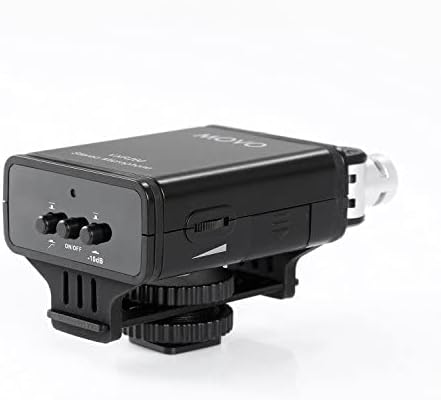
Figure 4: Side view of the Movo VXR280, highlighting the power switch, the -10dB/0dB PAD switch for managing input levels, and the adjustable recording level knob for precise gain control.

Figure 5: The Movo VXR280 in a recording setup, illustrating its capability to deliver clean audio by utilizing the recording sound level adjustment, the -10dB PAD switch, and the high-pass filter to minimize ambient background noise and distortion.
Compatibility:
The Movo VXR280 is compatible with a wide range of devices, including:
- DSLR Cameras (e.g., Sony, Nikon, Canon)
- Mirrorless Cameras
- Camcorders
- Portable Recorders

Figure 6: Compatibility overview for the Movo VXR280, demonstrating its use with camcorders, DSLR/mirrorless cameras, and portable audio recorders to capture high-quality sound.
Maintenance
- Cleaning: Use a soft, dry cloth to clean the microphone body. Do not use harsh chemicals or abrasive cleaners.
- Storage: When not in use, store the microphone in its travel bag to protect it from dust and physical damage.
- Battery Care: Remove batteries if the microphone will not be used for an extended period to prevent leakage.
- Windscreen Care: The furry windscreen can be gently cleaned with a damp cloth if it becomes dirty. Ensure it is completely dry before reattaching.
Troubleshooting
| Problem | Possible Cause | Solution |
|---|---|---|
| No audio output |
|
|
| Distorted audio |
|
|
| Excessive wind noise |
|
|
Specifications
| Feature | Detail |
|---|---|
| Type | Stereo Condenser |
| Frequency Response | 35-20,000 Hz +/- 3dB |
| Signal/Noise Ratio | 78dB |
| Sensitivity | -33dB +/- 1dB / 0dB=1V/Pa, 1kHz |
| Output Impedance | 200 ohm or less |
| Earphone Impedance | 32 ohm / 65MW |
| Power Source | 2 AAA Batteries |
| Connector | 3.5mm mini jack |
| Dimensions (L x W x H) | 9.5cm x 5.5cm x 5cm (3.74 x 2.17 x 1.97 inches) |
| Weight | 78g (0.17 lbs / 6.4 ounces) |
| Adjustable Pickup Pattern | 90°-120° |
| Model Number | VXR280 |
| UPC | 604888901543 |
Warranty and Support
For warranty information and technical support, please visit the official Movo website or contact Movo customer service. Keep your purchase receipt for warranty claims.
Movo Store: Visit the Movo Store on Amazon