
Introduction
This manual provides instructions for the safe and efficient use of your BM Premium EN-EL14A rechargeable batteries and dual bay charger. Please read this manual thoroughly before use and retain it for future reference. This product is designed for use with compatible Nikon D-series and Coolpix cameras.
Important Safety Information
Observe the following safety precautions to prevent damage to the product or injury to yourself:
- Do not short circuit the battery terminals.
- Do not dispose of batteries into fire.
- Charge batteries only with the specified BM Premium dual bay charger or compatible charging devices.
- Keep batteries and charger away from water and excessive heat.
- Do not disassemble or modify the batteries or charger.
- The charger is built with multiple circuit protections including over-charging, short-circuit, high-temperature, and surge protection.
- The charger features high-quality, fire-resistant construction.
Setup
Unpacking
Carefully remove all components from the packaging. Ensure you have the following items:
- BM Premium EN-EL14A Batteries (2x)
- BM Premium Dual Bay USB Charger
- USB Power Cord
Connecting the Charger
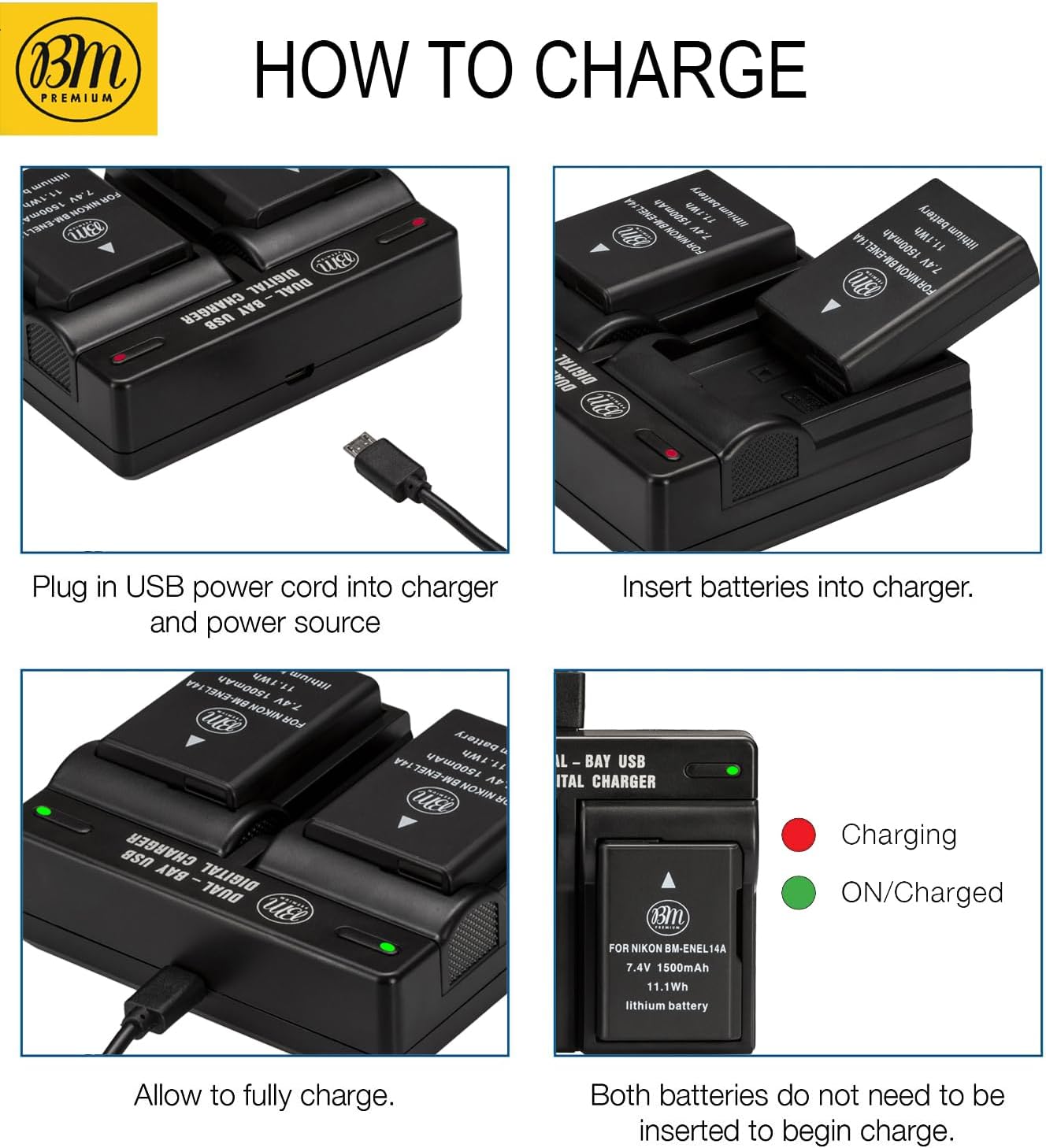
- Connect the provided USB power cord to the micro-USB input port on the dual bay charger.
- Plug the other end of the USB power cord into a compatible USB power source. This can be a USB wall charger, a car charger, or an external power bank. (Adapters and power bank are sold separately).

Operating Instructions
Charging the Batteries
- Ensure the charger is connected to a power source as described in the Setup section.
- Insert one or two EN-EL14A batteries into the charging bays. Ensure the battery contacts align correctly with the charger terminals.
- The smart LED indicator light above each bay will turn red to indicate that charging is in progress.
- When the battery is fully charged, the corresponding LED indicator light will turn green.
- Remove the batteries once charging is complete. Both batteries do not need to be inserted to begin charging; you can charge one at a time.
Using Batteries with Your Camera
Refer to your camera's instruction manual for specific details on inserting and removing the battery. Generally, open the battery compartment, insert the EN-EL14A battery with the correct orientation, and close the compartment securely.
Maintenance and Care
Battery Care
- The EN-EL14A batteries are memory-free, allowing you to charge them at any time without affecting their capacity.
- Store batteries in a cool, dry place when not in use.
- Avoid exposing batteries to extreme temperatures (hot or cold).
- If a battery will not be used for an extended period, charge it to approximately 50% before storage.
Charger Care
- Keep the charger clean and free from dust. Use a soft, dry cloth for cleaning.
- Do not use liquid cleaners or solvents.
- Ensure the charging contacts are clean and free of debris for optimal performance.
Troubleshooting
- Charger LED does not light up:
- Ensure the USB power cord is securely connected to both the charger and the power source. Verify that the power source is active.
- Battery not charging (LED remains off or flashes unexpectedly):
- Remove and re-insert the battery, ensuring proper alignment. Check for any obstructions on the battery or charger contacts. Try charging a different battery if available to isolate the issue.
- Camera displays a 'battery not compatible' error:
- Ensure the battery is fully inserted and the battery compartment door is closed. While these batteries are designed for full compatibility, some camera firmware versions may occasionally display warnings. If the camera functions normally despite the warning, the battery is likely working correctly. If the camera does not power on, try re-inserting the battery or using a different battery.
- Short battery life:
- Ensure batteries are fully charged before use (green LED). Battery performance can be affected by extreme temperatures or prolonged heavy use. Over time, all rechargeable batteries experience a gradual decrease in capacity.
Specifications
EN-EL14A Battery
- Type: Lithium-Ion
- Energy Storage Capacity: 1500 mAh
- Voltage: 7.4 Volts
- Watt-Hours (Wh): 11.1 Wh
- Chip: Fully decoded, functions like original battery (displays time left).

Dual Bay USB Charger
- Input: Micro-USB (2.1A recommended for optimal charging speed)
- Charging Capability: Charges 1 or 2 batteries simultaneously.
- Indicators: Smart LED (Red for charging, Green for complete).
- Protection: Over-charging, short-circuit, high-temperature, surge protection.
- Construction: High-quality, fire-resistant.
Compatibility
The BM Premium EN-EL14A batteries and charger are compatible with the following Nikon camera models:
- Nikon D3100, D3200, D3300, D3400, D3500
- Nikon D5100, D5200, D5300, D5500, D5600
- Nikon DF
- Nikon Coolpix P7000, P7100, P7700, P7800

Warranty Information
For detailed warranty information regarding your BM Premium EN-EL14A batteries and dual bay charger, please refer to the official BM Premium website or contact customer support. Warranty terms and conditions may vary.
Customer Support
If you encounter any issues or have questions not covered in this manual, please contact BM Premium customer support for assistance. Contact information can typically be found on the product packaging or the official BM Premium website.