
1. Introduction
This manual provides essential instructions for the proper installation, operation, and maintenance of your Kenwood CMOS-230 Backup Camera. Please read this manual thoroughly before use to ensure optimal performance and safety.
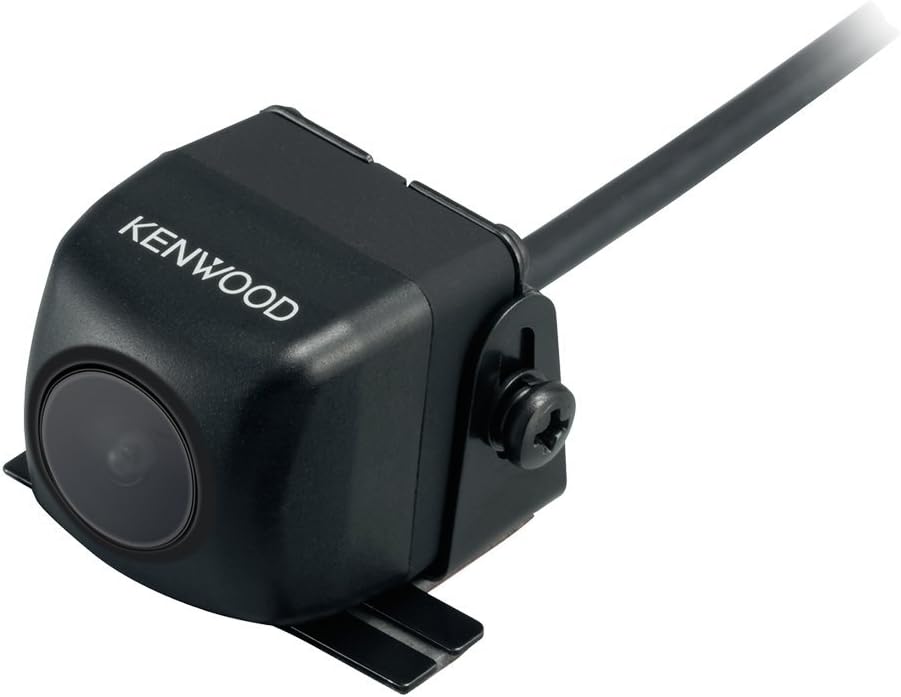
Image 1.1: The Kenwood CMOS-230 Backup Camera. This image displays the compact, black camera unit with the Kenwood logo visible on its side. A mounting bracket is attached to the bottom, and a cable extends from the rear of the unit.
Product Features:
- 1/3.6" Color CMOS Sensor: Provides clear and detailed imaging.
- Wide-Angle Mirror Image: Offers an expansive view of the area behind your vehicle.
- Waterproof Chassis: Designed for durability and reliable performance in various weather conditions.
- Flexible Mount Base: Allows for versatile installation options.
- Focal Length: f: 1.12mm, F value 2.25.
2. Setup and Installation
The Kenwood CMOS-230 is designed for bracket mount installation and operates on a 12-volt power supply. Professional installation is recommended.
Installation Guidelines:
- Mounting Location: Select a suitable location at the rear of your vehicle that provides an unobstructed view. The flexible mount base allows for adjustment.
- Secure Mounting: Use appropriate fasteners to securely attach the camera bracket to the vehicle. Ensure the camera is stable and does not vibrate.
- Wiring: Connect the camera's video output cable (RCA type) to the designated video input on your compatible monitor or head unit.
- Power Connection: Connect the camera's power wire to a 12-volt power source that is activated when the vehicle is in reverse gear. Ensure proper grounding.
- Cable Routing: Route all cables carefully to avoid pinching, abrasion, or interference with vehicle components. Use cable ties to secure loose wiring.
- Waterproofing: Ensure all connections exposed to the elements are properly sealed to maintain the waterproof integrity of the system.
Note: The camera is equipped with a waterproof chassis, but proper installation of wiring and connections is crucial for long-term reliability.
3. Operating Instructions
The Kenwood CMOS-230 Backup Camera provides a clear, wide-angle view to assist with reversing maneuvers when connected to a compatible monitor.
Basic Operation:
- Activation: The camera automatically activates when the vehicle is shifted into reverse gear, provided it is correctly wired to the vehicle's reverse light circuit.
- Display: The camera's video feed will appear on your connected monitor (e.g., an LCD display) when activated.
- Viewing Angle: The 130-degree real angle of view provides a broad perspective of the area behind your vehicle, enhancing situational awareness.
- Image Orientation: The camera outputs a wide-angle mirror image, which is standard for rear-view applications to match typical mirror perception.
Always check your surroundings visually in addition to using the backup camera. The camera is an aid and does not eliminate blind spots entirely.
4. Maintenance
Regular maintenance ensures the longevity and optimal performance of your Kenwood CMOS-230 Backup Camera.
Care and Cleaning:
- Lens Cleaning: Periodically clean the camera lens using a soft, damp cloth. Avoid abrasive cleaners or materials that could scratch the lens.
- Housing Cleaning: Wipe the camera housing with a mild detergent solution and a soft cloth. Rinse thoroughly with clean water.
- Inspection: Regularly inspect the camera and its mounting bracket for any signs of damage, corrosion, or loose connections.
- Cable Integrity: Check the wiring for any cuts, fraying, or signs of wear. Ensure all connections remain secure and waterproof.
Do not use high-pressure washers directly on the camera lens or housing, as this may compromise its waterproof seal.
5. Troubleshooting
If you experience issues with your Kenwood CMOS-230 Backup Camera, refer to the following common troubleshooting steps.
Common Issues and Solutions:
- No Image on Monitor:
- Check if the vehicle is in reverse gear.
- Verify all power and video connections are secure and correctly wired.
- Ensure the monitor is powered on and set to the correct video input.
- Inspect the camera's power fuse, if applicable.
- Poor Image Quality (Blurry, Distorted, or Dark):
- Clean the camera lens for dirt, dust, or moisture.
- Check for any obstructions blocking the camera's view.
- Ensure proper lighting conditions. The camera performs best with adequate ambient light.
- Verify video cable integrity; a damaged cable can cause signal degradation.
- Intermittent Image:
- Check for loose power or video connections.
- Ensure stable power supply to the camera.
If these steps do not resolve the issue, consult a qualified automotive electronics technician or contact Kenwood customer support for further assistance.
6. Specifications
| Model Number | CMOS-230 |
| Brand | Kenwood |
| Sensor Type | 1/3.6" Color CMOS Sensor |
| Optical Sensor Technology | CMOS |
| Lens Type | Wide Angle |
| Real Angle of View | 130 Degrees |
| Focal Length | f: 1.12mm |
| F Value | 2.25 |
| Installation Type | Bracket Mount |
| Voltage | 12 Volts |
| Connector Type | RCA |
| Product Dimensions | 0.91 x 0.91 x 0.91 inches (2.31 x 2.31 x 2.31 cm) |
| Item Weight | 0.774 ounces (21.94 grams) |
7. Warranty and Support
Warranty Information:
For detailed warranty information regarding your Kenwood CMOS-230 Backup Camera, please refer to the warranty card included with your product or visit the official Kenwood website. Warranty terms and conditions may vary by region and retailer.
Customer Support:
If you require technical assistance, have questions about installation, or need to report a product issue, please contact Kenwood customer support. You can find contact information on the official Kenwood website or through your product retailer.
Visit the official Kenwood Store for more information: Kenwood Store


