
Introduction
This manual provides essential instructions for the safe and effective installation, operation, and maintenance of your BulbAmerica Replacement Lamp for the Panasonic PT-DW11K Projector. This product includes a genuine original OEM bulb housed within a compatible assembly, designed to meet the exact specifications of your projector.
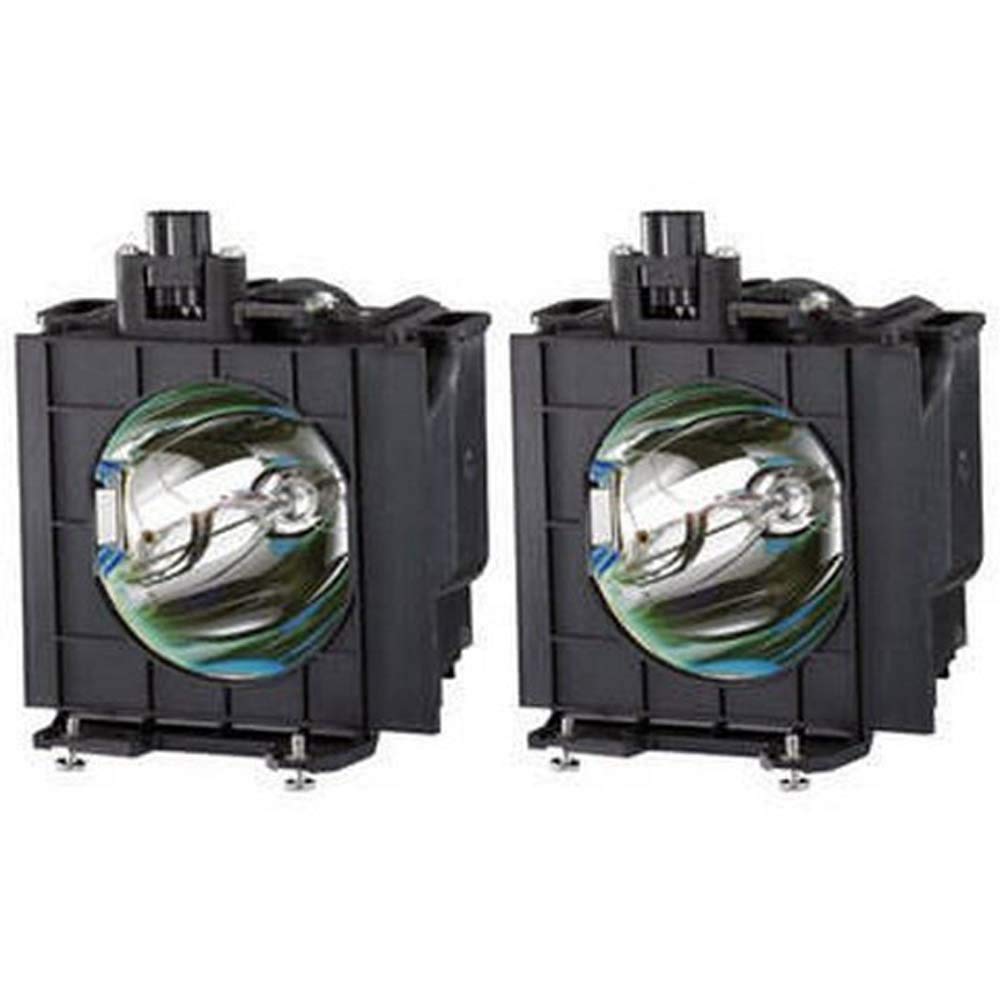
Image: BulbAmerica Projector Lamp for Panasonic PT-DW11K, showing the lamp housing with the bulb inside.
Important Safety Information
Please read all safety instructions before installing or operating the lamp. Failure to follow these instructions may result in electric shock, fire, or personal injury.
- Power Disconnection: Always disconnect the projector from the power outlet before attempting any installation or maintenance.
- Cool Down Period: Allow the projector to cool down completely (at least 30 minutes) after use before replacing the lamp. Hot lamps can cause severe burns.
- Handle with Care: Projector lamps contain fragile components. Handle the lamp assembly carefully to avoid breakage. Do not touch the glass bulb directly with bare hands, as oils can reduce lamp life.
- Proper Disposal: Dispose of old lamps according to local regulations. Lamps may contain mercury.
- Ventilation: Ensure the projector's ventilation system is clear and unobstructed to prevent overheating, which can shorten lamp life.
Package Contents
Verify that all items are present in the package:
- One (1) BulbAmerica Replacement Lamp for Panasonic PT-DW11K Projector (Housing Assembly with Original OEM Bulb)
Installation Instructions
Follow these steps to safely replace the projector lamp:
- Power Off and Disconnect: Turn off the Panasonic PT-DW11K projector and unplug its power cord from the electrical outlet.
- Cool Down: Allow the projector to cool down for at least 30 minutes. The lamp operates at high temperatures and can cause burns if handled while hot.
- Locate Lamp Cover: Refer to your Panasonic PT-DW11K projector's user manual to locate the lamp cover. This is typically secured by screws.
- Remove Lamp Cover: Use a screwdriver to carefully remove the screws securing the lamp cover. Set the screws and cover aside in a safe place.
- Remove Old Lamp: Loosen the screws that hold the old lamp assembly in place. Gently pull the handle on the lamp assembly to slide it out of the projector. Avoid forcing it.
- Install New Lamp: Carefully insert the new BulbAmerica lamp assembly into the projector, ensuring it is seated firmly and correctly. Do not force the lamp.
- Secure New Lamp: Tighten the screws that secure the new lamp assembly.
- Replace Lamp Cover: Reattach the lamp cover and secure it with the screws removed earlier.
- Reconnect Power: Plug the projector's power cord back into the electrical outlet.
- Reset Lamp Timer: Turn on the projector. It is crucial to reset the lamp timer in the projector's menu system. Consult your Panasonic PT-DW11K projector's manual for specific instructions on how to reset the lamp timer. This ensures accurate tracking of the new lamp's life.
Operation (Post-Installation)
After successful installation and resetting the lamp timer, the projector should power on and display an image as expected. The genuine OEM bulb ensures optimal brightness, color accuracy, and longevity.
- Initial Warm-up: The lamp may take a few moments to reach full brightness after being turned on.
- Consistent Performance: Expect consistent light output and color performance throughout the lamp's lifespan, as provided by the original OEM bulb.
Maintenance
Proper maintenance helps extend the life of your projector lamp and maintain optimal performance:
- Projector Cleaning: Regularly clean the projector's air filters and ventilation openings as per your projector's manual. Blocked filters can lead to overheating and premature lamp failure.
- Avoid Rapid On/Off Cycles: Frequent turning on and off of the projector can reduce lamp life. Allow the lamp to cool down for at least 5-10 minutes before restarting if it was recently turned off.
- Environmental Conditions: Operate the projector in a well-ventilated area with stable temperature and humidity. Extreme conditions can affect lamp performance and lifespan.
- Lamp Life Indicator: Pay attention to your projector's lamp life indicator. Replace the lamp when the indicator suggests it, or when brightness significantly diminishes, to avoid unexpected failure during critical use.
Troubleshooting
| Problem | Possible Cause | Solution |
|---|---|---|
| Projector does not turn on after lamp replacement. | Lamp not properly seated; lamp cover not secured; power cord disconnected. | Ensure the lamp is fully inserted and secured. Verify the lamp cover is correctly installed and its screws are tightened. Check power cord connection. |
| Image is dim or colors are off. | Lamp timer not reset; projector settings; dirty lens/filters. | Reset the lamp timer in the projector's menu. Check projector brightness/color settings. Clean projector lens and air filters. |
| Lamp indicator light remains on after replacement. | Lamp timer not reset. | Reset the lamp timer in the projector's menu. Refer to your projector's manual for specific instructions. |
| Projector shuts down unexpectedly. | Overheating due to poor ventilation or dirty filters. | Ensure projector is in a well-ventilated area. Clean air filters. If problem persists, consult projector's manual or professional service. |
Specifications
- Brand: BulbAmerica
- Model: PT-DW11K (Compatible Projector)
- Bulb Type: Genuine Original OEM Bulb (UHP, P-VIP, SHP, NSH equivalent)
- Assembly: Housing Assembly with OEM Bulb
- Item Weight: 1.5 Pounds
- UPC: 675650328936
- ASIN: B00W1HB5WW
Warranty and Support
BulbAmerica stands behind the quality of its products.
- Warranty: This replacement lamp is covered by a 180-day warranty against defective products.
- Return Policy: A 30-day return policy is offered.
- Customer Service: For technical assistance, warranty claims, or support, please contact BulbAmerica customer service. Refer to your purchase documentation for contact details.