1. Introduction
This manual provides essential instructions for the safe and effective use of your Generic Compatible Replacement AC Adapter Charger. This adapter is designed to provide power and charge batteries for Vivitar ViviCam X30, X60, and 4000 camera models. Please read this manual thoroughly before use and retain it for future reference.
2. Safety Information
Observe the following safety precautions to prevent damage to the product or injury to yourself:
- Do not expose the adapter to water, moisture, or extreme temperatures.
- Do not disassemble or modify the adapter.
- Ensure the power outlet voltage matches the adapter's input specifications (AC 110V-220V).
- Avoid using the adapter with damaged cords or plugs.
- Keep out of reach of children.
- Unplug the adapter from the power outlet when not in use or during electrical storms.
3. Package Contents
- 1 x Generic Compatible Replacement AC Adapter Charger
4. Product Overview
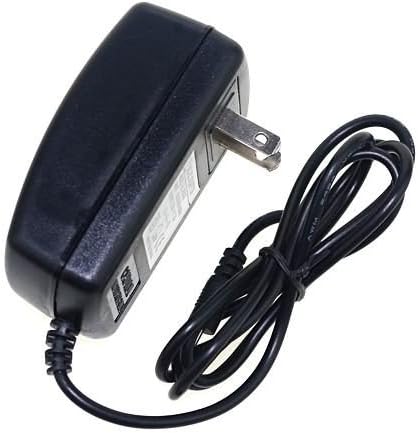
Figure 1: The Generic AC Adapter Charger. This image displays the black rectangular adapter unit with a standard two-prong US-style plug on one side and a coiled black power cord extending from the other side, terminating in a proprietary connector (not fully visible).
The AC Adapter Charger consists of a main power brick with integrated prongs for wall outlets and an attached cable with a proprietary connector designed for compatible Vivitar ViviCam camera models.
5. Setup
- Verify Compatibility: Ensure your camera model is Vivitar ViviCam X30, X60, or 4000.
- Inspect Adapter: Before first use, visually inspect the adapter and cable for any signs of damage. Do not use if damaged.
- Connect to Camera: Carefully insert the adapter's proprietary connector into the power input port of your Vivitar ViviCam camera. Ensure a secure connection.
- Connect to Power Outlet: Plug the adapter's two-prong plug into a standard AC wall outlet (110V-220V).
6. Operating Instructions
Once connected, the adapter will begin to supply power to your camera and/or charge its battery, depending on the camera's design and current power state.
- The camera's charging indicator (if present) should illuminate, indicating that charging is in progress.
- You can typically operate the camera while it is connected to the AC adapter, provided the battery is sufficiently charged or the camera supports direct power operation.
- To disconnect, first unplug the adapter from the wall outlet, then carefully remove the connector from the camera.
7. Maintenance
- Cleaning: Disconnect the adapter from power before cleaning. Use a soft, dry cloth to wipe the adapter. Do not use liquid cleaners or solvents.
- Storage: Store the adapter in a cool, dry place away from direct sunlight and extreme temperatures when not in use. Avoid tightly coiling the cable to prevent damage.
- Inspection: Periodically inspect the cable and connector for any signs of wear, cuts, or bends.
8. Troubleshooting
| Problem | Possible Cause | Solution |
|---|---|---|
| Adapter not providing power/charging. |
|
|
| Adapter gets unusually hot. |
|
|
9. Specifications
| Brand | Generic |
| Compatible Devices | Vivitar ViviCam X30, X60, 4000 Cameras |
| Input Voltage | AC 110V-220V |
| Output Voltage | 5 Volts (DC) |
| Connector Type | Proprietary |
| Main Power Connector Type | 2 Pin (US Standard) |
| Special Feature | Travel (Wide International Voltages Input) |
| Manufacturer | DPDUSA |
10. Warranty and Support
As a generic compatible replacement product, warranty and support are typically provided by the seller. Please refer to your purchase documentation or contact the seller directly for information regarding warranty coverage, returns, or technical assistance.


