
Introduction
This manual provides detailed instructions for the proper installation, operation, and maintenance of your Salamander Designs SN/PM2 Synergy Integrated TV Mount. Please read all instructions carefully before beginning installation to ensure safe and correct usage. Retain this manual for future reference.
Important Safety Information
Always follow assembly instructions. Do not exceed the maximum weight capacity of 165 lbs. Secure the TV mount to the wall to prevent tip-over risks. Keep small children away from the area during assembly and use. Failure to follow these instructions may result in property damage or personal injury.
Setup Instructions
The Salamander Designs SN/PM2 TV Mount is designed for seamless integration with Synergy Twin-width cabinets. No on-wall wiring or complex installation is required.
- Unpack Components: Carefully remove all parts from the packaging and verify against the included parts list.
- Attach to Cabinet: Bolt the TV mount onto your Synergy Twin-width cabinet. Ensure all bolts are securely tightened.
- Mount TV: Attach your television to the mount according to the TV manufacturer's instructions and the mount's specific attachment points. Ensure the TV is centered and level.
- Adjust Height: Utilize the fully adjustable TV height positioning along the aluminum support post to achieve your desired viewing level.
- Cable Management: Use the simple attachment points provided for effective cable management, keeping wires organized and out of sight.
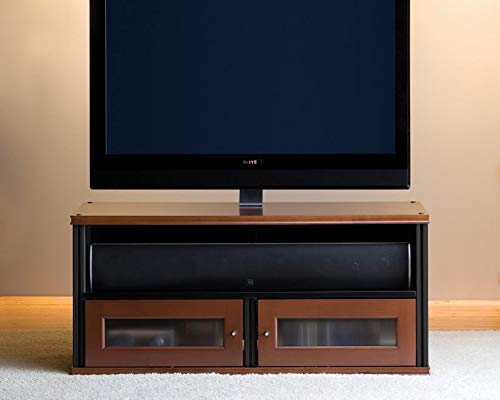
Image: The Salamander Designs SN/PM2 Synergy Integrated TV Mount, shown in black, ready for installation.
Operating Instructions
The SN/PM2 mount offers flexibility for optimal viewing.
- Height Adjustment: The TV height can be adjusted along the aluminum support post. Loosen the securing mechanism, slide the TV to the desired height, and re-tighten securely.
- Tilt Adjustment: The mount features a tilting range of 15 degrees upward and downward. Adjust the tilt by loosening the tilt mechanism, positioning the screen, and then re-securing it firmly.
Maintenance
To maintain the appearance and functionality of your TV mount:
- Cleaning: Wipe the mount with a damp cloth. Avoid abrasive cleaners.
- Periodic Checks: Periodically check all bolts and connections to ensure they remain tight and secure.
Troubleshooting
- TV Not Level: Ensure the mounting brackets on the TV are evenly positioned and securely fastened. Re-check the mount's attachment to the cabinet for levelness.
- Mount Feels Loose: Verify that all assembly bolts and screws are fully tightened. Refer to the setup instructions for proper tightening procedures.
- Difficulty Adjusting Tilt/Height: Ensure that any locking mechanisms or adjustment knobs are sufficiently loosened before attempting to reposition the TV. Do not force adjustments.
Specifications
| Model Number | SN/PM2 |
| Brand | Salamander Designs |
| Material | Aluminum |
| Color | Black |
| Maximum Weight Capacity | 165 lbs |
| Tilt Range | 15° upward and downward |
| Assembly Required | No (integration with Synergy cabinets) |
| Item Dimensions | 0.02 x 0.02 x 0.02 inches (packaging/shipping dimensions, actual mount dimensions vary) |
Warranty Information
Warranty details for the Salamander Designs SN/PM2 Synergy Integrated TV Mount are typically included with your product packaging or can be found on the official Salamander Designs website. Please refer to these resources for specific terms and conditions.
Customer Support
For technical assistance, missing parts, or any questions regarding your Salamander Designs SN/PM2 TV Mount, please contact Salamander Designs customer support directly. Contact information can usually be found on their official website or in your product documentation.


