
1. Introduction
This manual provides essential information for the installation, operation, and maintenance of the Xtreme X0015 Power Take-Off (PTO) Clutch. This component is designed for specific outdoor power equipment applications. Please read these instructions thoroughly before proceeding with any installation or maintenance.
1.1. Product Overview
The Xtreme X0015 PTO Clutch is a robust replacement component engineered for demanding lawn care applications. It features enhanced durability and performance characteristics to ensure reliable power transfer.

Figure 1: Front view of the Xtreme X0015 PTO Clutch, showing the pulley, bearing, and integrated wire harness.
1.2. Key Features
- Xtreme Torque Series: Designed for high torque output.
- High Torque Cool Coil Upgrade: Improves heat dissipation for extended life.
- Heavy Duty "FatBoy Series" Upgrade: Enhanced durability for rigorous use.
- Replaceable Pulley Bearing: Facilitates easier maintenance.
- Super Smooth "Xtreme Precision" Machined Pulley: Ensures efficient belt operation.
- Upgraded to 3 Layer "Xtreme TOUGH" Integrated, Water Tight, Impact resistant Wire Harness: Provides superior protection for electrical connections.

Figure 2: An annotated diagram highlighting key features of the Xtreme X0015 PTO Clutch, including machined pulleys, FatBoy bearing, high temp bearing, stainless steel rivets, high torque transmission, cool coils, and triple protected wire harness.
1.3. Compatibility
This PTO Clutch is compatible with/replacement for the following equipment and part numbers:
- Exmark: Lazer Z 25 hp Units, Serial No. 0 to 159,999 (e.g., ZTH5223A 2000-2006, ZTH5225A 2000-2006)
- Exmark Part Numbers: 1-631645, 1-633099, 103-0664, 631645, 633099, E633099
- Other Compatible Brands/Part Numbers: AYP (102603, 109580, 539102603, 539109580), Bobcat (1522040, 2188151), Bunton (2188151), Dixon (102603, 109580, 539102603, 539109580), Electrolux (102603, 109580, 539102603, 539109580), Ferris (1522040), Ingersoll (2188151), Jacobsen (2188151), Jonsered (102603, 539102603), McCulloch (102603, 109580, 539102603, 539109580), Poulan (102603, 109580, 539102603, 539109580), Prime (7-06032), Ransomes (2188151), Roper (102603, 109580, 539102603, 539109580), Rotary (11444), Sears Craftsman (102603, 109580, 2188151, 539102603, 539109580), Toro (1-631645, 1-633099, 103-0664, 631645, 633099, E633099), Woods (2188151), Yazoo Kees (ZKH 52220, ZKH 52221, ZKH 52222, ZKH 52223, ZKH 52233, ZKH 52250, ZKH 52251).
2. Product Specifications
The following table details the key specifications of the Xtreme X0015 PTO Clutch:
| Specification | Detail |
|---|---|
| Description | PTO Clutch |
| Crankshaft Diameter | 1.125 inches |
| Pulley Diameter | 6.3 inches |
| Rotation | Clockwise |
| Belt Type | A/B Belt |
| Torque Rating | 175 ft. lbs. |
| Product Dimensions | 11 x 9 x 6 inches |
| Item Weight | 14 pounds |
3. Setup and Installation
Installation of a PTO clutch requires mechanical aptitude and adherence to safety protocols. If you are not confident in your ability to perform this installation, it is recommended to seek assistance from a qualified service technician.
3.1. Safety Precautions
- Always disconnect the spark plug wire(s) or battery cables before working on the equipment to prevent accidental starting.
- Wear appropriate personal protective equipment (PPE), including safety glasses and gloves.
- Ensure the equipment is on a stable, level surface and properly supported to prevent movement.
- Refer to the original equipment manufacturer's (OEM) service manual for specific instructions related to your machine's model.
3.2. Pre-Installation Checks
- Verify that the replacement clutch (Xtreme X0015) matches the specifications and part numbers required for your equipment.
- Inspect the new clutch for any signs of shipping damage.
- Gather all necessary tools, including wrenches, sockets, torque wrench, and possibly a puller.
3.3. General Installation Steps
- Remove Old Clutch: Carefully disconnect the electrical wiring from the old PTO clutch. Remove any retaining bolts or nuts securing the clutch to the engine crankshaft. Use a puller if necessary to detach the old clutch.
- Clean Mounting Area: Thoroughly clean the engine crankshaft and the mounting surface to ensure proper seating of the new clutch.
- Install New Clutch: Slide the new Xtreme X0015 PTO Clutch onto the crankshaft. Ensure the keyway aligns correctly. Secure the clutch with the appropriate bolts and washers, tightening them to the torque specifications provided in your equipment's service manual.
- Connect Wiring: Connect the electrical harness of the new clutch to the equipment's wiring. Ensure a secure and proper connection.
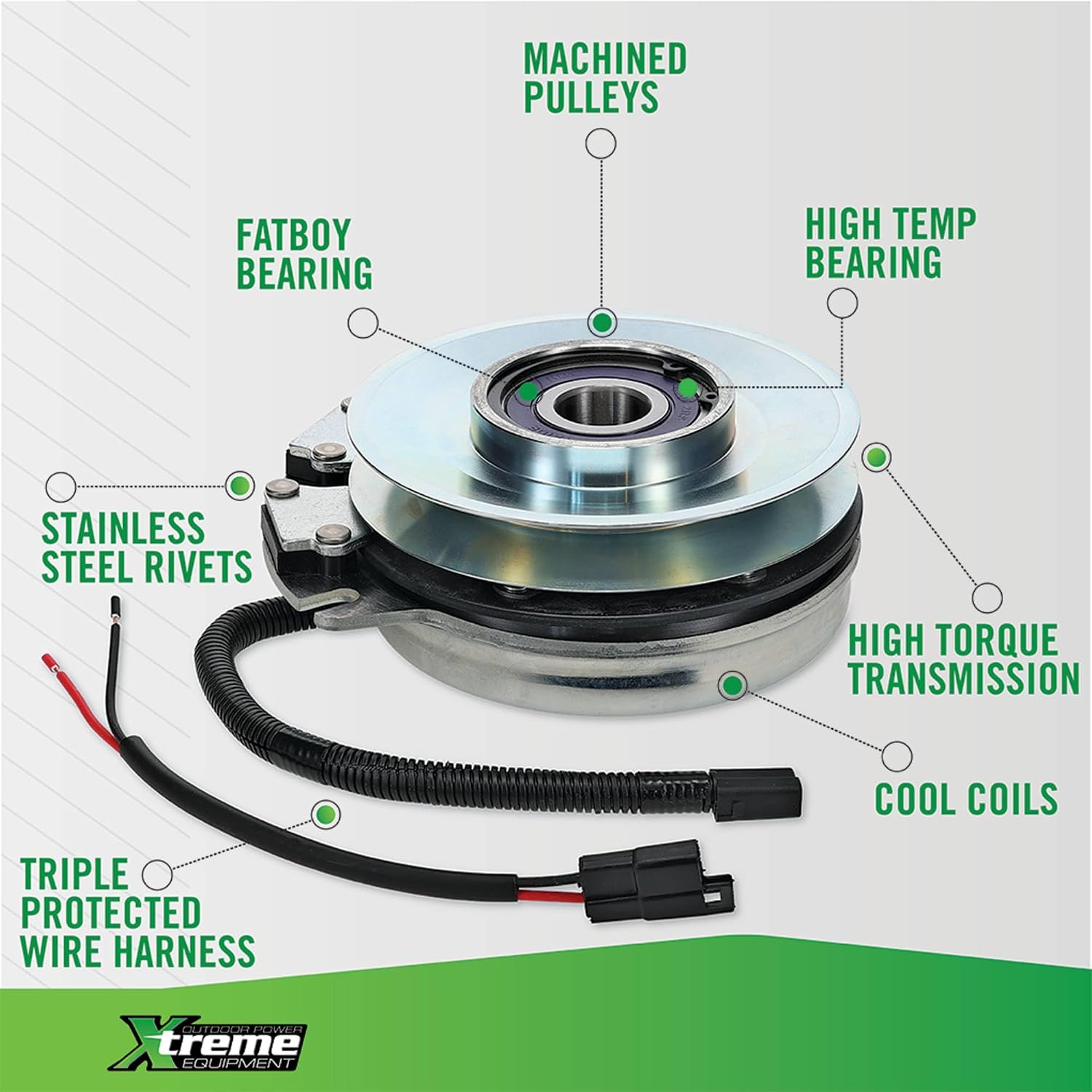
Figure 3: Close-up view of the electrical connectors on the Xtreme X0015 PTO Clutch wire harness, illustrating the connection points.
- Install Belt: Route the drive belt around the clutch pulley and any other pulleys as per the equipment's design. Ensure the belt is properly tensioned.
- Test Operation: Reconnect the spark plug wire(s) or battery. Start the engine and carefully test the engagement and disengagement of the PTO clutch in a safe, open area. Listen for unusual noises and observe for proper function.
4. Operating Instructions
The Xtreme X0015 PTO Clutch functions as an integral part of your outdoor power equipment's drive system. Its operation is controlled by the equipment's PTO engagement mechanism, typically a switch or lever.
4.1. Engaging the PTO
To engage the PTO, follow the specific instructions provided in your equipment's operator's manual. This typically involves activating a switch or lever that sends an electrical signal to the clutch, causing it to engage and transfer power to the attached implements (e.g., mower blades).
4.2. Disengaging the PTO
To disengage the PTO, deactivate the PTO switch or lever according to your equipment's manual. This will de-energize the clutch, stopping power transfer to the implements.
4.3. Important Operating Considerations
- Always ensure the engine is running at the recommended RPM before engaging the PTO.
- Avoid engaging or disengaging the PTO abruptly, especially under heavy load, to prevent premature wear.
- Never operate equipment with a malfunctioning PTO clutch.
5. Maintenance
Regular inspection and maintenance can extend the life of your Xtreme X0015 PTO Clutch and ensure optimal performance.
5.1. Routine Inspection
- Visual Check: Periodically inspect the clutch for signs of wear, damage, or corrosion. Check the pulley for cracks or excessive wear.
- Wiring: Examine the wire harness for fraying, cuts, or loose connections. Ensure the connectors are clean and secure.
- Belt Condition: Inspect the drive belt for cracks, glazing, or proper tension. Replace worn belts as needed.
- Mounting Bolts: Check that all mounting bolts are tight and secure.
5.2. Cleaning
Keep the clutch and surrounding area free from debris, grass clippings, and dirt. Excessive buildup can lead to overheating and reduced performance. Use compressed air or a brush to clean the clutch exterior.
5.3. Bearing Maintenance
The Xtreme X0015 features a replaceable pulley bearing. If the bearing develops excessive play or noise, it should be replaced by a qualified technician.
6. Troubleshooting
This section addresses common issues that may arise with your PTO clutch. For problems not listed here, consult a qualified service technician.
| Problem | Possible Cause | Solution |
|---|---|---|
| Clutch does not engage |
|
|
| Clutch slips during operation |
|
|
| Excessive noise or vibration |
|
|
| Clutch overheats |
|
|
7. Warranty Information
For specific warranty terms and conditions pertaining to the Xtreme X0015 PTO Clutch, please refer to the documentation provided at the time of purchase or contact Xtreme customer support directly. Warranty coverage typically addresses manufacturing defects under normal operating conditions.
Note: Xtreme Mower Clutches is a registered trademark of Extreme Mower Clutches Inc. (XMCI). XMCI does not imply any association or affiliation with any OEM Manufacturer including Warner Electric, Ogura Industrial Corp., John Deere, Exmark/Toro, Hustler, Husqvarna, Cub Cadet, or any of its associates or affiliates, trademarks or copyrights. XMCI also states "OEM Upgrade" or "Warner Upgrade" only refers to the billet pulley, the use of stainless steel braking rivets, replaceable pulley bearing, Xtreme wire protection system, and Cool coil technology, most of which are unique to the Xtreme Mower Clutch product line.
8. Customer Support
If you require further assistance, have questions regarding installation, or need to report a product issue, please contact Xtreme customer support through their official channels. When contacting support, please have your product model (X0015) and any relevant purchase information available.