
Introduction
This manual provides detailed instructions for the installation, operation, and maintenance of the ECOJAY SmartZone-4X Control 4-Zone Controller. This universal zoning panel is designed to manage up to 4 HVAC zones, with expandability to 20 zones, and is compatible with various HVAC systems and thermostats. Proper installation and understanding of its features will ensure optimal performance and comfort.
Key Features
- Supports 4 zones, expandable up to 20 zones.
- Universal compatibility with Gas, Electric, and Heat Pump HVAC systems.
- Compatible with any 24V thermostats, including smart thermostats like Nest, Ecobee, Honeywell, Amazon, and Sensi.
- Easy installation with screwless wiring terminals.
- Built-in Fresh Air control, Economizer, ECO Mode, and Humidity control.
- Color-coded LEDs on all inputs and outputs for easy diagnostics.
- Pushbutton setup and simple mode display.
- Includes a supply air temperature sensor for system protection.
- Supports both 2-wire (spring return) and 3-wire (power open/close) dampers.
- G2/BK fan speed control capability.
Package Contents
- ECOJAY SmartZone-4X Control Board (Model ZS4X-2.0)
- Supply Air Temperature Sensor
- Installation Guide

Image: Contents of the ECOJAY SmartZone-4X Control package, including the main board, temperature sensor, and installation guide.
Setup and Installation
Safety First: Before beginning any installation, ensure all power to the HVAC system is disconnected at the circuit breaker. Installation should be performed by a qualified technician.
Mounting the Control Board
Mount the SmartZone-4X control board in an accessible location near your HVAC equipment, away from direct sunlight or heat sources. Use appropriate fasteners to secure the board firmly.
Wiring Overview
The SmartZone-4X features screwless wiring terminals for quick and secure connections. Refer to the wiring diagrams below for specific connections. Ensure all connections are tight and correct before restoring power.
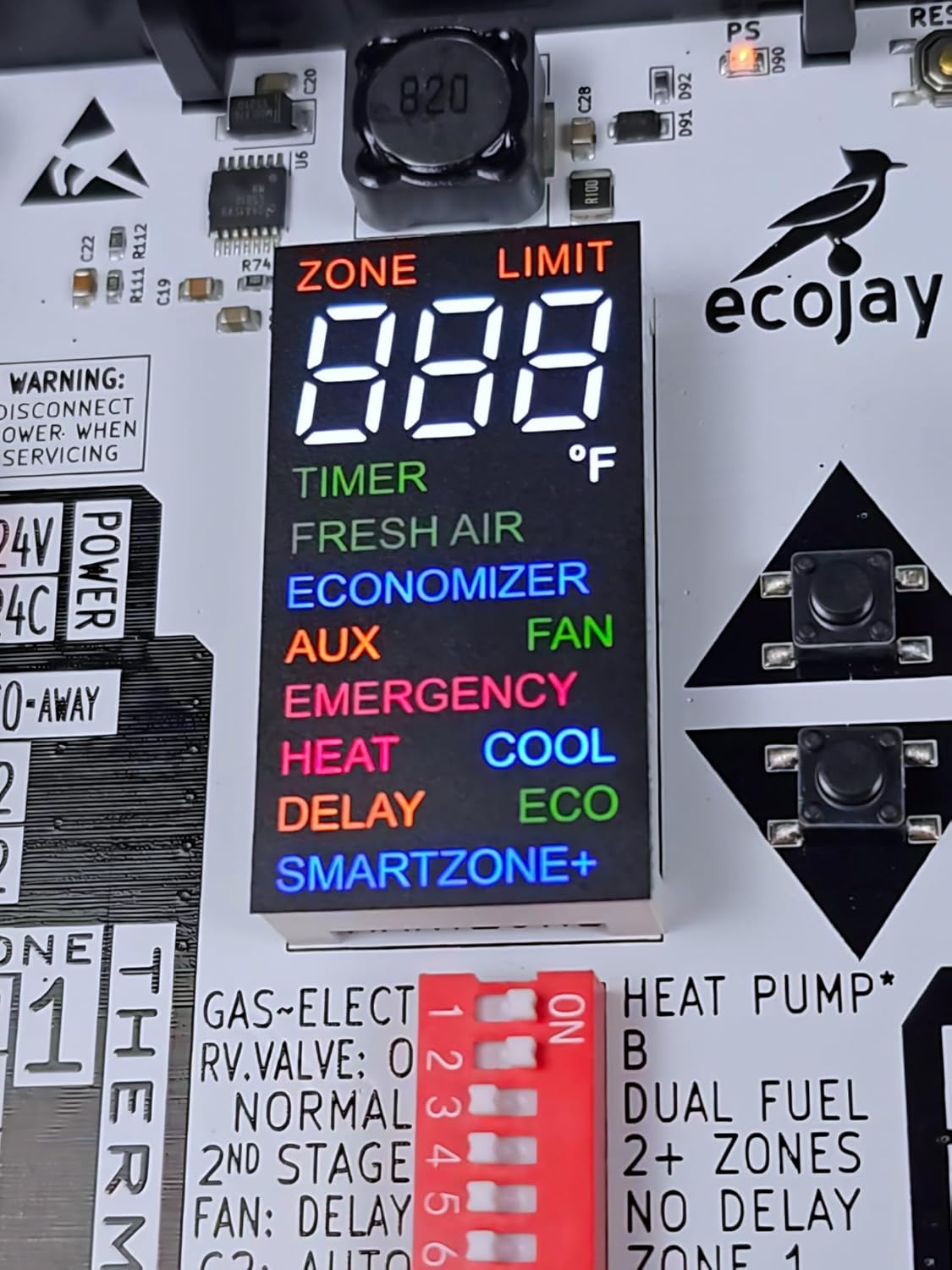
Image: Comprehensive wiring diagram illustrating connections for the SmartZone-4X controller. This diagram shows inputs for 24 VAC power (not included), up to four 24V thermostats (not included), connections to HVAC equipment (heat pump, gas, electric, dual fuel, single & multi-stage), and connections for up to four dampers (not included). A supply air temperature sensor is also shown connected. For detailed wiring instructions, visit ecojay.com/smartzoneqr.html.
Connecting Power
Connect a dedicated 24 VAC transformer (not included) to the power terminals on the control board. Ensure the power source is stable and meets the required voltage for the system.
Thermostat Connections
Connect each zone's thermostat to the corresponding zone terminals (ZONE 1, ZONE 2, etc.) on the left side of the control board. Follow standard thermostat wiring conventions (R, C, Y, G, W, O/B). The SmartZone-4X is compatible with 5-wire (R-C-G-Y-W for Gas/Electric), 6-wire (R-C-G-Y-W-O for Heat Pump), and 2/3-wire (R-Y-W for Heat or Cool) thermostats.
HVAC Equipment Connections
Connect your HVAC equipment (furnace, air handler, condenser) to the EQUIPMENT terminals on the right side of the control board. The board supports various system types including Gas, Electric, Heat Pump, and Dual Fuel, with single or multi-stage operation. Refer to your HVAC equipment manual for specific wiring requirements.
Damper Connections
Connect your motorized dampers (not included) to the DAMPER terminals on the right side of the control board. The board supports both 2-wire (spring return) and 3-wire (power open/close) dampers. Ensure correct wiring for each damper type as per the damper manufacturer's instructions.
Supply Air Temperature Sensor
Install the included supply air temperature sensor into the supply plenum of your HVAC system. Connect the sensor's wire to the designated "SUPPLY AIR TEMP SENSOR" input on the control board. This sensor is crucial for system protection against overheating or freezing and for optimal operation.

Image: An ECOJAY SmartZone-4X Control board with multiple wires connected to its terminals, illustrating a completed wiring setup.
Operating Instructions
Initial Power-Up
After all wiring is complete and verified, restore power to the HVAC system. The control board's LED display will illuminate, and the system will perform an initial self-check. Observe the LEDs to confirm proper power and communication.
LED Indicators and Display
The SmartZone-4X features color-coded LEDs for each input and output, providing visual feedback on system status. The digital display shows current zone information, temperature limits, and active modes (e.g., HEAT, COOL, FAN, AUX). This display is a key diagnostic tool.

Image: A close-up view of the SmartZone-4X's digital display, indicating various system statuses and modes.
System Configuration (DIP Switches)
The control board includes DIP switches for configuring system type (Gas/Electric, Heat Pump), reversing valve operation (O/B), number of stages, fan delay, and other settings. Consult the detailed installation guide provided with the product for specific DIP switch configurations based on your HVAC system and desired operation.
Zone Operation
Each zone operates independently based on its connected thermostat's settings. When a thermostat calls for heating or cooling, the SmartZone-4X manages the corresponding damper positions and activates the HVAC equipment to maintain desired temperatures in that specific zone, while minimizing energy use in unoccupied zones.

Image: A conceptual diagram showing the SmartZone-4X controller integrated into a multi-zone HVAC system, managing airflow to different zones via dampers. For more information, visit ecojay.com/smartzoneqr.html.
Advanced Features
- Fresh Air Control: Integrates with external fresh air dampers for improved indoor air quality and ventilation management.
- Economizer: Utilizes outdoor air for cooling when conditions are favorable, reducing mechanical cooling run time and energy consumption.
- ECO Mode: Optimizes system operation for enhanced energy efficiency, potentially adjusting setpoints or fan speeds during specific periods.
- Humidity Control: Works with compatible thermostats and HVAC equipment to manage indoor humidity levels, improving comfort and preventing moisture issues.
- Expandability: Multiple SmartZone-4X units can be linked together to control a larger number of zones, supporting systems with up to 20 zones.

Image: An illustration demonstrating how multiple SmartZone-4X control boards can be interconnected to manage a larger number of zones, from 9 up to 20.
Maintenance
The SmartZone-4X control board requires minimal maintenance to ensure long-term reliable operation.
- Periodically inspect wiring connections for tightness and any signs of wear or corrosion.
- Ensure the area around the control board is clean and free from dust, debris, or moisture.
- Check the supply air temperature sensor for proper placement in the plenum and ensure it is clean and unobstructed.
Troubleshooting
This section provides guidance for common issues. For complex problems or issues not covered here, contact ECOJAY technical support.
No Power to Board
- Verify that the 24 VAC transformer is properly connected and receiving power.
- Check the fuse on the control board. Replace if blown (ensure correct amperage).
- Confirm the circuit breaker for the HVAC system is in the ON position.
Zone Not Responding
- Check thermostat wiring for the affected zone. Ensure connections are secure and correct.
- Verify the thermostat is powered and set to the desired mode (Heat/Cool/Fan).
- Observe the LED indicators for the zone on the control board to diagnose the call signal.
Dampers Not Operating Correctly
- Inspect damper wiring for correct connections (2-wire vs. 3-wire) as per the damper type.
- Ensure dampers are receiving power from the control board.
- Check for any physical obstructions preventing damper movement.
System Short Cycling or Overheating/Freezing
- Verify the supply air temperature sensor is correctly installed in the plenum and is clean.
- Ensure DIP switch settings accurately match your HVAC system type and stages.
- Check for proper airflow and damper operation throughout the system.
Specifications
| Model Number | ZS4X-2.0 |
| Zones Supported | 4 (expandable to 20) |
| Power Source | 24 Volts AC (Hardwire) |
| Dimensions | 9.5 x 5 x 1.75 inches |
| Item Weight | 1.3 pounds |
| Included Components | SmartZone controller, Supply temperature sensor |
| Compatibility | Universal (Gas, Electric, Heat Pump HVAC systems; any 24V thermostats) |
Warranty Information
The ECOJAY SmartZone-4X Control comes with a 5-Year Limited Warranty. This warranty covers defects in materials and workmanship under normal use. For full warranty terms and conditions, please refer to the official ECOJAY website or contact customer support.

Image: The SmartZone-4X control board prominently displaying a "5 Year Limited Warranty" badge, indicating the product's warranty period.
Support and Contact
For technical assistance, troubleshooting, or warranty claims, please contact ECOJAY customer support through the following channels:
- Official Website: Visit the official ECOJAY website for FAQs, additional resources, and contact information: ecojay.com
- Online Resources: For detailed wiring instructions, product videos, and comprehensive information, scan the QR code on the product or visit: ecojay.com/smartzoneqr.html